 PluginStats
@softeria/ms-365-mcp-server weekly downloads statistics
By softeria · npm · MCP servers
A Model Context Protocol (MCP) server for interacting with Microsoft 365 and Office services through the Graph API
@softeria/ms-365-mcp-server has 38,490 recorded weekly downloads on npm, a decrease of 32.3% over the past 30 days.
About @softeria/ms-365-mcp-server
ms-365-mcp-server


Microsoft 365 MCP Server
A Model Context Protocol (MCP) server for interacting with Microsoft 365 and Microsoft Office services through the Graph API.
Supported Clouds
This server supports multiple Microsoft cloud environments:
| Cloud | Description | Auth Endpoint | Graph API Endpoint |
|---|---|---|---|
| Global (default) | International Microsoft 365 | login.microsoftonline.com | graph.microsoft.com |
| China (21Vianet) | Microsoft 365 operated by 21Vianet | login.chinacloudapi.cn | microsoftgraph.chinacloudapi.cn |
| GCC High | Microsoft 365 US Government GCC High | login.microsoftonline.us | graph.microsoft.us |
GCC High has no pre-registered client: register an app in your government tenant and set MS365_MCP_CLIENT_ID (and MS365_MCP_TENANT_ID), then use --cloud gcc-high.
To route Graph traffic through a proxy of your own (one that terminates the client's plain HTTP and originates TLS to Microsoft), set MS365_MCP_GRAPH_BASE_URL to its base URL; see the environment variable list under CLI Options, including what still bypasses it.
Prerequisites
- Node.js >= 20 (recommended)
- Node.js 14+ may work with dependency warnings
Features
- Authentication via Microsoft Authentication Library (MSAL)
- Comprehensive Microsoft 365 service integration
- Read-only mode support for safe operations
- Tool filtering for granular access control
- Tool presets and dynamic discovery to shrink the tool surface and token usage
Output Format: JSON vs TOON
The server supports two output formats that can be configured globally:
JSON Format (Default)
Standard JSON output with pretty-printing:
{
  "value": [
    {
      "id": "1",
      "displayName": "Alice Johnson",
      "mail": "alice@example.com",
      "jobTitle": "Software Engineer"
    }
  ]
}
(experimental) TOON Format
Token-Oriented Object Notation for efficient LLM token usage:
value[1]{id,displayName,mail,jobTitle}:
  "1",Alice Johnson,alice@example.com,Software Engineer
Benefits:
- 30-60% fewer tokens vs JSON
- Best for uniform array data (lists of emails, calendar events, files, etc.)
- Ideal for cost-sensitive applications at scale
Usage: (experimental) Enable TOON format globally:
Via CLI flag:
npx @softeria/ms-365-mcp-server --toon
Via Claude Desktop configuration:
{
  "mcpServers": {
    "ms365": {
      "command": "npx",
      "args": ["-y", "@softeria/ms-365-mcp-server", "--toon"]
    }
  }
}
Via environment variable:
MS365_MCP_OUTPUT_FORMAT=toon npx @softeria/ms-365-mcp-server
Supported Services & Tools
The server provides 300+ tools covering most of the Microsoft Graph API surface. Each tool maps 1-to-1 to a Graph API endpoint and is defined declaratively in src/endpoints.json.
Personal Account Tools (Available by default)
Email (Outlook), Calendar, OneDrive Files, Excel, OneNote, To Do Tasks, Planner, Contacts, User Profile, Search
Organization Account Tools (Requires --org-mode flag)
Teams & Chats, Online Meetings, Transcripts & Recordings, Attendance Reports, SharePoint Sites & Lists, Shared Mailboxes & Calendars, User Management, Presence, Virtual Events
Custom Teams emojis are available in organization mode through list-custom-emojis
and create-custom-emoji (teams and work presets). These use the Microsoft Graph
beta API and request the delegated permissions TeamworkCustomEmoji.Read and
TeamworkCustomEmoji.Create, respectively. Read-only mode exposes only the list tool.
Existing deployments may need consent for these new scopes and reauthentication;
adding tool support does not upgrade an already-issued token.
Listing can return contentBytes: null by default. To request base64 PNG/GIF images,
pass select: "displayName,contentBytes" or select: ["displayName", "contentBytes"].
Use a small top to keep image responses manageable.
To create an emoji, pass body: { displayName, contentBytes }
with the exact approved name and base64 PNG/GIF file bytes. See Microsoft's
list
and create
contracts. These tools do not post messages or reactions.
Required Graph API Permissions
Permissions are requested dynamically based on which tools are enabled. Use --list-permissions to see the exact permissions for your configuration:
# Personal mode (default)
npx @softeria/ms-365-mcp-server --list-permissions

# Organization mode (includes Teams, SharePoint, etc.)
npx @softeria/ms-365-mcp-server --org-mode --list-permissions

# Filtered by preset
npx @softeria/ms-365-mcp-server --preset mail --list-permissions
This is useful for enterprise environments where Graph API permissions must be pre-approved and admin-consented before deploying a new version.
The --list-permissions JSON includes:…
Description from the npm listing.
- microsoft
- 365
- mcp
- server
README badge
Show your rank in a README or on your website. The badge updates automatically.
Charts
Images: 30d · 1y · all time · 1600×900 dark


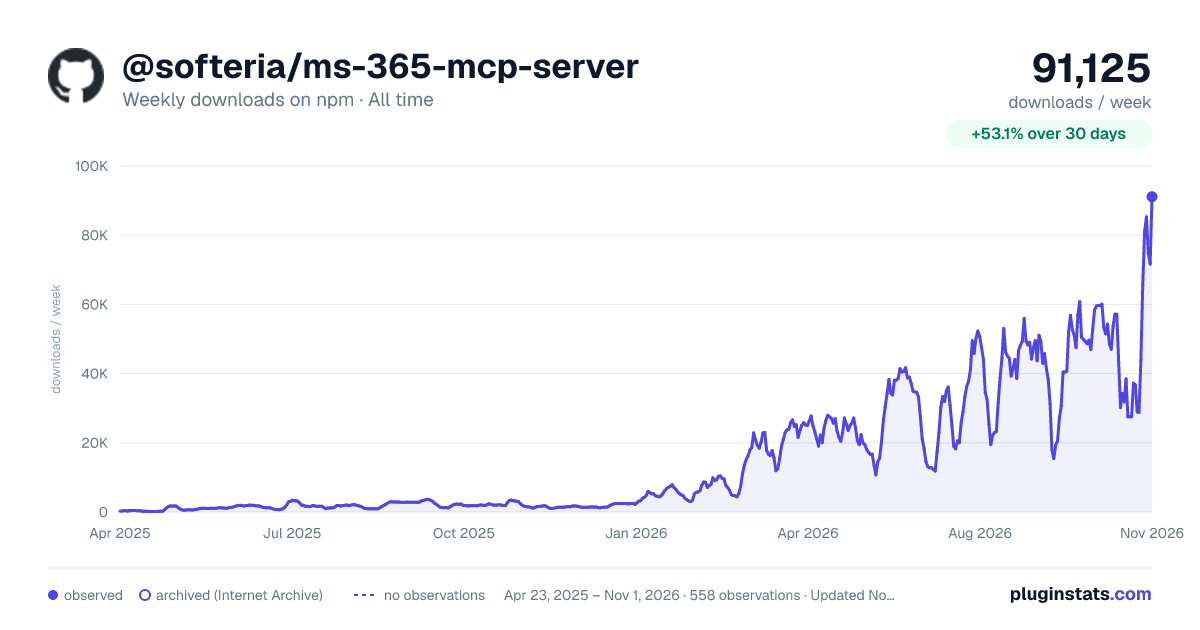

Adoption over time
7/30/90-day growth
Ranking history
Listing placement
Listing placement
Filled points are observed values; hollow points come from Internet Archive snapshots of the listing page. Dashed segments span periods with no observations — values between points are not interpolated.
Each band is one page of 20. Weekly downloads on a linear scale. Placement is projected from weekly downloads, so it can differ from the marketplace's own sort order. Hover a dot to see the listing.
Recent observations
Full history (544)Similar npm MCP servers plugins
All 20 @softeria/ms-365-mcp-server alternativesData source
Weekly downloads (trailing 7 complete days) come from the official npm downloads API. Downloads include CI and mirrors and are not equivalent to installs or users. npm publishes no ratings.
Listing: https://www.npmjs.com/package/@softeria/ms-365-mcp-server. First seen Oct 16, 2026; last successful collection Oct 22, 2026. See the methodology.