 PluginStats
eslint-plugin-json-schema-validator weekly downloads statistics
By ota-meshi (10 listings) · npm · ESLint plugins
ESLint plugin that validates data using JSON Schema Validator.
eslint-plugin-json-schema-validator has 97,996 recorded weekly downloads on npm, a decrease of 32.0% over the past 30 days, ranking #476 of 2,322 tracked listings.
About eslint-plugin-json-schema-validator
Introduction
eslint-plugin-json-schema-validator is ESLint plugin that validates data using JSON Schema Validator.








:name_badge: Features
This ESLint plugin validates [JSON], [JSONC], [JSON5], [YAML], [TOML], JavaScript and [Vue Custom Blocks] with JSON Schema.
You can check on the Online DEMO.
<!--DOCS_IGNORE_START-->:book: Documentation
See documents.
:cd: Installation
npm install --save-dev eslint eslint-plugin-jsonc eslint-plugin-json-schema-validator
<!--DOCS_IGNORE_END-->Requirements
- ESLint v9.38.0 and above
- Node.js v20.19.0 or higher (in the 20.x line), v22.13.0 or higher (in the 22.x line), or v24.0.0 and above
:book: Usage
<!--USAGE_SECTION_START--> <!--USAGE_GUIDE_START-->Configuration
Use eslint.config.js file to configure rules. See also: https://eslint.org/docs/latest/use/configure/configuration-files-new.
Example eslint.config.js:
import eslintPluginJsonSchemaValidator from "eslint-plugin-json-schema-validator";
export default [
  // add more generic rule sets here, such as:
  // js.configs.recommended,
  ...eslintPluginJsonSchemaValidator.configs.recommended,
  {
    rules: {
      // override/add rules settings here, such as:
      // 'json-schema-validator/no-invalid': 'warn'
    },
  },
];
This plugin provides configs:
*.configs.base... Configuration to enable correct JSON, YAML and TOML parsing.*.configs.recommended... Above, plus rule to validate with JSON Schema.
See the rule list to get the rules that this plugin provides.
For backward compatibility, the flat/ prefix can still be used:
*.configs["flat/base"]is an alias for*.configs.base*.configs["flat/recommended"]is an alias for*.configs.recommended
Running ESLint from the command line
If you want to run eslint from the command line, make sure you include the .json, .jsonc, .json5, .yaml, .yml and .toml extension using the --ext option or a glob pattern, because ESLint targets only .js files by default.
Examples:
eslint --ext .js,.json,.jsonc,.json5,.yaml,.yml,.toml src
eslint "src/**/*.{js,json,jsonc,json5,yaml,yml,toml}"
:computer: Editor Integrations
Visual Studio Code
Use the dbaeumer.vscode-eslint extension that Microsoft provides officially.
You have to configure the eslint.validate option of the extension to check .json, .jsonc, .json5, .yaml, .yml and .toml files, because the extension targets only *.js or *.jsx files by default.
Example .vscode/settings.json:
{
  "eslint.validate": [
    "javascript",
    "javascriptreact",
    "json",
    "jsonc",
    "json5",
    "yaml",
    "toml"
  ]
}
:white_check_mark: Rules
<!--RULES_SECTION_START--> <!-- The `--fix` option on the [command line](https://eslint.org/docs/user-guide/command-line-interface#fixing-problems) automatically fixes problems reported by rules which have a wrench :wrench: below. -->The rules with the following star :star: are included in the configs.
<!--RULES_TABLE_START-->Rules
| Rule ID | Description | Fixable | RECOMMENDED |
|---|---|---|---|
| json-schema-validator/no-invalid | validate object with JSON Schema. | :star: |
:zap: Advanced Usage
Settings
Use .eslintrc.* file to configure settings. See also: https://eslint.org/docs/user-guide/configuring/configuration-files#adding-shared-settings.
Example .eslintrc.js:
module.exports = {
  settings: {
    "json-schema-validator": {
      http: {
        getModulePath: "",
        requestOptions: {},
      },
      cache: {
        path: "",
        ttl: "1d",
      },
    },
  },
};
```…
Description from the npm listing.
- eslint
- eslintplugin
- eslint-plugin
- validator
- validation
- jsonschema
- json-schema
README badge
Show your rank in a README or on your website. The badge updates automatically.
Charts
Images: 30d · 1y · all time · 1600×900 dark


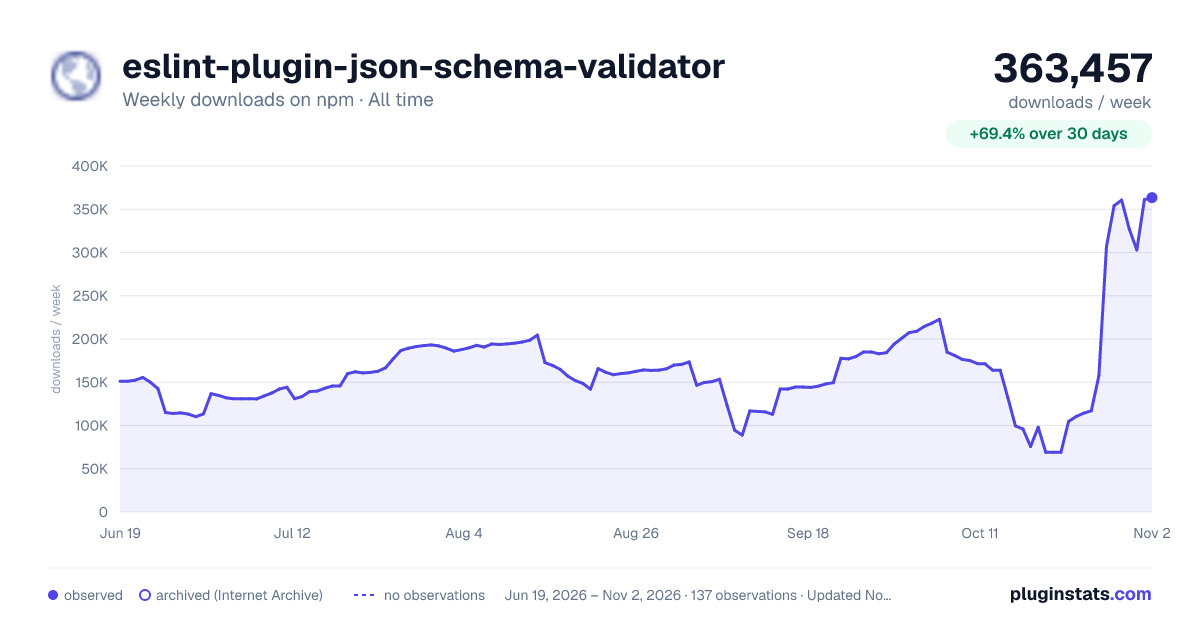

Adoption over time
7/30/90-day growth
Ranking history
Listing placement
Listing placement
Filled points are observed values; hollow points come from Internet Archive snapshots of the listing page. Dashed segments span periods with no observations — values between points are not interpolated.
Each band is one page of 20. Weekly downloads on a linear scale. Placement is projected from weekly downloads, so it can differ from the marketplace's own sort order. Hover a dot to see the listing.
Recent observations
Full history (122)Similar npm ESLint plugins plugins
All 20 eslint-plugin-json-schema-validator alternatives- 98.6K weekly downloads-39.7%
- 105.6K weekly downloads-43.5%
- 89.3K weekly downloads-36.1%
Data source
Weekly downloads (trailing 7 complete days) come from the official npm downloads API. Downloads include CI and mirrors and are not equivalent to installs or users. npm publishes no ratings.
Listing: https://www.npmjs.com/package/eslint-plugin-json-schema-validator. First seen Oct 16, 2026; last successful collection Oct 20, 2026. See the methodology.