 PluginStats
prettier-plugin-coffeescript weekly downloads statistics
By helixbass · npm · Prettier plugins
Prettier Coffeescript Plugin
prettier-plugin-coffeescript has 591 recorded weekly downloads on npm, a decrease of 60.9% over the past 30 days.
It ranks #1473 of 2,251 tracked npm listings by weekly downloads.
Over 90 days, weekly downloads changed by -59.0%.
PluginStats has 121 daily observations since Jun 19, 2026; the latest is from Oct 17, 2026.
About prettier-plugin-coffeescript
Prettier CoffeeScript Plugin
Prettier is an opinionated code formatter. It enforces a consistent style by parsing your code and re-printing it with its own rules that take the maximum line length into account, wrapping code when necessary
This plugin adds support for the CoffeeScript language to Prettier
Install
This plugin currently requires a forked version of Prettier (in order to support things like implicit calls and objects, new Prettier primitives are required - here's the PR) as well as CoffeeScript v2.5.0 or higher.
So the best way to ensure that the required dependencies are available to the plugin is to explicitly install them in your project along with the plugin:
yarn:
npm:
Usage
To run Prettier manually, you can add prettier as a script in your package.json,
and then run it via
In practice, there are various ways to run Prettier: • most editors can be configured to run Prettier automatically (see below for instructions for specific editors) • Prettier can be configured to run via a linter like ESLint • you can enforce the usage of Prettier by having it run automatically before committing code
The "Usage" section of the Prettier docs describes how to set these up
Running in-editor
Depending on your editor, there may or may not currently be a straightforward way to get Prettier running against .coffee files (e.g. using a Prettier editor plugin).
If you're having trouble getting Prettier running in your editor (and it's not listed below), please file an issue and we'll try and help with support for your editor.
VS Code
To run Prettier from VS Code, first install the VS Code Prettier extension.
Then add to your VS Code settings.json:
Configuration
The following formatting options are supported:
| Name | Default | Description |
| printWidth | 80 | Same as in Prettier (see prettier docs) | | tabWidth | 2 | Same as in Prettier (see prettier docs) | | singleQuote | true | If set to true, non-interpolated strings/heredocs will prefer single quotes ('abc'/'''I'm a heredoc''') | | comma | none | Applies to multiline arrays/calls/function params/explicit objects If set to none, no commas will be used If set to nonTrailing, commas will be added after non-last items If set to all, commas will be added after all items | | noImplicit | [] | If includes callParens, call parentheses will always be explicitly included If includes objectBraces, object braces will always be explicitly included | | respectExplicit | [] | If includes callParens, explicit call parentheses in the original source will be preserved If includes objectBraces, explicit object braces in the original source will be preserved | | respectBreak | ['control', 'functionBody', 'object'] | Applies to multiline structures in the original source If includes control, the formatter will not attempt to inline multiline control structures (if/unless/for/while/until/try) If includes functionBody, the formatter will not attempt to inline functions with indented bodies If includes object, the formatter will not attempt to inline multiline objects (similar to Prettier JS formatter) | | inlineAssignmentsTo | ['control'] | If includes control, will attempt to inline assignments of control structures | | emptyParamListParens | false | If set to true, functions with an empty param list will include an empty pair of parentheses eg () -> a | | indentChain | false | If set to true, multiline chained method calls will be indented with respect to the first line of the chain :warning: Warning :warning: Setting indentChain: true can currently cause broken formatting in some edge cases |
Any of these can be added to an existing or new Prettier configuration file. For example:
Help / Contributing / Feedback
Please file an issue or submit a pull request on Github with any bugs/questions/suggestions
If you're interested in contributing to the development of this plugin, Prettier's CONTRIBUTING guide may be helpful
To get started:
• Clone this repository • Run yarn install • Create a test.coffee file • Run yarn prettier test.coffee to check the output • You can adjust the project's .prettierrc file to temporarily adjust formatting options when running manually • Run yarn test while developing to see if any formatting snapshots have changed • To update the stored snapshots, run yarn test -u • Add new snapshot tests under tests/. New subdirectories need a jsfmt.spec.js file, where you can specify multiple different formatting option configurations for those snapshots if desired
License
MIT
Description from the npm listing.
- coffeescript
- prettier
- prettier-plugin
Where prettier-plugin-coffeescript sits in the listing
Each band is one page of 20. Weekly downloads on a log scale. Placement is projected from weekly downloads, so it can differ from the marketplace's own sort order. Hover a dot to see the listing.


Charts
Images: 30d · 1y · all time · 1600×900 dark


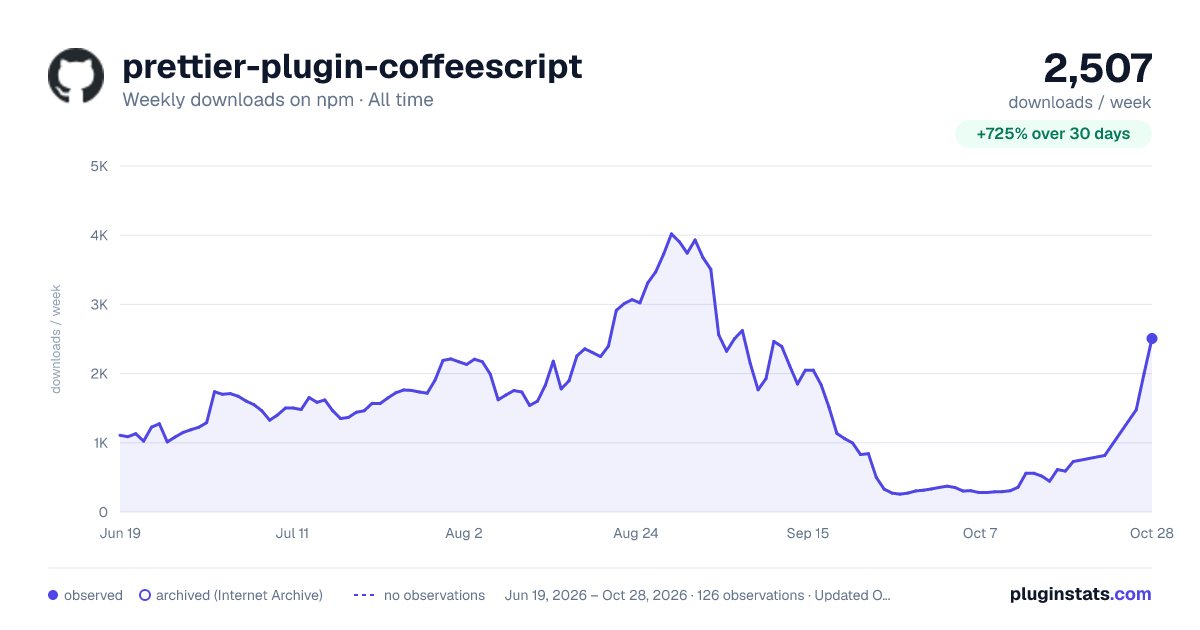

Adoption over time


7/30/90-day growth


Filled points are observed values; hollow points come from Internet Archive snapshots of the listing page. Dashed segments span periods with no observations — values between points are not interpolated.
Recent observations
Full history (121)Similar npm Prettier plugins plugins
Data source
Weekly downloads (trailing 7 complete days) come from the official npm downloads API. Downloads include CI and mirrors and are not equivalent to installs or users. npm publishes no ratings.
Listing: https://www.npmjs.com/package/prettier-plugin-coffeescript. First seen Oct 16, 2026; last successful collection Oct 18, 2026. See the methodology.