 PluginStats
prettier-plugin-tasm weekly downloads statistics
By weph · npm · Prettier plugins
Prettier plugin for Turbo Assembler (TASM) IDEAL mode syntax
prettier-plugin-tasm has 0 recorded weekly downloads on npm.
It ranks #2253 of 2,256 tracked npm listings by weekly downloads.
PluginStats has 1 daily observations since Oct 16, 2026; the latest is from Oct 16, 2026.
About prettier-plugin-tasm
prettier-plugin-tasm
A Prettier plugin for Borland Turbo Assembler (TASM) source in IDEAL mode.
Disclaimer
I needed a formatter for TASM code and there's apparently no such thing. Because time is scarce and I've got enough on my plate already, I vibe-coded this whole project. And when I say "vibe-coded," I really mean it: I only skimmed the code. I don't think there are many people out there still writing Turbo Assembler IDEAL mode code, but if you're one of them and happen to stumble upon this project, I at least want you to know how it was built.
Installation
Add the plugin to your Prettier configuration:
Files ending in .asm, .inc and .ash are formatted with the tasm parser. For other extensions, add an override:
Options
| Option | CLI flag | Default | Description |
| tasmKeywordCase | --tasm-keyword-case | upper | Case of directives and keyword operators (PROC, DB, PTR) | | tasmMnemonicCase | --tasm-mnemonic-case | lower | Case of instruction mnemonics (mov, jmp) | | tasmRegisterCase | --tasm-register-case | lower | Case of register names (ax, ds, st) | | tasmMnemonicColumn | --tasm-mnemonic-column | 8 | Column where mnemonics and directives start | | tasmOperandColumn | --tasm-operand-column | 16 | Column where operands start | | tasmCommentColumn | --tasm-comment-column | 36 | Column where trailing comments start |
The case options accept upper, lower or preserve. Identifiers, numbers and strings are never changed. That includes names declared in the same file that are spelled like a keyword, such as ARG page:BYTE or LOCAL Width:WORD: labels, definitions, procedure arguments, local variables and macro parameters keep their case wherever they appear.
Tabs
Alignment uses spaces by default. With Prettier's useTabs: true, tabs are used instead: each tab advances to the next multiple of tabWidth, and a column that is not a multiple of tabWidth is rounded up to the next tab stop. Prettier's default tabWidth of 2 makes for many short tabs, so set it to 8 when using tabs:
Formatting rules
• Labels (Start:, @@loop:, Entry::) start at column 0. An instruction on the same line is aligned to the mnemonic column. • Instructions and plain directives (ASSUME, LOCAL, ARG, USES, ALIGN, ORG, …) put the keyword at the mnemonic column and operands at the operand column. • Structural directives (IDEAL, MODEL, CODESEG, DATASEG, SEGMENT/ENDS, PROC/ENDP, STRUC/UNION/ENDS, MACRO/ENDM, LABEL, GROUP, END, P386, …), file-level declarations (PUBLIC, PUBLICDLL, EXTRN, GLOBAL, COMM, INCLUDE, INCLUDELIB) and listing directives (%TITLE, %NEWPAGE, %NOLIST, …) start at column 0, with their argument at the mnemonic column, since IDEAL mode puts the name after the keyword. • Definitions (Msg DB …, Max EQU …, Count = …) put the name at column 0. Consecutive definitions share their keyword and value columns. If a name or keyword in the block is too long, both columns move right in steps of the distance between the mnemonic and operand columns (8 by default):
Inside PROC … ENDP and MACRO … ENDM, definitions are indented to the mnemonic column and their other columns move along. A label in front of a definition stays at column 0. A single = assignment there, with no other definition directly above or below it, isn't aligned: plane = plane + 1.
• Structure instances (Origin Point ) are laid out like definitions, and macro invocations (PrintStr Greeting) like instructions, when the structure, union, record, enum, table, type or macro is defined in the same file. Their names keep their case. Macro arguments are kept exactly as written, because a macro may paste them anywhere, even into a string. • Blocks: REPT, IRP, IRPC, WHILE and conditional blocks (IF, IFDEF, ELSE, ENDIF, …) indent their body by 4 spaces per level (one tab with useTabs). Inside PROC and MACRO bodies the block directive sits at the mnemonic column; elsewhere it starts at column 0. Its arguments follow after a single space. ELSE, ENDIF and ENDM line up with the line that opened the block. Labels stay at column 0, and trailing comments stay at the comment column. MACRO bodies are formatted at the normal level, like a procedure body. • Operands get one space after each comma, no space just inside brackets and parentheses, and a space between a keyword operator and a parenthesis (10 DUP (?)). Other spacing is kept, so [bx+si+4] stays compact. • Comments: trailing comments are aligned to the comment column. Full-line comments stay at column 0, or move to the mnemonic column if they were indented. • Blank lines: runs of blank lines collapse to one, and leading and trailing blank lines are removed. • If text does not fit before the next column, a single space (or tab) separates it instead.
Kept as written
Some code is kept exactly as written, apart from trailing whitespace:
• COMMENT blocks, up to the closing delimiter • code between a MASM directive and the next IDEAL directive • the line (or block) after a ; prettier-ignore comment • everything between ; prettier-ignore-start and ; prettier-ignore-end • any line the plugin does not recognise, such as invocations of macros and instances of types defined in an INCLUDEd file
Development
Each directory in tests/fixtures holds an input.asm and the expected output.asm. Every fixture is checked three ways: the input must format to the output, formatting the output must not change it, and formatting must not change the sequence of tokens, ignoring whitespace and the case of reserved words.
Description from the npm listing.
- prettier
- prettier-plugin
- tasm
- turbo-assembler
- assembly
- x86
Where prettier-plugin-tasm sits in the listing
Each band is one page of 20. Weekly downloads on a log scale. Placement is projected from weekly downloads, so it can differ from the marketplace's own sort order. Hover a dot to see the listing.


Charts
Images: 30d · 1y · all time · 1600×900 dark


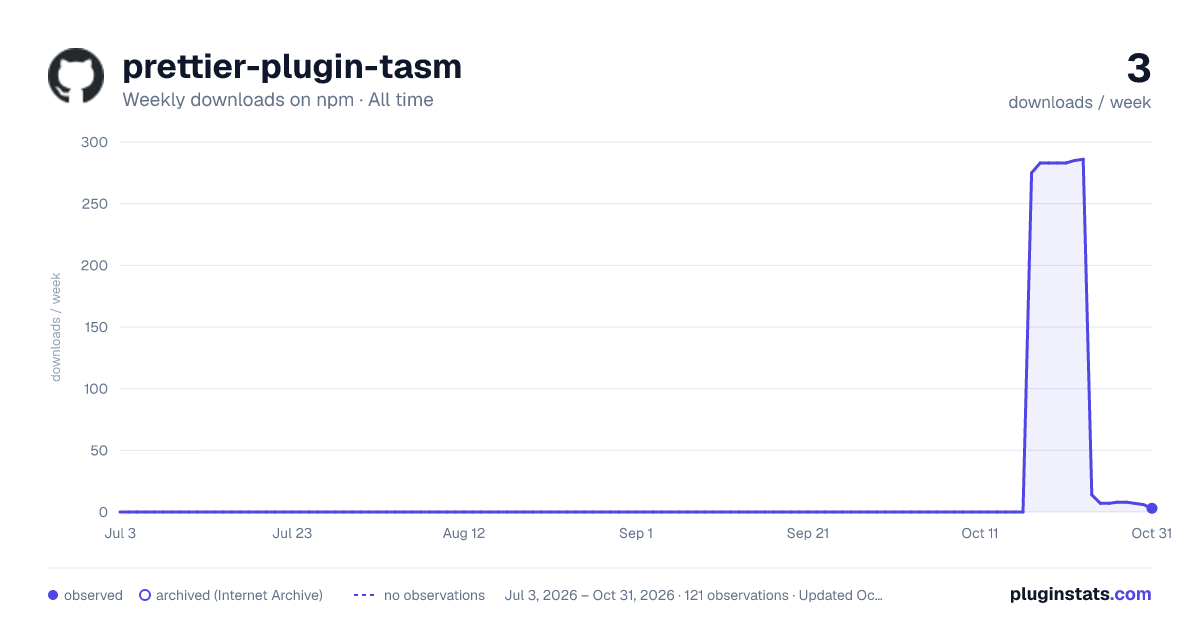

Adoption over time


7/30/90-day growth


Filled points are observed values; hollow points come from Internet Archive snapshots of the listing page. Dashed segments span periods with no observations — values between points are not interpolated.
Recent observations
Full history (1)Similar npm Prettier plugins plugins
Data source
Weekly downloads (trailing 7 complete days) come from the official npm downloads API. Downloads include CI and mirrors and are not equivalent to installs or users. npm publishes no ratings.
Listing: https://www.npmjs.com/package/prettier-plugin-tasm. First seen Oct 17, 2026; last successful collection Oct 19, 2026. See the methodology.