 PluginStats
@eslint/css weekly downloads statistics
By eslint (6 listings) · npm · ESLint plugins
CSS linting plugin for ESLint
@eslint/css has 282,994 recorded weekly downloads on npm, a decrease of 45.0% over the past 30 days.
It ranks #311 of 2,251 tracked npm listings by weekly downloads.
Over 90 days, weekly downloads changed by -34.4%.
PluginStats has 542 daily observations since Apr 24, 2025; the latest is from Oct 17, 2026.
About @eslint/css
ESLint CSS Language Plugin
Overview
This package contains a plugin that allows you to natively lint CSS files using ESLint.
Important: This plugin requires ESLint v9.15.0 or higher and you must be using the new configuration system.
Prerequisites
In order to use the ESLint CSS plugin, you must have the following installed:
1. Node.js 1. ESLint
Installation
You can install ESLint using npm or other package managers:
Then, for Node.js and compatible runtimes:
For Deno (experimental):
Configurations
| Configuration Name | Description |
| recommended | Enables all recommended rules. |
In your eslint.config.js file, import @eslint/css and include the recommended config:
Rules
| Rule Name | Description | Recommended |
| font-family-fallbacks | Enforce use of fallback fonts and a generic font last | yes | | no-duplicate-imports | Disallow duplicate @import rules | yes | | no-duplicate-keyframe-selectors | Disallow duplicate selectors within keyframe blocks | yes | | no-empty-blocks | Disallow empty blocks | yes | | no-important | Disallow !important flags | yes | | no-invalid-at-rule-placement | Disallow invalid placement of at-rules | yes | | no-invalid-at-rules | Disallow invalid at-rules | yes | | no-invalid-named-grid-areas | Disallow invalid named grid areas | yes | | no-invalid-properties | Disallow invalid properties | yes | | no-unmatchable-selectors | Disallow unmatchable selectors | yes | | prefer-logical-properties | Enforce the use of logical properties | no | | relative-font-units | Enforce the use of relative font units | no | | selector-complexity | Disallow and limit CSS selectors | no | | use-baseline | Enforce the use of baseline features | yes | | use-layers | Require use of layers | no |
Note: This plugin does not provide formatting rules. We recommend using a source code formatter such as Prettier for that purpose.
In order to individually configure a rule in your eslint.config.js file, import @eslint/css and configure each rule with a prefix:
You can individually configure, disable, and enable rules in CSS using comments, such as:
Languages
| Language Name | Description |
| css | Parse CSS stylesheets. |
In order to individually configure a language in your eslint.config.js file, import @eslint/css and configure a language:
Tolerant Mode
By default, the CSS parser runs in strict mode, which reports all parsing errors. If you'd like to allow recoverable parsing errors (those that the browser automatically fixes on its own), you can set the tolerant option to true:
Setting tolerant to true is necessary if you are using custom syntax, such as PostCSS plugins, that aren't part of the standard CSS syntax.
Configuring Custom Syntax
The CSS lexer comes prebuilt with a set of known syntax for CSS that is used in rules like no-invalid-properties to validate CSS code. While this works for most cases, there may be cases when you want to define your own extensions to CSS, and this can be done using the customSyntax language option.
The customSyntax option accepts either an object or a function:
Object-based syntax: An object that uses the CSSTree format for defining custom syntax, which allows you to specify at-rules, properties, and some types. For example, suppose you'd like to define a custom at-rule that looks like this:
You can configure that syntax as follows:
Function-based syntax: A function that receives the default CSS syntax data and returns a custom syntax configuration. This is useful when you want to extend the base syntax rather than replace it. For example:
Configuring Tailwind Syntax
Tailwind specifies some extensions to CSS that will otherwise be flagged as invalid by the rules in this plugin. To properly parse Tailwind-specific syntax, install the tailwind-csstree package:
Then include it in your configuration using languageOptions.customSyntax:
Editor and IDE Setup
Visual Studio Code
First, ensure you have the ESLint plugin installed.
Then, edit eslint.validate in your settings.json file to include css:
JetBrains WebStorm
For any JetBrains WebStorm, configure the ESLint scope to include css, such as:
License
Apache 2.0
Sponsors
The following companies, organizations, and individuals support ESLint's ongoing maintenance and development. Become a Sponsor to get your logo on our READMEs and website.
Gold Sponsors
Silver Sponsors
Bronze Sponsors
Technology Sponsors
Technology sponsors allow us to use their products and services for free as part of a contribution to the open source ecosystem and our work.
Description from the npm listing.
- eslint
- eslint-plugin
- eslintplugin
- css
- linting
Where @eslint/css sits in the listing
Each band is one page of 20. Weekly downloads on a log scale. Placement is projected from weekly downloads, so it can differ from the marketplace's own sort order. Hover a dot to see the listing.


Charts
Images: 30d · 1y · all time · 1600×900 dark


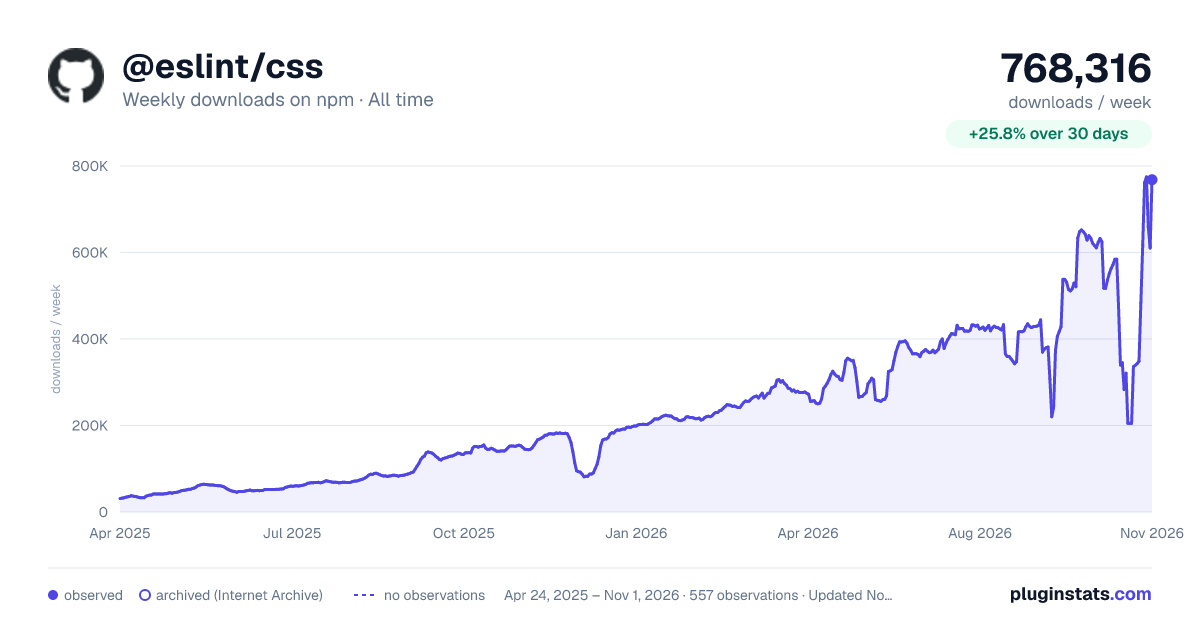

Adoption over time


7/30/90-day growth


Filled points are observed values; hollow points come from Internet Archive snapshots of the listing page. Dashed segments span periods with no observations — values between points are not interpolated.
Recent observations
Full history (542)Similar npm ESLint plugins plugins
Data source
Weekly downloads (trailing 7 complete days) come from the official npm downloads API. Downloads include CI and mirrors and are not equivalent to installs or users. npm publishes no ratings.
Listing: https://www.npmjs.com/package/@eslint/css. First seen Oct 16, 2026; last successful collection Oct 18, 2026. See the methodology.