 PluginStats
vite-css-modules weekly downloads statistics
By privatenumber (2 listings) · npm · Vite plugins
Vite plugin for correct CSS Modules behavior
vite-css-modules has 58,494 recorded weekly downloads on npm, a decrease of 5.3% over the past 30 days, ranking #561 of 2,322 tracked listings.
About vite-css-modules
vite-css-modules <a href="https://npm.im/vite-css-modules"><img src="https://badgen.net/npm/v/vite-css-modules"></a> <a href="https://npm.im/vite-css-modules"><img src="https://badgen.net/npm/dm/vite-css-modules"></a>
Vite plugin to fix broken CSS Modules handling.
→ Play with a demo on StackBlitz
<br> <p align="center"> <a href="https://github.com/sponsors/privatenumber/sponsorships?tier_id=398771"><img width="412" src="https://raw.githubusercontent.com/privatenumber/sponsors/master/banners/assets/donate.webp"></a> <a href="https://github.com/sponsors/privatenumber/sponsorships?tier_id=416984"><img width="412" src="https://raw.githubusercontent.com/privatenumber/sponsors/master/banners/assets/sponsor.webp"></a> </p> <br>[!NOTE] We're working to integrate this fix directly into Vite (PR #16018). Until then, use this plugin to benefit from these improvements now.
Why use this plugin?
Have you encountered any of these Vite CSS Module bugs? They're happening because Vite's CSS Modules implementation delegates everything to postcss-modules, creating a black box that Vite can't see into.
This plugin fixes these issues by properly integrating CSS Modules into Vite's build pipeline.
The bugs this fixes
<details> <summary>1. PostCSS plugins don't apply to <code>composes</code> dependencies</summary><br>When you use composes to import classes from another CSS file, Vite's PostCSS plugins never process the imported file. This means your PostCSS transformations, auto-prefixing, or custom plugins are silently skipped for dependencies.
What happens in Vite:
style.module.cssgets processed by PostCSS ✓utils.cssdoes NOT get processed by PostCSS ✗- Your PostCSS plugin never sees
utils.cssbecausepostcss-modulesbundles it internally
With this plugin:
- Both files go through your PostCSS pipeline correctly
Vite issue #10079, #10340 | Test case
</details> <details> <summary>2. Shared classes get duplicated in your bundle</summary><br>When multiple CSS Modules compose from the same utility file, the utility's styles get bundled multiple times. This increases bundle size and can cause style conflicts.
Example:
/* utils.css */
.button { padding: 10px; }

/* header.module.css */
.title { composes: button from './utils.css'; }

/* footer.module.css */
.link { composes: button from './utils.css'; }
What happens in Vite:
/* Final bundle contains .button styles TWICE */
.button { padding: 10px; }  /* from header.module.css */
.button { padding: 10px; }  /* from footer.module.css - duplicated! */
With this plugin:
/* Final bundle contains .button styles ONCE */
.button { padding: 10px; }  /* deduplicated */
Vite issue #7504, #15683 | Test case
</details> <details> <summary>3. Missing <code>composes</code> classes fail silently</summary><br>If you typo a class name in composes, Vite doesn't error. Instead, it outputs undefined in your class names, breaking your UI with no warning.
Example:
.button {
  composes: nonexistant from './utils.css';  /* Typo! */
}
What happens in Vite:
import styles from './style.module.css'

console.log(styles.button) // "_button_abc123 undefined" - no error!
With this plugin:
Error: Cannot find class 'nonexistent' in './utils.css'
Trying to compose from SCSS/Sass files causes syntax errors because postcss-modules tries to parse SCSS as plain CSS.
Example:
/* base.module.scss */
.container { display: flex; }
/* style.module.css */
.wrapper { composes: container from './base.module.scss'; }
What happens in Vite:
CssSyntaxError: Unexpected '/'
With this plugin:
- Works correctly because each file goes through its proper preprocessor first
Changing a CSS Module file causes a full page reload instead of a hot update, losing component state.
What happens in Vite:
- Full page reload on CSS Module changes
With this plugin:
- CSS Module changes update instantly without losing component state
Using JavaScript reserved keywords as class names (like .import, .export) generates invalid JavaScript code.
Example:
.import { color: red; }
.export { color: blue; }
What happens in Vite:
// Tries to generate invalid JavaScript:
export const import = "...";  // Syntax error "import" is reserved!
export const export = "...";  // Syntax error "export" is reserved!
With this plugin:
- Properly handles reserved keywords in class names…
Description from the npm listing.
- vite
- plugin
- vite-plugin
- css modules
- patch
README badge
Show your rank in a README or on your website. The badge updates automatically.
Charts
Images: 30d · 1y · all time · 1600×900 dark


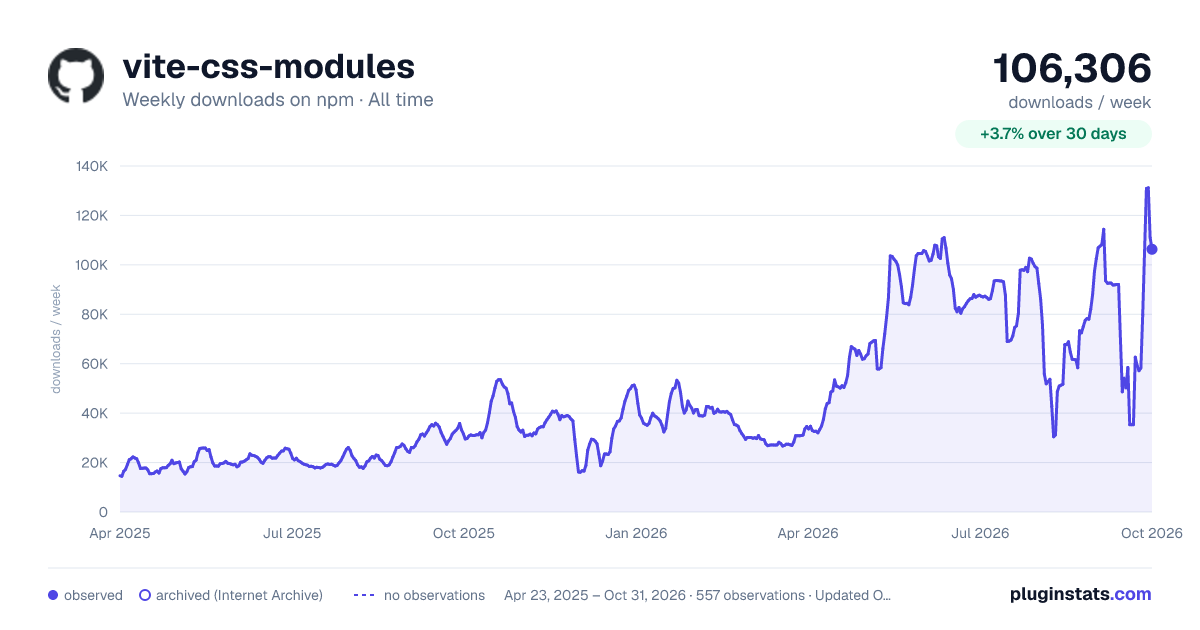

Adoption over time
7/30/90-day growth
Ranking history
Listing placement
Listing placement
Filled points are observed values; hollow points come from Internet Archive snapshots of the listing page. Dashed segments span periods with no observations — values between points are not interpolated.
Each band is one page of 20. Weekly downloads on a linear scale. Placement is projected from weekly downloads, so it can differ from the marketplace's own sort order. Hover a dot to see the listing.
Recent observations
Full history (544)Similar npm Vite plugins plugins
All 20 vite-css-modules alternativesData source
Weekly downloads (trailing 7 complete days) come from the official npm downloads API. Downloads include CI and mirrors and are not equivalent to installs or users. npm publishes no ratings.
Listing: https://www.npmjs.com/package/vite-css-modules. First seen Oct 16, 2026; last successful collection Oct 20, 2026. See the methodology.