 PluginStats
tailwindcss-prefers-dark-mode weekly downloads statistics
By javifm86 · npm · Tailwind plugins
Tailwind CSS plugin that adds variants for @media (prefers-color-scheme: dark)
tailwindcss-prefers-dark-mode has 16 recorded weekly downloads on npm, a decrease of 69.8% over the past 30 days, ranking #1965 of 2,322 tracked listings.
About tailwindcss-prefers-dark-mode
Tailwindcss prefers dark mode
Tailwind CSS plugin that adds variants for [@media (prefers-color-scheme: dark)][2]. It can also generate dark
variants with an activator CSS class on the html, body or any parent tag making the dark classes active allowing easily switch between light and dark theme.
Installation
npm install tailwindcss-prefers-dark-mode --save-dev
Add the plugin to the plugins array in your tailwind.config.js file.
module.exports = {
  // ...

  plugins: [
    // ...
    require('tailwindcss-prefers-dark-mode')({
      type: 'mediaQuery', // 'mediaQuery' or 'class'
      className: '.dark-mode', // Activator css class if type === 'class'
      prefix: 'dark' // Class name prefix for naming dark variants
    })
  ]
};
Plugin params
You can customize how dark variants are generated depending on the params passed to the plugin. The old behaviour was passing no params or just an empty string. You can continue using the old config but passing an object is prefered. These are the different posibilities:
- No params. If no param is supplied, variants will be under
@media (prefers-color-scheme: dark)and the default prefix for classes will bedark.
require('tailwindcss-prefers-dark-mode')();
- Passing an string. In this case variants will be generated under
@media (prefers-color-scheme: dark)but the prefix for classes will be the string passed. For example, withprefers-dark:
require('tailwindcss-prefers-dark-mode')('prefers-dark');
- Passing an object allows you to choose between generate variants with
@media (prefers-color-scheme: dark)or generate with an activator CSS class. Object properties:type:mediaQueryif you want the option with@media (prefers-color-scheme: dark)orclassif you prefer an activator CSS class. This field is required.className: The activator CSS class if type isclass. If noclassNameis provided,.dark-modeclass will be used as default.prefix: Prefix for naming dark variants. If no prefix is provided,darkwill be used as default.
require('tailwindcss-prefers-dark-mode')({
  type: 'class', // 'mediaQuery'
  className: '.dark-mode',
  prefix: 'dark'
});
Variants generated
darkdark:hoverdark:focusdark:activedark:disableddark:odddark:evendark:group-hoverdark:focus-withindark:placeholder
<div class="bg-gray-100 dark:bg-gray-800 border-t-4 border-green-500">
  <nav class="flex flex-wrap justify-end items-center p-4">
    <a class="text-gray-700 hover:bg-gray-300 dark:hover:bg-transparent dark:focus:text-green-500" href="#">Text</a>
  </nav>
</div>
Dark variants must be enabled on each utility in your tailwind.config.js file.
variants: {
    backgroundColor: [
      "responsive",
      "hover",
      "focus",
      "dark",
      "dark:hover",
      "dark:focus"
    ],
    borderColor: [
      "responsive",
      "hover",
      "focus",
      "dark",
      "dark:hover",
      "dark:focus"
    ],
    textColor: [
      "responsive",
      "hover",
      "focus",
      "group-hover",
      "dark",
      "dark:hover",
      "dark:focus",
      "dark:group-hover",
      "focus-within",
      "dark:focus-within",
      "dark:odd",
      "dark:even",
      "dark:active",
      "dark:disabled"
    ],
    borderStyle: ["responsive", "dark"],
    placeholderColor: ['responsive', 'focus', 'dark:placeholder']
  }
You can check the full list of default variants in [Tailwind default config file][1].
Use @apply to inline any existing utility classes in dark mode
With @media (prefers-color-scheme: dark)
Just use prefers-color-scheme CSS media feature and apply Tailwind classes.
.btn {
  @apply font-bold py-2 px-4 rounded bg-red-500;
}

@media (prefers-color-scheme: dark) {
  .btn {
    @apply bg-gray-500;
  }
}
With activator CSS class
Just add the activator CSS class at the beggining of the selector and apply Tailwind classes.
.btn {
  @apply font-bold py-2 px-4 rounded bg-red-500;
}

.dark-mode .btn {
  @apply bg-gray-500;
}
Customize class name prefix for variants
dark is used as default prefix for variants generated. It´s possible to change dark for whatever you want, just pass any string as param or use prefix key if you pass an object as param to the plugin. For example, with prefers-dark:
module.exports = {
  // ...

  plugins: [
    // ...
    require('tailwindcss-prefers-dark-mode')('prefers-dark')
  ]
};
module.exports = {
  // ...

  plugins: [
    // ...
    require('tailwindcss-prefers-dark-mode')({
      type: 'class', // 'mediaQuery'
      className: '.dark-mode',
      prefix: 'prefers-dark'
    })
  ]
};
And variants must be named with the new prefix:
variants: {
  textColor: [
    'responsive',
    'hover',
    'focus',
    'group-hover',
    'prefers-dark',
    'prefers-dark:hover',
    'prefers-dark:focus',
    'prefers-dark:group-hover',
    'focus-within',
    'prefers-dark:focus-within'
  ];
}
Alternatives
If you're looking for a more complex approach, a different kind of configuration, or just want to know the alternatives, here is a list that you may find useful:…
Description from the npm listing.
- tailwind
- tailwindcss
- postcss
- dark-mode
- tailwindcss-plugin
README badge
Show your rank in a README or on your website. The badge updates automatically.
Charts
Images: 30d · 1y · all time · 1600×900 dark


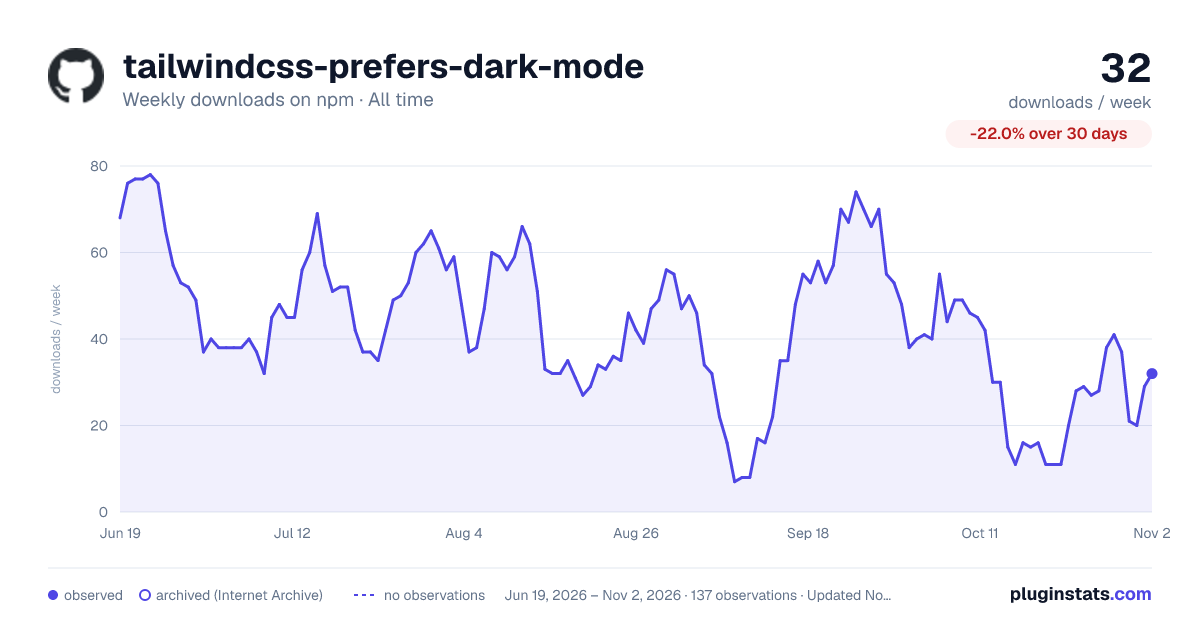

Adoption over time
7/30/90-day growth
Ranking history
Listing placement
Listing placement
Filled points are observed values; hollow points come from Internet Archive snapshots of the listing page. Dashed segments span periods with no observations — values between points are not interpolated.
Each band is one page of 20. Weekly downloads on a linear scale. Placement is projected from weekly downloads, so it can differ from the marketplace's own sort order. Hover a dot to see the listing.
Recent observations
Full history (122)Similar npm Tailwind plugins plugins
All 20 tailwindcss-prefers-dark-mode alternatives- 17 weekly downloads+54.5%
Data source
Weekly downloads (trailing 7 complete days) come from the official npm downloads API. Downloads include CI and mirrors and are not equivalent to installs or users. npm publishes no ratings.
Listing: https://www.npmjs.com/package/tailwindcss-prefers-dark-mode. First seen Oct 16, 2026; last successful collection Oct 20, 2026. See the methodology.