 PluginStats
@microsoft/jsts-upgrade-assistant weekly downloads statistics
By microsoft (224 listings) · npm · MCP servers
AI-powered tool for automatically upgrading npm packages in TypeScript projects and resolving compiler errors
@microsoft/jsts-upgrade-assistant has 5,734 recorded weekly downloads on npm, a decrease of 60.1% over the past 30 days, ranking #1107 of 2,391 tracked listings.
About @microsoft/jsts-upgrade-assistant
@microsoft/jsts-upgrade-assistant
A modernization tool that helps developers upgrade their TypeScript npm dependencies and TypeScript compiler version. The package ships an MCP (Model Context Protocol) server plus a set of Agent Skills that orchestrate the upgrade workflow end-to-end.
Installation
# Install globally
npm install -g @microsoft/jsts-upgrade-assistant

# Or install locally in your project
npm install --save-dev @microsoft/jsts-upgrade-assistant
The package will automatically download the correct platform-specific binary for your system.
Supported Platforms
- Windows x64 (Intel/AMD)
- Windows ARM64
- Linux x64 (Intel/AMD)
- Linux ARM64
- macOS x64 (Intel)
- macOS ARM64 (Apple Silicon)
Requirements
- Node.js 14.0.0 or higher
Usage
The primary entry point is the MCP server. Point your MCP-capable host (Visual Studio, VS Code with Copilot, Claude Desktop, etc.) at the jsts-upgrade --mcp command:
jsts-upgrade --mcp
Example MCP host config (JSON):
{
  "mcpServers": {
    "jstsUpgradeAssistant": {
      "command": "npx",
      "args": ["-y", "@microsoft/jsts-upgrade-assistant", "--mcp"]
    }
  }
}
Once connected, the server exposes tools for scanning dependencies, planning upgrades, applying package changes, compiling, and validating projects. Agent Skills (below) drive the upgrade and validation workflows.
Upgrade requests may target latest releases or exact stable versions such as react@18.3.1. The scan and upgrade tools carry these as package-to-version maps while remaining backward compatible with package-name-only requests.
Agent Skills
The package bundles four ordinary Agent Skills under skills/:
typescript-dependencies-upgrade— upgrade a project's npm dependencies and resolve breaking changes across installation, compilation, build, test, and runtime validation.typescript-compiler-upgrade— upgrade thetypescriptpackage itself, along with compiler configuration and compatible type definitions.jsts-framework-migration— replace an application, build, test, or tooling framework while preserving behavior and integration contracts.typescript-runtime-validation— author or reuse an eval plan that can build, test, start, and exercise a project, either directly or as part of an upgrade.
The separately published Upgrade Agent NuGet extender packages the first three workflows as scenarios while continuing to use these canonical workflow files.
After installing the package, the skill files live at:
<install-root>/skills/typescript-dependencies-upgrade/SKILL.md
<install-root>/skills/typescript-compiler-upgrade/SKILL.md
<install-root>/skills/jsts-framework-migration/SKILL.md
<install-root>/skills/typescript-runtime-validation/SKILL.md
Where <install-root> is node_modules/@microsoft/jsts-upgrade-assistant/ for local installs, or your global node_modules for -g installs. Hosts that support Agent Skills (for example, certain Copilot front-ends) can register these directories directly. Hosts that don't can read each SKILL.md and use it as a prompt template.
Custom Agent
The package bundles one custom subagent under agents/ that the
runtime-validation skill uses internally to record webapp Playwright flows. It
is an implementation detail of the recording workflow — you do not invoke or
register it directly; hosts that support contributed agents pick it up
automatically.
Programmatic Usage
To resolve the path of the underlying platform binary from Node.js (for example, to spawn it from your own tooling):
import { getExePath } from "@microsoft/jsts-upgrade-assistant";
import { spawn } from "child_process";

const executablePath = getExePath(); // throws if the platform is unsupported
const child = spawn(executablePath, ["--mcp"], { stdio: "inherit" });

child.on("exit", (code) => {
  process.exit(code ?? 0);
});
Architecture
This package uses a multi-package architecture for efficient platform-specific binary distribution:
- Main package (
@microsoft/jsts-upgrade-assistant): JavaScript wrapper, CLI shim, and Agent Skill files. - Platform packages: one per supported
os-arch, each containing only its native binary:@microsoft/jsts-upgrade-assistant-win32-x64@microsoft/jsts-upgrade-assistant-win32-arm64@microsoft/jsts-upgrade-assistant-linux-x64@microsoft/jsts-upgrade-assistant-linux-arm64@microsoft/jsts-upgrade-assistant-darwin-x64@microsoft/jsts-upgrade-assistant-darwin-arm64
When you install the main package, npm automatically installs the appropriate platform-specific package as an optional dependency.
Package Contents
@microsoft/jsts-upgrade-assistant/
├── lib/          # JavaScript wrapper and CLI shim
├── skills/       # Agent Skill files (.md) for workflow orchestration
│   ├── typescript-dependencies-upgrade/
│   │   ├── SKILL.md
│   │   └── ...
│   ├── typescript-compiler-upgrade/
│   │   ├── SKILL.md
│   │   └── ...
│   ├── jsts-framework-migration/
│   │   ├── SKILL.md
│   │   └── migrations/
│   └── typescript-runtime-validation/
│   │   ├── SKILL.md
│   │   └── ...
├── agents/
│   └── jsts-playwright-spec-author.agent.md
├── LICENSE
├── README.md
└── package.json
License
This software is licensed under the Microsoft Software License Terms for JS/TS Upgrade Assistant. Copyright (c) Microsoft Corporation.
Description from the npm listing.
- typescript
- javascript
- upgrade
- tool
- ai
- npm
- packages
- mcp
- model-context-protocol
README badge
Show your rank in a README or on your website. The badge updates automatically.
Charts
Images: 30d · 1y · all time · 1600×900 dark


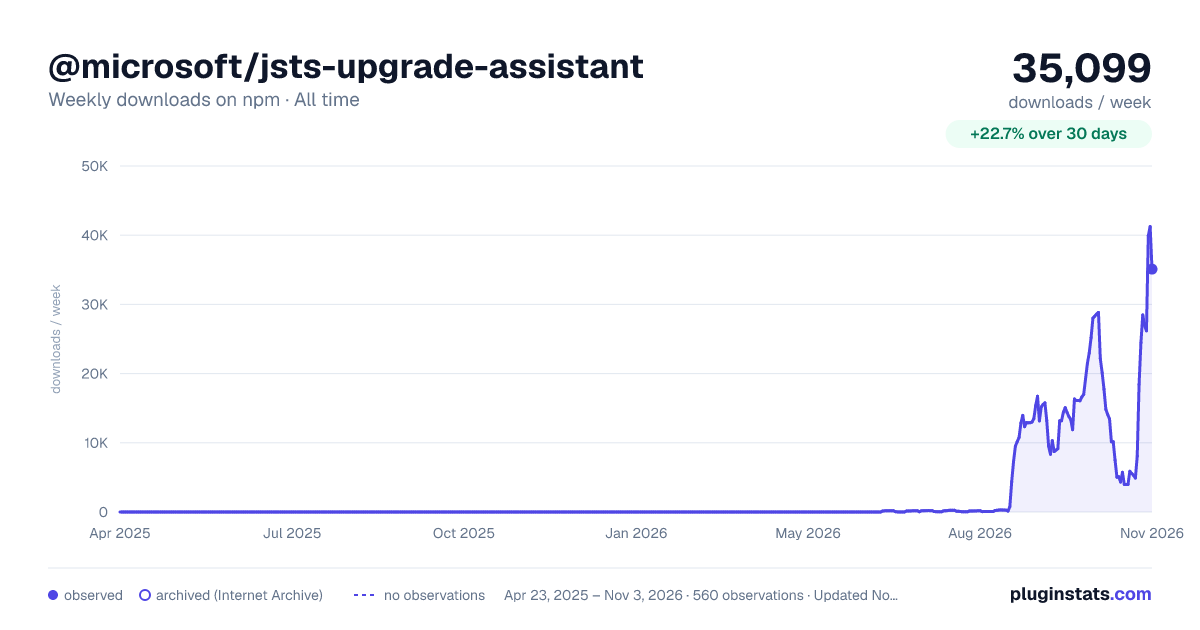

Adoption over time
7/30/90-day growth
Ranking history
Listing placement
Listing placement
Filled points are observed values; hollow points come from Internet Archive snapshots of the listing page. Dashed segments span periods with no observations — values between points are not interpolated.
Each band is one page of 20. Weekly downloads on a linear scale. Placement is projected from weekly downloads, so it can differ from the marketplace's own sort order. Hover a dot to see the listing.
Recent observations
Full history (544)Similar npm MCP servers plugins
All 20 @microsoft/jsts-upgrade-assistant alternativesData source
Weekly downloads (trailing 7 complete days) come from the official npm downloads API. Downloads include CI and mirrors and are not equivalent to installs or users. npm publishes no ratings.
Listing: https://www.npmjs.com/package/@microsoft/jsts-upgrade-assistant. First seen Oct 16, 2026; last successful collection Oct 21, 2026. See the methodology.