 PluginStats
firecrawl-mcp weekly downloads statistics
By firecrawl (3 listings) · npm · MCP servers
Firecrawl MCP server, the context API for AI agents: search, scrape, parse, crawl, map, and interact with the web, run Agent and Monitor jobs, and search scientific papers (PubMed, bioRxiv, medRxiv, arXiv). Works with Firecrawl cloud or a self-hosted inst
firecrawl-mcp has 102,401 recorded weekly downloads on npm, an increase of 261% over the past 30 days, ranking #472 of 2,322 tracked listings.
About firecrawl-mcp
Firecrawl MCP Server
A Model Context Protocol (MCP) server that brings Firecrawl, the context API for AI agents, to MCP-compatible clients: search, scrape, and interact with the live web and get back clean Markdown or structured data.
Big thanks to @vrknetha, @knacklabs for the initial implementation!
Features
- Search the web, optionally with full page content for each result
- Search indexes for developer sources (GitHub issues, merged pull requests, READMEs, and docs), US government sources, and scientific papers (PubMed, bioRxiv, medRxiv, arXiv)
- Scrape any URL into clean Markdown or structured JSON
- Parse PDFs and documents
- Crawl a site for content from many pages, or map it to discover its URLs
- Interact with pages in a real browser: click, type, fill forms, and navigate dynamic pages
- Run Agent jobs for multi-source research that returns structured data
- Monitor pages and get notified when their content changes
- Check current and historical Firecrawl credit usage
- Automatic retries and rate limiting
- Cloud and self-hosted support
- SSE support
Play around with our MCP Server on MCP.so's playground or on Klavis AI.
When to Use This Server
- Use
firecrawl_scrapewhen you have a known URL and want its content as markdown or as JSON matching a schema you supply. - Use
firecrawl_mapwhen you need to discover URLs on a site without fetching their content. - Use
firecrawl_crawlwhen you need content from many pages under a site; setlimit,includePaths/excludePaths, ormaxDiscoveryDepthto bound it. - Use
firecrawl_searchwhen you're starting from a query rather than a URL and want ranked web results; addscrapeOptionsif you also want page content fetched in the same call (the search-only endpoint never fetches content). - Use
firecrawl_interactwhen a page needs a click, type, or navigate action before you can read it: pass aurlfor a fresh page or ascrapeIdto continue on one you already scraped. - Use the
firecrawl_monitor_*tools when the same page needs to be checked on a recurring schedule with diffs and change alerts, rather than fetched once. - Use
firecrawl_credit_usageto check credits left or monthly consumption, optionally broken down by API key. - Consider something else when you need to hold a browser session open across many of your own steps with your own retry and termination logic: each
firecrawl_interactcall runs onepromptorcodeturn to completion and returns control. The session can persist across calls viascrapeIdand ends withfirecrawl_interact_stop, but you cannot drive it interactively step-by-step from the client side within a single call.
This server lists 27 tools when the full profile registers with default settings (feedback tools included, not running in local-keyless mode). Setting FIRECRAWL_NO_SEARCH_FEEDBACK=1 and/or FIRECRAWL_NO_ENDPOINT_FEEDBACK=1 removes the corresponding feedback tools and reduces this count, as does local keyless startup. For clients with a tool-slot limit: the hosted keyless endpoint (https://mcp.firecrawl.dev/v2/mcp, no API key) exposes only 3 (firecrawl_scrape, firecrawl_search, firecrawl_parse), and the dedicated search-only endpoint (https://mcp.firecrawl.dev/v2/mcp-search) exposes a fixed set of 9 tools (search, developer, government, and research search, plus Alexandria catalogue lookup and execution).
Installation
Hosted MCP (keyless free tier)
Connect to the remote hosted server with no setup:
https://mcp.firecrawl.dev/v2/mcp
On the keyless free tier, scrape, search, and parse work without an API key (rate-limited). Other tools such as crawl, map, and agent still need a key.
Prefer OAuth or an API key whenever the human can sign up. It unlocks the full tool set and higher limits.
For an interactive account connection, configure your MCP client to use this server URL. This is an MCP endpoint, not a browser page; use the client's account-connection flow and do not add a second Firecrawl server entry when reconnecting:
https://mcp.firecrawl.dev/v2/mcp-oauth
For an API-key connection (for example, an unattended integration), keep the server URL as:
https://mcp.firecrawl.dev/v2/mcp
Then configure the client's secure header or secret setting with:
Authorization: Bearer <FIRECRAWL_API_KEY>
Never put an API key in the server URL. Never put an API key in an agent chat. Configure it directly in the client or secret manager. See the hosted MCP setup guide and the agent onboarding guide for client-specific instructions.
Naming your integration
An integration that connects over HTTP can name itself with an X-Firecrawl-Origin header, for example X-Firecrawl-Origin: my-agent. The server reports it to Firecrawl as the request origin mcp-my-agent@<server version>, in place of the client name or User-Agent it would otherwise report. Use letters, digits and dashes: each run of other characters becomes one dash, leading and trailing dashes are dropped, and the name is cut at 48 characters. Tool results are unaffected; only the origin sent to the Firecrawl API (and passed to an embedder's beforeKeylessRequest) changes.
Search-only endpoint
A fixed-scope search surface is also hosted at:
https://mcp.firecrawl.dev/v2/mcp-search
```…
Description from the npm listing.
- mcp
- firecrawl
- web-search
- web-data
- web-interaction
- research
- paper-search
- literature-search
- biomedical
- pubmed
- arxiv
README badge
Show your rank in a README or on your website. The badge updates automatically.
Charts
Images: 30d · 1y · all time · 1600×900 dark


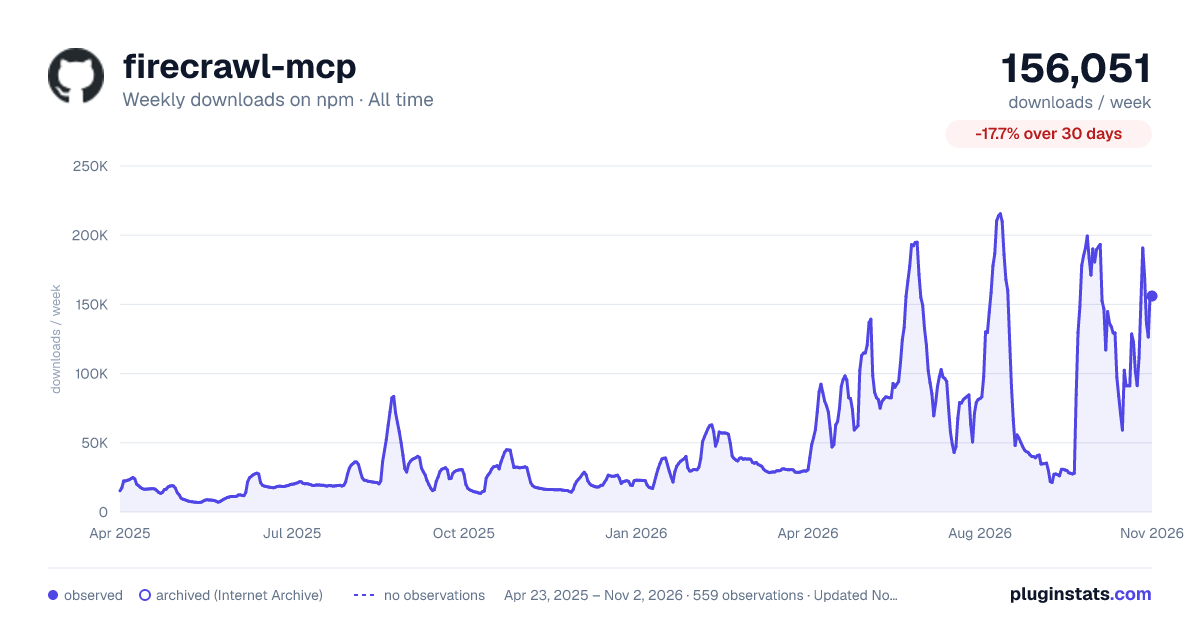

Adoption over time
7/30/90-day growth
Ranking history
Listing placement
Listing placement
Filled points are observed values; hollow points come from Internet Archive snapshots of the listing page. Dashed segments span periods with no observations — values between points are not interpolated.
Each band is one page of 20. Weekly downloads on a linear scale. Placement is projected from weekly downloads, so it can differ from the marketplace's own sort order. Hover a dot to see the listing.
Recent observations
Full history (544)Similar npm MCP servers plugins
All 20 firecrawl-mcp alternativesData source
Weekly downloads (trailing 7 complete days) come from the official npm downloads API. Downloads include CI and mirrors and are not equivalent to installs or users. npm publishes no ratings.
Listing: https://www.npmjs.com/package/firecrawl-mcp. First seen Oct 16, 2026; last successful collection Oct 20, 2026. See the methodology.