 PluginStats
webpack-assets-manifest weekly downloads statistics
By webdeveric · npm · Webpack plugins
This Webpack plugin will generate a JSON file that matches the original filename with the hashed version.
webpack-assets-manifest has 303,249 recorded weekly downloads on npm, a decrease of 58.0% over the past 30 days, ranking #301 of 2,256 tracked listings.
About webpack-assets-manifest
Webpack Assets Manifest
This webpack plugin will generate a JSON file that matches the original filename with the hashed version.
Installation
New in version 6
• This plugin is now written with TypeScript. • TypeScript types are provided by this package. • The package exports esm and cjs. • Added manifest.utils for use in the customize hook. • See examples/customized.js • https://github.com/webdeveric/webpack-assets-manifest/blob/b6ed8c09394bf33c8fadd5adff8bad7694f295ba/src/plugin.ts#L185-L195
Breaking changes
• Bumped minimum webpack version to 5.61 • Bumped minimum Node version to 20.10 • The plugin is exported using a named export instead of default. • Use import { WebpackAssetsManifest } from 'webpack-assets-manifest';
New in version 5
• Compatible with webpack 5 only (5.1+ required). • Supports finding asset modules. • Updated options schema to prevent additional properties. This helps with catching typos in option names. • :warning: Updated default value of the output option to be assets-manifest.json. This is to prevent confusion when working with Web app manifests or WebExtension manifests.
New in version 4
• Requires Node 10+. • Compatible with webpack 4 only (4.40+ required). • Added options: enabled, entrypointsUseAssets, contextRelativeKeys. • Updated writeToDisk option to default to auto. • Use lock files for various operations. • done hook is now an AsyncSeriesHook. • :warning: The structure of the entrypoints data has been updated to include preload and prefetch assets. Assets for an entrypoint are now included in an assets property under the entrypoint.
Example:
Usage
In your webpack config, require the plugin then add an instance to the plugins array.
Sample output
Options (read the schema)
enabled
Type: boolean
Default: true
Is the plugin enabled?
output
Type: string
Default: assets-manifest.json
This is where to save the manifest file relative to your webpack output.path.
assets
Type: object
Default: {}
Data is stored in this object.
Sharing data
You can share data between instances by passing in your own object in the assets option.
This is useful in multi-compiler mode.
contextRelativeKeys
Type: boolean
Default: false
Keys are relative to the compiler context.
space
Type: int
Default: 2
Number of spaces to use for pretty printing.
replacer
Type: null, function, or array
Default: null
Replacer reference
You'll probably want to use the transform hook instead.
fileExtRegex
Type: regex
Default: /.\w{2,4}.(?:map|gz)$|.\w+$/i
This is the regular expression used to find file extensions. You'll probably never need to change this.
writeToDisk
Type: boolean, string
Default: 'auto'
Write the manifest to disk using fs.
:warning: If you're using another language for your site and you're using webpack-dev-server to process your assets during development, you should set writeToDisk: true and provide an absolute path in output so the manifest file is actually written to disk and not kept only in memory.
sortManifest
Type: boolean, function
Default: true
The manifest is sorted alphabetically by default. You can turn off sorting by setting sortManifest: false.
If you want more control over how the manifest is sorted, you can provide your own comparison function. See the sorted example.
merge
Type: boolean, string
Default: false
If the output file already exists and you'd like to add to it, use merge: true. The default behavior is to use the existing keys/values without modification.
If you need to customize during merge, use merge: 'customize'.
If you want to know if customize was called when merging with an existing manifest, you can check manifest.isMerging.
publicPath
Type: string, function, boolean,
Default: null
When using publicPath: true, your webpack config output.publicPath will be used as the value prefix.
When using a string, it will be the value prefix. One common use is to prefix your CDN URL.
If you'd like to have more control, use a function. See the custom CDN example.
entrypoints
Type: boolean
Default: false
Include compilation.entrypoints in the manifest file.
entrypointsKey
Type: string, boolean
Default: entrypoints
If this is set to false, the entrypoints will be added to the root of the manifest.
entrypointsUseAssets
Type: boolean
Default: false
Entrypoint data should use the value from assets, which means the values could be customized and not just a string file path. This new option defaults to false so the new behavior is opt-in.
integrity
Type: boolean
Default: false
Include the subresource integrity hash.
integrityHashes
Type: array
Default: [ 'sha256', 'sha384', 'sha512' ]
Hash algorithms to use when generating SRI. For browsers, the currently the allowed integrity hashes are sha256, sha384, and sha512.
Other hash algorithms can be used if your target environment is not a browser. If you were to create a tool to audit your S3 buckets for data integrity, you could use something like this example to record the md5 hashes.
integrityPropertyName
Type: string
Default: integrity
This is the property that will be set on each entry in compilation.assets, which will then be available during customize. It is customizable so that you can have multiple instances of this plugin and not have them overwrite the currentAsset.integrity property.
You'll probably only need to change this if you're using multiple instances of this plugin to create different manifests.
apply
Type: function
Default: null
Callback to run after setup is complete.
customize
Type: function
Default: null
Callback to customize each entry in the manifest.
You can use this to customize entry names for example. In the sample below, we adjust img keys so that it's easier to use them with a template engine:
The function is called per each entry and provides you a way to intercept and rewrite each object. The result is then merged into a whole manifest.…
Description from the npm listing.
- webpack-assets-manifest
- webpack-plugin
- webpack
- plugin
- assets
- manifest
- json
- subresource
- integrity
- sri
README badge
Show your rank in a README or on your website. The badge updates automatically.
Charts
Images: 30d · 1y · all time · 1600×900 dark


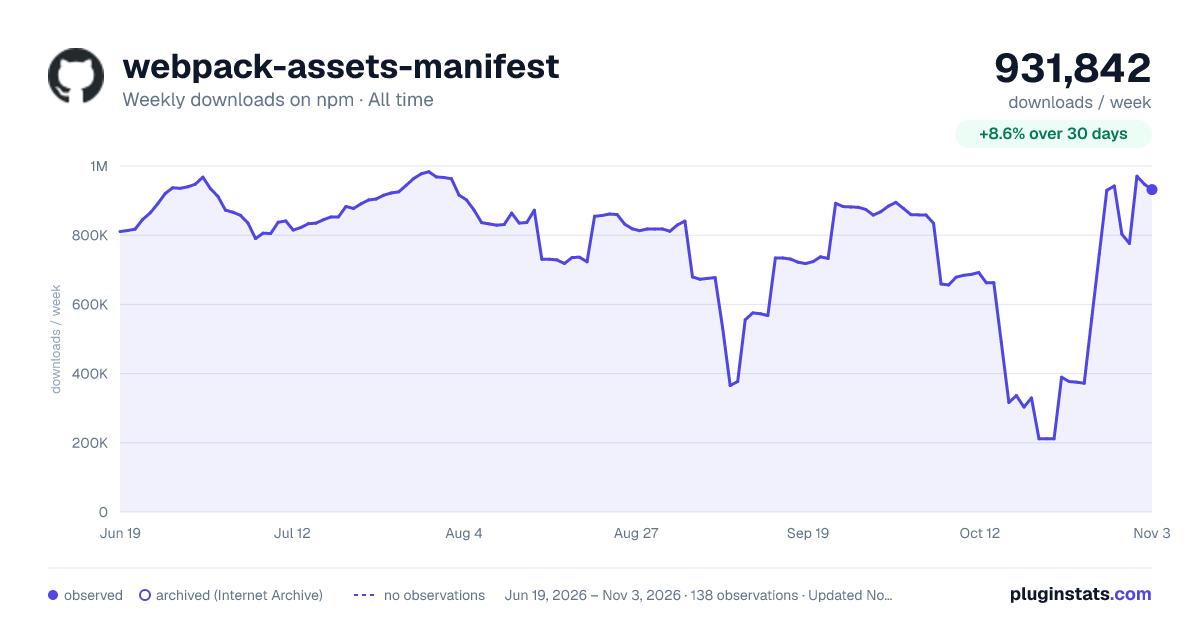

Adoption over time
7/30/90-day growth
Ranking history
Listing placement
Listing placement
Filled points are observed values; hollow points come from Internet Archive snapshots of the listing page. Dashed segments span periods with no observations — values between points are not interpolated.
Each band is one page of 20. Weekly downloads on a linear scale. Placement is projected from weekly downloads, so it can differ from the marketplace's own sort order. Hover a dot to see the listing.
Recent observations
Full history (121)Similar npm Webpack plugins plugins
All 20 webpack-assets-manifest alternatives- 52.4K weekly downloads-59.5%
Data source
Weekly downloads (trailing 7 complete days) come from the official npm downloads API. Downloads include CI and mirrors and are not equivalent to installs or users. npm publishes no ratings.
Listing: https://www.npmjs.com/package/webpack-assets-manifest. First seen Oct 16, 2026; last successful collection Oct 19, 2026. See the methodology.