 PluginStats
mcp-evals weekly downloads statistics
By mclenhard · npm · MCP servers
GitHub Action for evaluating MCP server tool calls using LLM-based scoring
mcp-evals has 30,535 recorded weekly downloads on npm, a decrease of 40.6% over the past 30 days, ranking #683 of 2,322 tracked listings.
About mcp-evals
MCP Evals
A Node.js package and GitHub Action for evaluating MCP (Model Context Protocol) tool implementations using LLM-based scoring, with built-in observability support. This helps ensure your MCP server's tools are working correctly, performing well, and are fully observable with integrated monitoring and metrics.
Installation
As a Node.js Package
npm install mcp-evals
As a GitHub Action
Add the following to your workflow file:
name: Run MCP Evaluations
on:
  pull_request:
    types: [opened, synchronize, reopened]
jobs:
  evaluate:
    runs-on: ubuntu-latest
    permissions:
      contents: read
      pull-requests: write
    steps:
      - uses: actions/checkout@v4

      - name: Setup Node.js
        uses: actions/setup-node@v4
        with:
          node-version: '20'

      - name: Install dependencies
        run: npm install

      - name: Run MCP Evaluations
        uses: mclenhard/mcp-evals@v1.0.9
        with:
          evals_path: 'src/evals/evals.ts'    # Can also use .yaml files
          server_path: 'src/index.ts'
          openai_api_key: ${{ secrets.OPENAI_API_KEY }}
          model: 'gpt-4'  # Optional, defaults to gpt-4
Usage -- Evals
1. Create Your Evaluation File
You can create evaluation configurations in either TypeScript or YAML format.
Option A: TypeScript Configuration
Create a file (e.g., evals.ts) that exports your evaluation configuration:
import { EvalConfig } from 'mcp-evals';
import { openai } from "@ai-sdk/openai";
import { grade, EvalFunction} from "mcp-evals";

const weatherEval: EvalFunction = {
    name: 'Weather Tool Evaluation',
    description: 'Evaluates the accuracy and completeness of weather information retrieval',
    run: async () => {
      const result = await grade(openai("gpt-4"), "What is the weather in New York?");
      return JSON.parse(result);
    }
};
const config: EvalConfig = {
    model: openai("gpt-4"),
    evals: [weatherEval]
  };

  export default config;

  export const evals = [
    weatherEval,
    // add other evals here
];
Option B: YAML Configuration
For simpler configuration, you can use YAML format (e.g., evals.yaml):
# Model configuration
model:
  provider: openai     # 'openai' or 'anthropic'
  name: gpt-4o        # Model name
  # api_key: sk-...   # Optional, uses OPENAI_API_KEY env var by default

# List of evaluations to run
evals:
  - name: weather_query_basic
    description: Test basic weather information retrieval
    prompt: "What is the current weather in San Francisco?"
    expected_result: "Should return current weather data for San Francisco including temperature, conditions, etc."

  - name: weather_forecast
    description: Test weather forecast functionality
    prompt: "Can you give me the 3-day weather forecast for Seattle?"
    expected_result: "Should return a multi-day forecast for Seattle"

  - name: invalid_location
    description: Test handling of invalid location requests
    prompt: "What's the weather in Atlantis?"
    expected_result: "Should handle invalid location gracefully with appropriate error message"
2. Run the Evaluations
As a Node.js Package
You can run the evaluations using the CLI with either TypeScript or YAML files:
# Using TypeScript configuration
npx mcp-eval path/to/your/evals.ts path/to/your/server.ts

# Using YAML configuration
npx mcp-eval path/to/your/evals.yaml path/to/your/server.ts
As a GitHub Action
The action will automatically:
- Run your evaluations
- Post the results as a comment on the PR
- Update the comment if the PR is updated
Evaluation Results
Each evaluation returns an object with the following structure:
interface EvalResult {
  accuracy: number;        // Score from 1-5
  completeness: number;    // Score from 1-5
  relevance: number;       // Score from 1-5
  clarity: number;         // Score from 1-5
  reasoning: number;       // Score from 1-5
  overall_comments: string; // Summary of strengths and weaknesses
}
Configuration
Environment Variables
OPENAI_API_KEY: Your OpenAI API key (required for OpenAI models)ANTHROPIC_API_KEY: Your Anthropic API key (required for Anthropic models)
[!NOTE] If you're using this GitHub Action with open source software, enable data sharing in the OpenAI billing dashboard to claim 2.5 million free GPT-4o mini tokens per day, making this Action effectively free to use.
Evaluation Configuration
TypeScript Configuration
The EvalConfig interface requires:
model: The language model to use for evaluation (e.g., GPT-4)evals: Array of evaluation functions to run
Each evaluation function must implement:
name: Name of the evaluationdescription: Description of what the evaluation testsrun: Async function that takes a model and returns anEvalResult
YAML Configuration
YAML configuration files support:
Model Configuration:
provider: Either 'openai' or 'anthropic'name: Model name (e.g., 'gpt-4o', 'claude-3-opus-20240229')api_key: Optional API key (uses environment variables by default)
Evaluation Configuration:
name: Name of the evaluation (required)description: Description of what the evaluation tests (required)prompt: The prompt to send to your MCP server (required)expected_result: Optional description of expected behavior
Supported File Extensions: .yaml, .yml
Usage -- Monitoring
Note: The metrics functionality is still in alpha. Features and APIs may change, and breaking changes are possible.
- Add the following to your application before you initilize the MCP server.
import { metrics } from 'mcp-evals';
metrics.initialize(9090, { enableTracing: true, otelEndpoint: 'http://localhost:4318/v1/traces' });
- Start the monitoring stack:
docker-compose up -d
```…
Description from the npm listing.
- mcp
- evaluation
- github-actions
- llm
README badge
Show your rank in a README or on your website. The badge updates automatically.
Charts
Images: 30d · 1y · all time · 1600×900 dark


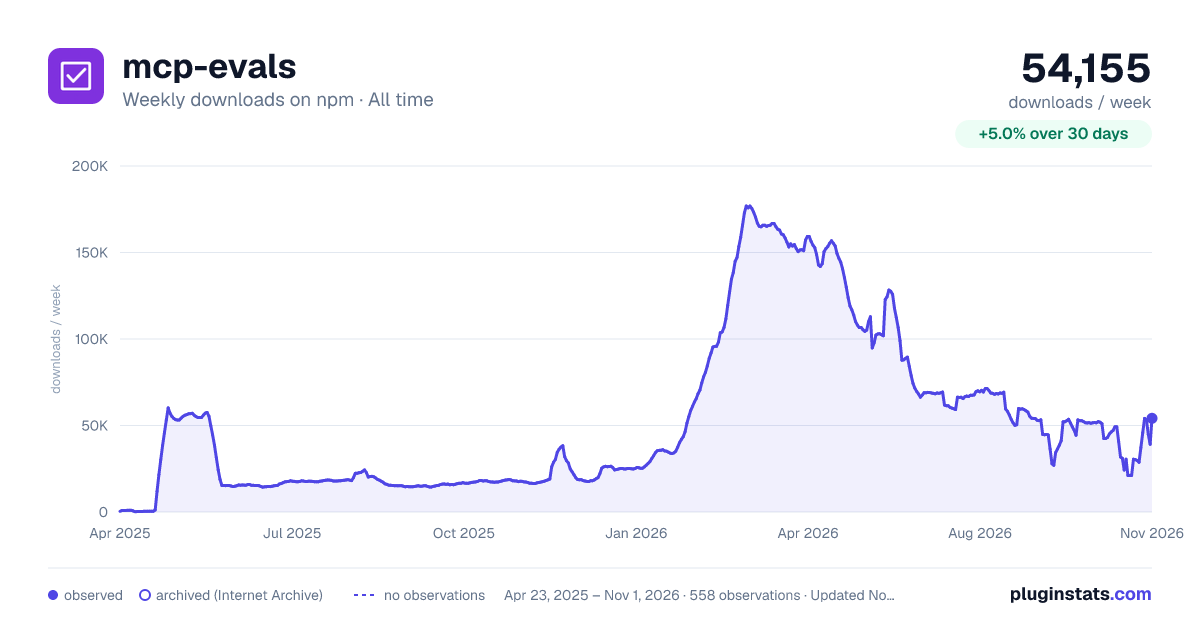

Adoption over time
7/30/90-day growth
Ranking history
Listing placement
Listing placement
Filled points are observed values; hollow points come from Internet Archive snapshots of the listing page. Dashed segments span periods with no observations — values between points are not interpolated.
Each band is one page of 20. Weekly downloads on a linear scale. Placement is projected from weekly downloads, so it can differ from the marketplace's own sort order. Hover a dot to see the listing.
Recent observations
Full history (544)Similar npm MCP servers plugins
All 20 mcp-evals alternativesData source
Weekly downloads (trailing 7 complete days) come from the official npm downloads API. Downloads include CI and mirrors and are not equivalent to installs or users. npm publishes no ratings.
Listing: https://www.npmjs.com/package/mcp-evals. First seen Oct 16, 2026; last successful collection Oct 20, 2026. See the methodology.