 PluginStats
@amoo-miki/terser-webpack-plugin weekly downloads statistics
By amoo-miki · npm · Webpack plugins
Terser plugin for webpack
@amoo-miki/terser-webpack-plugin has 5,518 recorded weekly downloads on npm, a decrease of 32.2% over the past 30 days, ranking #1112 of 2,322 tracked listings.
About @amoo-miki/terser-webpack-plugin
[![npm][npm]][npm-url] [![node][node]][node-url] [![deps][deps]][deps-url] [![tests][tests]][tests-url] [![cover][cover]][cover-url] [![chat][chat]][chat-url] [![size][size]][size-url]
terser-webpack-plugin
This plugin uses terser to minify your JavaScript.
ℹ️ For
webpack@3use terser-webpack-plugin-legacy package
Getting Started
To begin, you'll need to install terser-webpack-plugin:
$ npm install terser-webpack-plugin --save-dev
Then add the plugin to your webpack config. For example:
webpack.config.js
const TerserPlugin = require('terser-webpack-plugin');

module.exports = {
  optimization: {
    minimizer: [new TerserPlugin()],
  },
};
And run webpack via your preferred method.
Options
test
Type: String|RegExp|Array<String|RegExp>
Default: /\.m?js(\?.*)?$/i
Test to match files against.
webpack.config.js
module.exports = {
  optimization: {
    minimizer: [
      new TerserPlugin({
        test: /\.js(\?.*)?$/i,
      }),
    ],
  },
};
include
Type: String|RegExp|Array<String|RegExp>
Default: undefined
Files to include.
webpack.config.js
module.exports = {
  optimization: {
    minimizer: [
      new TerserPlugin({
        include: /\/includes/,
      }),
    ],
  },
};
exclude
Type: String|RegExp|Array<String|RegExp>
Default: undefined
Files to exclude.
webpack.config.js
module.exports = {
  optimization: {
    minimizer: [
      new TerserPlugin({
        exclude: /\/excludes/,
      }),
    ],
  },
};
chunkFilter
Type: Function<(chunk) -> boolean>
Default: () => true
Allowing to filter which chunks should be uglified (by default all chunks are uglified).
Return true to uglify the chunk, false otherwise.
webpack.config.js
module.exports = {
  optimization: {
    minimizer: [
      new TerserPlugin({
        chunkFilter: (chunk) => {
          // Exclude uglification for the `vendor` chunk
          if (chunk.name === 'vendor') {
            return false;
          }

          return true;
        },
      }),
    ],
  },
};
cache
Type: Boolean|String
Default: false
Enable file caching.
Default path to cache directory: node_modules/.cache/terser-webpack-plugin.
ℹ️ If you use your own
minifyfunction please read theminifysection for cache invalidation correctly.
Boolean
Enable/disable file caching.
webpack.config.js
module.exports = {
  optimization: {
    minimizer: [
      new TerserPlugin({
        cache: true,
      }),
    ],
  },
};
String
Enable file caching and set path to cache directory.
webpack.config.js
module.exports = {
  optimization: {
    minimizer: [
      new TerserPlugin({
        cache: 'path/to/cache',
      }),
    ],
  },
};
cacheKeys
Type: Function<(defaultCacheKeys, file) -> Object>
Default: defaultCacheKeys => defaultCacheKeys
Allows you to override default cache keys.
Default cache keys:
({
  terser: require('terser/package.json').version, // terser version
  'terser-webpack-plugin': require('../package.json').version, // plugin version
  'terser-webpack-plugin-options': this.options, // plugin options
  path: compiler.outputPath ? `${compiler.outputPath}/${file}` : file, // asset path
  hash: crypto
    .createHash('md4')
    .update(input)
    .digest('hex'), // source file hash
});
webpack.config.js
module.exports = {
  optimization: {
    minimizer: [
      new TerserPlugin({
        cache: true,
        cacheKeys: (defaultCacheKeys, file) => {
          defaultCacheKeys.myCacheKey = 'myCacheKeyValue';

          return defaultCacheKeys;
        },
      }),
    ],
  },
};
parallel
Type: Boolean|Number
Default: false
Use multi-process parallel running to improve the build speed.
Default number of concurrent runs: os.cpus().length - 1.
ℹ️ Parallelization can speedup your build significantly and is therefore highly recommended.
Boolean
Enable/disable multi-process parallel running.
webpack.config.js
module.exports = {
  optimization: {
    minimizer: [
      new TerserPlugin({
        parallel: true,
      }),
    ],
  },
};
Number
Enable multi-process parallel running and set number of concurrent runs.
webpack.config.js
module.exports = {
  optimization: {
    minimizer: [
      new TerserPlugin({
        parallel: 4,
      }),
    ],
  },
};
sourceMap
Type: Boolean
Default: false
Use source maps to map error message locations to modules (this slows down the compilation).
If you use your own minify function please read the minify section for handling source maps correctly.
⚠️
cheap-source-mapoptions don't work with this plugin.
webpack.config.js
module.exports = {
  optimization: {
    minimizer: [
      new TerserPlugin({
        sourceMap: true,
      }),
    ],
  },
};
minify
Type: Function
Default: undefined
Allows you to override default minify function. By default plugin uses terser package. Useful for using and testing unpublished versions or forks.
⚠️ Always use
requireinsideminifyfunction whenparalleloption enabled.
webpack.config.js
module.exports = {
  optimization: {
    minimizer: [
      new TerserPlugin({
        minify: (file, sourceMap) => {
          const extractedComments = [];

          // Custom logic for extract comments…
Description from the npm listing.
- uglify
- uglify-js
- uglify-es
- terser
- webpack
- webpack-plugin
- minification
- compress
- compressor
- min
- minifier
- minify
- optimize
- optimizer
README badge
Show your rank in a README or on your website. The badge updates automatically.
Charts
Images: 30d · 1y · all time · 1600×900 dark


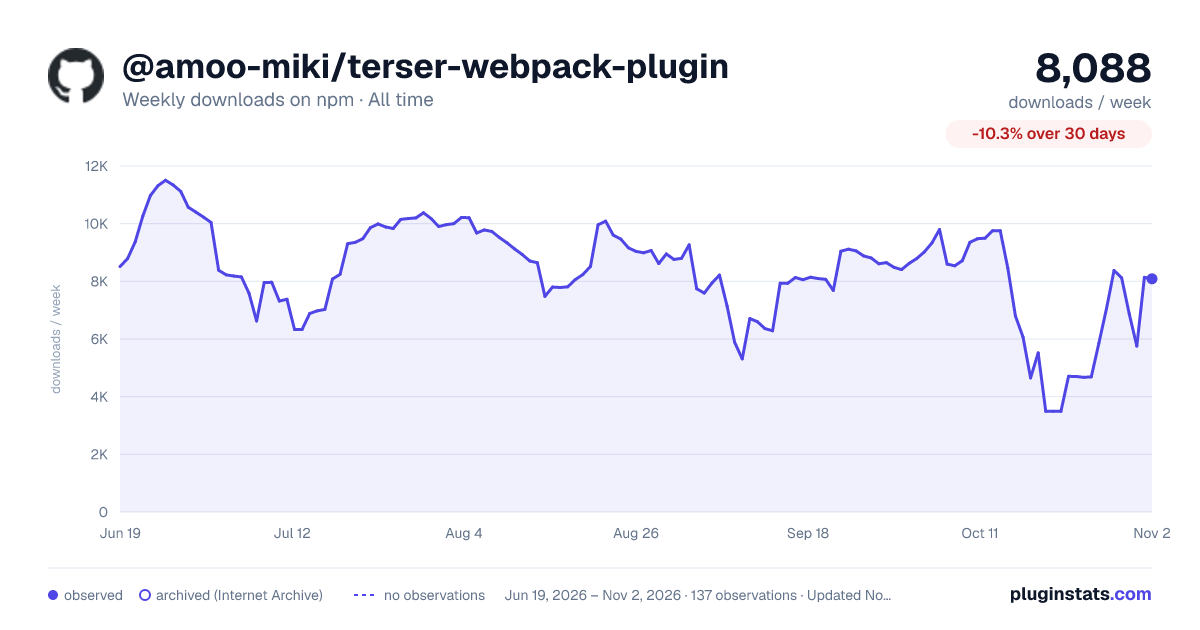

Adoption over time
7/30/90-day growth
Ranking history
Listing placement
Listing placement
Filled points are observed values; hollow points come from Internet Archive snapshots of the listing page. Dashed segments span periods with no observations — values between points are not interpolated.
Each band is one page of 20. Weekly downloads on a linear scale. Placement is projected from weekly downloads, so it can differ from the marketplace's own sort order. Hover a dot to see the listing.
Recent observations
Full history (122)Similar npm Webpack plugins plugins
All 20 @amoo-miki/terser-webpack-plugin alternatives- 4.7K weekly downloads-65.5%
- 4.6K weekly downloads-54.2%
- 6.7K weekly downloads-57.2%
Data source
Weekly downloads (trailing 7 complete days) come from the official npm downloads API. Downloads include CI and mirrors and are not equivalent to installs or users. npm publishes no ratings.
Listing: https://www.npmjs.com/package/@amoo-miki/terser-webpack-plugin. First seen Oct 16, 2026; last successful collection Oct 20, 2026. See the methodology.