 PluginStats
@lightspeed-js/prettier-plugin weekly downloads statistics
By lightspeed-js · npm · Prettier plugins
Prettier plugin for Lightspeed component files (.lsp)
@lightspeed-js/prettier-plugin has 10 recorded weekly downloads on npm, a change of -52.4% over the past 7 days, ranking #2042 of 2,322 tracked listings.
About @lightspeed-js/prettier-plugin
@lightspeed-js/prettier-plugin
A Prettier plugin for formatting Lightspeed component files (.lsp).
Installation
npm install --save-dev @lightspeed-js/prettier-plugin
# or
yarn add -D @lightspeed-js/prettier-plugin
# or
pnpm add -D @lightspeed-js/prettier-plugin
Usage
Add it to your Prettier config (Prettier 3 only loads plugins listed there):
{ "plugins": ["@lightspeed-js/prettier-plugin"] }
# Format a single file
npx prettier --write components/Button.lsp

# Format all .lsp files
npx prettier --write "**/*.lsp"
How it works
The plugin recognises four block types in Lightspeed files:
| Block | Formatter | Language attribute support |
|---|---|---|
<view> | HTML | - |
<skeleton> | HTML | - |
<logic> | JavaScript | lang="ts" for TypeScript |
<style> | CSS | lang="scss" or lang="less" |
Example
Before formatting:
<view>
  <div class="container">
    <h1>{{title}}</h1>
    <p>Welcome!</p>
  </div>
</view>

<logic>
  const state = reactive({title: 'Hello',count:0}) function
  increment(){state.count++}
</logic>

<style>
  .container {
    padding: 20px;
    margin: 0 auto;
    max-width: 800px;
  }
</style>
After formatting:
<view>
  <div class="container">
    <h1>{{ title }}</h1>
    <p>Welcome!</p>
  </div>
</view>

<logic>
  const state = reactive({ title: "Hello", count: 0 }); function increment() {
  state.count++; }
</logic>

<style>
  .container {
    padding: 20px;
    margin: 0 auto;
    max-width: 800px;
  }
</style>
Configuration
This plugin respects your existing Prettier configuration. You can also add Lightspeed-specific overrides:
{
  "semi": true,
  "singleQuote": true,
  "overrides": [
    {
      "files": "*.lsp",
      "options": {
        "printWidth": 100
      }
    }
  ]
}
Editor Integration
VS Code
Install the Prettier extension and add to your settings:
{
  "[lightspeed]": {
    "editor.defaultFormatter": "esbenp.prettier-vscode"
  }
}
Nova
Use the Prettier extension for Nova and ensure the plugin is installed in your project.
TypeScript Support
Use the lang attribute for TypeScript in logic blocks:
<logic lang="ts">
  interface User { name: string; age: number; } const user: User = { name:
  "Alice", age: 30, };
</logic>
SCSS/LESS Support
Use the lang attribute for SCSS or LESS in style blocks:
<style lang="scss">
  .container {
    padding: 20px;

    .title {
      font-size: 24px;

      &:hover {
        color: blue;
      }
    }
  }
</style>
License
MIT
Description from the npm listing.
- prettier
- prettier-plugin
- lightspeed
- lsp
README badge
Show your rank in a README or on your website. The badge updates automatically.
Charts
Images: 30d · 1y · all time · 1600×900 dark


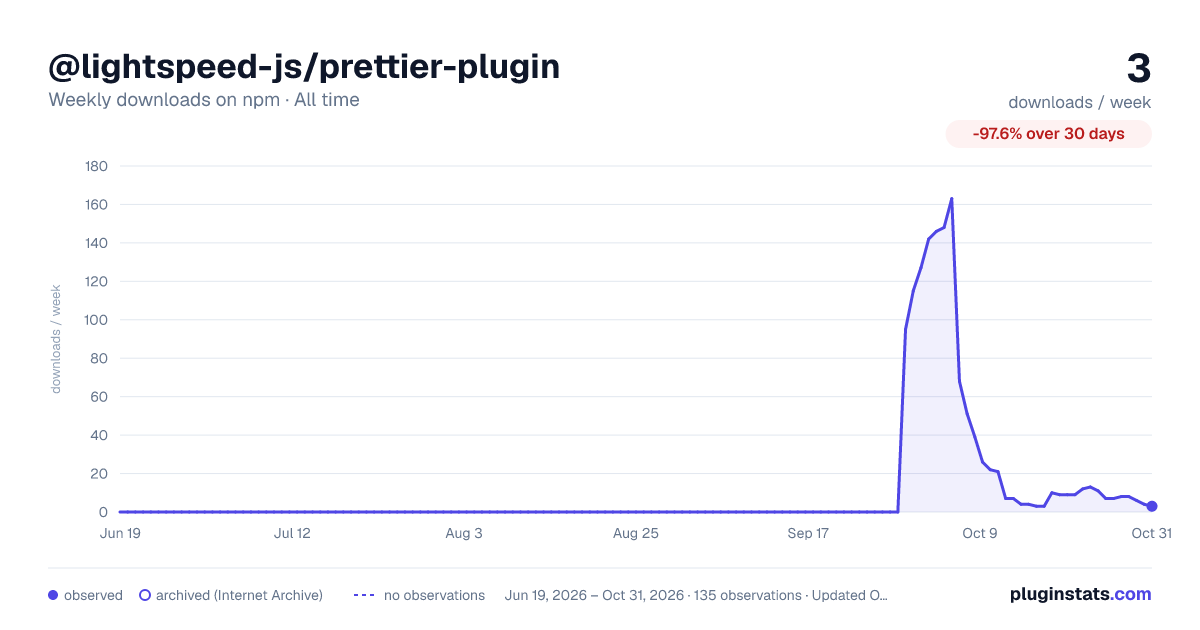

Adoption over time
7/30/90-day growth
Ranking history
Listing placement
Listing placement
Filled points are observed values; hollow points come from Internet Archive snapshots of the listing page. Dashed segments span periods with no observations — values between points are not interpolated.
Each band is one page of 20. Weekly downloads on a linear scale. Placement is projected from weekly downloads, so it can differ from the marketplace's own sort order. Hover a dot to see the listing.
Recent observations
Full history (122)Similar npm Prettier plugins plugins
All 20 @lightspeed-js/prettier-plugin alternatives- 10 weekly downloads+150%
- 11 weekly downloads-63.3%
Data source
Weekly downloads (trailing 7 complete days) come from the official npm downloads API. Downloads include CI and mirrors and are not equivalent to installs or users. npm publishes no ratings.
Listing: https://www.npmjs.com/package/@lightspeed-js/prettier-plugin. First seen Oct 16, 2026; last successful collection Oct 20, 2026. See the methodology.