 PluginStats
@prefecthq/fastmcp-ts weekly downloads statistics
By prefecthq · npm · MCP servers
🏎️ The official FastMCP TypeScript library - build MCP servers and clients, fast 🏎️
@prefecthq/fastmcp-ts has 9,609 recorded weekly downloads on npm, an increase of 127% over the past 30 days, ranking #971 of 2,322 tracked listings.
About @prefecthq/fastmcp-ts
fastmcp-ts
The TypeScript framework for building Model Context Protocol servers, clients, and apps. The official TypeScript counterpart to FastMCP for Python - built and maintained with 💙 by the same team at Prefect.
Built on version 2 of the official MCP TypeScript SDK — the scoped @modelcontextprotocol/server and @modelcontextprotocol/client packages. FastMCP handles the protocol plumbing so you can focus on what your server actually does.
FastMCP 1.0 speaks both MCP protocol generations: the 2025 legacy era and the 2026-07-28 modern era. A server serves both at once, and a client negotiates one. The client negotiates automatically by default: it probes once at connect, uses the modern era when the server offers it, and falls back to legacy otherwise, so upgrading from 0.x keeps your existing code running against servers of either generation. Pass versionNegotiation: { mode: 'legacy' } to opt out of the probe. The migration guide covers the upgrade path.
Installation
npm install @prefecthq/fastmcp-ts
Servers
Turn TypeScript functions into MCP tools, resources, and prompts. Input schemas are inferred automatically from any Standard Schema-compatible library: Zod, Valibot, ArkType, and others.
import { FastMCP } from '@prefecthq/fastmcp-ts/server'
import { z } from 'zod'

const server = new FastMCP({ name: 'my-server', version: '1.0.0' })

server.tool(
  {
    name: 'add',
    description: 'Add two numbers',
    input: z.object({ a: z.number(), b: z.number() }),
  },
  ({ a, b }) => a + b
)

server.resource(
  { uri: 'config://settings', description: 'App configuration' },
  () => JSON.stringify({ theme: 'dark', lang: 'en' })
)

server.resource(
  { uri: 'user://{id}', description: 'User by ID' },
  ({ id }) => `User #${id}`
)

server.prompt(
  {
    name: 'review_code',
    description: 'Review code for quality and correctness',
    arguments: [
      { name: 'code', required: true },
      { name: 'language', required: false },
    ],
  },
  ({ code, language }) =>
    `Review this ${language ?? 'code'} for quality and correctness:\n\n${code}`
)

await server.run()                              // stdio (default)
// await server.run({ transport: 'http', port: 3000 })
Save this file as server.ts. Installing @prefecthq/fastmcp-ts also installs the fastmcp CLI. Use it to inspect the server and call a tool, with no build step:
npx fastmcp inspect --file server.ts
npx fastmcp call add --file server.ts a=1 b=2
Context
Handlers access logging, progress, LLM sampling, user elicitation, and per-session state through an ambient context with no prop-drilling.
import { FastMCP } from '@prefecthq/fastmcp-ts/server'
import { z } from 'zod'

const server = new FastMCP({ name: 'assistant' })

server.tool(
  {
    name: 'summarize',
    description: 'Summarize a document',
    input: z.object({ text: z.string() }),
  },
  async ({ text }) => {
    const ctx = server.getContext()

    await ctx.info('Sending document to LLM')
    await ctx.reportProgress(0, 1, 'Sampling…')

    const { content } = await ctx.sample({
      messages: [{ role: 'user', content: { type: 'text', text: `Summarize:\n${text}` } }],
      maxTokens: 512,
    })

    return content.type === 'text' ? content.text : ''
  }
)
Middleware & Auth
import { FastMCP, LoggingMiddleware, RateLimitingMiddleware, jwtVerifier } from '@prefecthq/fastmcp-ts/server'

const server = new FastMCP({
  name: 'secure-server',
  auth: jwtVerifier({
    jwksUri: 'https://auth.example.com/.well-known/jwks.json',
    issuer: 'https://auth.example.com',
    audience: 'my-mcp-server',
  }),
})

server.use(new LoggingMiddleware())
server.use(new RateLimitingMiddleware(100, 60_000))  // 100 requests per minute

await server.run({ transport: 'http', port: 3000 })
Composition
Mount child servers onto a parent with optional name-prefix namespacing.
import { FastMCP, createProxy } from '@prefecthq/fastmcp-ts/server'

const weather = new FastMCP({ name: 'weather' })
weather.tool({ name: 'forecast', description: 'Get a forecast', input: z.object({ city: z.string() }) }, ({ city }) => `Forecast for ${city}`)

// Wrap a remote server as a mountable instance
const maps = await createProxy({ type: 'http', url: 'http://maps-service/mcp' })

const gateway = new FastMCP({ name: 'gateway' })
gateway.mount(weather, 'weather')   // → weather_forecast
gateway.mount(maps, 'maps')         // → maps_<tool_name>

await gateway.run({ transport: 'http', port: 3000 })
Clients
import { Client } from '@prefecthq/fastmcp-ts/client'

const client = await Client.connect('http://localhost:3000')

const tools     = await client.listTools()
const resources = await client.listResources()
const prompts   = await client.listPrompts()

const result = await client.callTool('add', { a: 1, b: 2 })
const config = await client.readResource('config://settings')
const review = await client.getPrompt('review_code', { code: 'const x = 1' })

await client.close()
Use await using for automatic cleanup:
await using client = await Client.connect('http://localhost:3000')
const result = await client.callTool('add', { a: 1, b: 2 })
// client closed automatically on scope exit
Sampling Adapters
Forward LLM sampling requests from servers to your AI provider with a single line:
import { Client, AnthropicSamplingAdapter } from '@prefecthq/fastmcp-ts/client'
import Anthropic from '@anthropic-ai/sdk'

const client = await Client.connect('http://localhost:3000', {
  handlers: {
    sampling: new AnthropicSamplingAdapter(new Anthropic()).asHandler(),
  },
})
```…
Description from the npm listing.
- mcp
- mcp-tools
- fastmcp
- mcp-clients
- llms
- model-context-protocol
- mcp-servers
- typescript
README badge
Show your rank in a README or on your website. The badge updates automatically.
Charts
Images: 30d · 1y · all time · 1600×900 dark


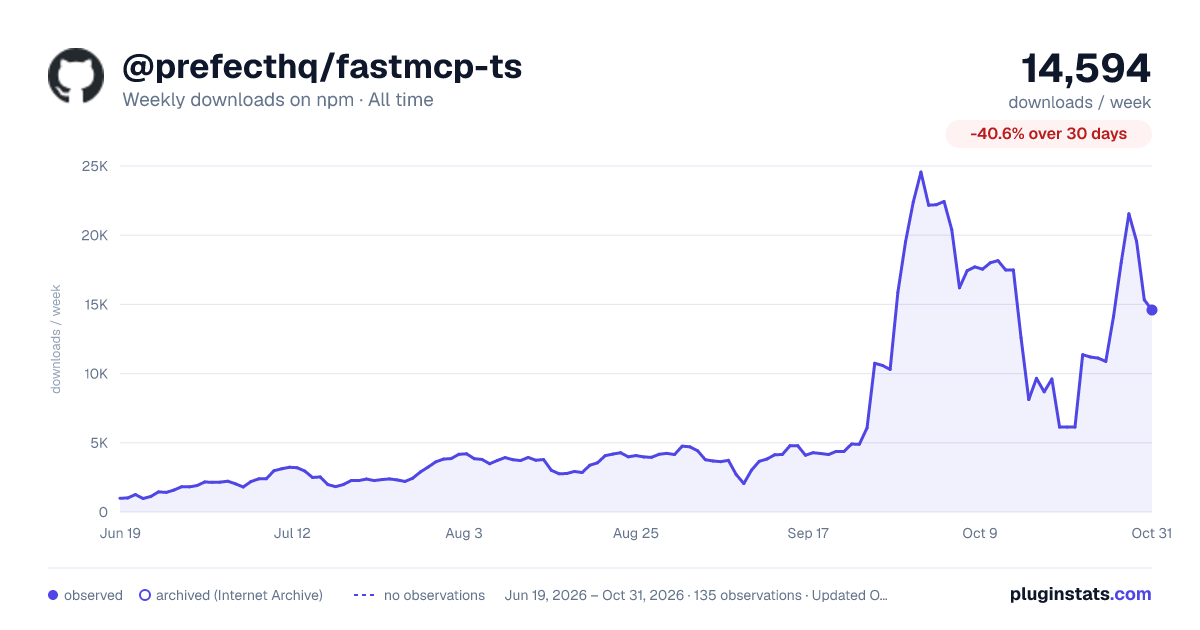

Adoption over time
7/30/90-day growth
Ranking history
Listing placement
Listing placement
Filled points are observed values; hollow points come from Internet Archive snapshots of the listing page. Dashed segments span periods with no observations — values between points are not interpolated.
Each band is one page of 20. Weekly downloads on a linear scale. Placement is projected from weekly downloads, so it can differ from the marketplace's own sort order. Hover a dot to see the listing.
Recent observations
Full history (122)Similar npm MCP servers plugins
All 20 @prefecthq/fastmcp-ts alternativesData source
Weekly downloads (trailing 7 complete days) come from the official npm downloads API. Downloads include CI and mirrors and are not equivalent to installs or users. npm publishes no ratings.
Listing: https://www.npmjs.com/package/@prefecthq/fastmcp-ts. First seen Oct 16, 2026; last successful collection Oct 20, 2026. See the methodology.