 PluginStats
prettier-plugin-tailwind-multiline weekly downloads statistics
By ivanlynch · npm · Prettier plugins
Prettier plugin that formats Tailwind classes in multiple lines for JS/TS/HTML
prettier-plugin-tailwind-multiline has 22 recorded weekly downloads on npm, an increase of 10.0% over the past 30 days, ranking #1921 of 2,322 tracked listings.
About prettier-plugin-tailwind-multiline
prettier-plugin-tailwind-multiline
A Prettier plugin that automatically formats Tailwind classes into multiple lines to improve code readability.
Features
- Automatically splits Tailwind classes into multiple lines when there are more than X classes (configurable)
- Maintains all Prettier existing functionality
- Compatible with React (JSX/TSX), Vue, Angular, and other frameworks
- Compatible with HTML files
- Compatible with Vue and Svelte components
- Easy to install and configure
- Zero additional dependencies
- Better code readability and maintainability
Installation
npm install --save-dev prettier-plugin-tailwind-multiline
or
yarn add --dev prettier-plugin-tailwind-multiline
Usage in your project
1. Automatic installation
Once installed, Prettier will automatically detect and use this plugin. No additional configuration is required if you already have Prettier set up in your project.
2. Configuration in different environments
In projects with a Prettier configuration file
If you have a .prettierrc, .prettierrc.json, or .prettierrc.js file in your project, you can configure the plugin by adding:
{
  "tailwindClassThreshold": 2
}
In projects with package.json
You can also configure Prettier directly in your package.json:
{
  "prettier": {
    "tailwindClassThreshold": 2
  }
}
In projects with ESLint + Prettier
If you're using the eslint-plugin-prettier, make sure to include this plugin in your ESLint configuration:
// .eslintrc.js
module.exports = {
  // ... other configurations
  extends: [
    // ... other extends
    'plugin:prettier/recommended'
  ],
  rules: {
    'prettier/prettier': ['error', {
      tailwindClassThreshold: 2,
    }]
  }
};
In VsCode with Prettier extension
If you use VS Code with the Prettier extension, no additional configuration is needed. The plugin will be automatically detected as long as it's installed in your project dependencies.
3. Usage with npm scripts
You can set up a script in your package.json to format all your files:
{
  "scripts": {
    "format": "prettier --write \"src/**/*.{js,jsx,ts,tsx,html,svelte,vue}\""
  }
}
And then run it with:
npm run format
4. Usage with formatting tools in CI/CD
To use in CI/CD environments, you can verify that all code is properly formatted:
npx prettier --check "src/**/*.{js,jsx,ts,tsx,html,svelte,vue}"
Example
Before:
<div className="flex flex-col items-center justify-center p-4 bg-white rounded-lg shadow-md hover:shadow-lg transition-shadow duration-300">
  <h1>Hello World</h1>
</div>
After:
<div
  className={`
  flex
  flex-col
  items-center
  justify-center
  p-4
  bg-white
  rounded-lg
  shadow-md
  hover:shadow-lg
  transition-shadow
  duration-300
`}
>
  <h1>Hello World</h1>
</div>
HTML Before:
<div class="flex flex-col items-center justify-center p-4 bg-white rounded-lg shadow-md hover:shadow-lg transition-shadow duration-300">
  <h1>Hello World</h1>
</div>
HTML After:
<div
  class="
  flex
  flex-col
  items-center
  justify-center
  p-4
  bg-white
  rounded-lg
  shadow-md
  hover:shadow-lg
  transition-shadow
  duration-300
"
>
  <h1>Hello World</h1>
</div>
Vue Before:
<template>
  <div class="bg-white shadow-xl rounded-lg overflow-hidden">
    <div class="bg-gradient-to-r from-blue-500 to-indigo-600 px-6 py-4">
      <div class="flex items-center justify-between">
        <h2 class="text-2xl font-bold text-white">Dashboard</h2>
      </div>
    </div>
  </div>
</template>
Vue After:
<template>
  <div class="
  bg-white
  shadow-xl
  rounded-lg
  overflow-hidden
">
    <div class="
  bg-gradient-to-r
  from-blue-500
  to-indigo-600
  px-6
  py-4
">
      <div class="
  flex
  items-center
  justify-between
">
        <h2 class="
  text-2xl
  font-bold
  text-white
">Dashboard</h2>
      </div>
    </div>
  </div>
</template>
Svelte Before:
<button class="bg-blue-500 hover:bg-blue-600 text-white font-medium py-2 px-6 rounded-full shadow-md hover:shadow-lg transition-all duration-300 focus:outline-none focus:ring-2 focus:ring-blue-500 focus:ring-opacity-50">
  Incrementar
</button>
Svelte After:
<button class="
  bg-blue-500
  hover:bg-blue-600
  text-white
  font-medium
  py-2
  px-6
  rounded-full
  shadow-md
  hover:shadow-lg
  transition-all
  duration-300
  focus:outline-none
  focus:ring-2
  focus:ring-blue-500
  focus:ring-opacity-50
">
  Incrementar
</button>
Configuration
You can adjust the minimum number of classes needed to trigger multiline formatting:
{
  "tailwindClassThreshold": 2
}
tailwindClassThreshold: (default: 2) Number of classes after which formatting will be applied in multiple lines
Troubleshooting
If the plugin doesn't seem to be working:
- Make sure Prettier is correctly configured
- Verify that the plugin is installed in the current project
- Confirm there are no conflicts with other Prettier plugins
Compatibility
- Prettier v3.0.0 or higher
- JavaScript/TypeScript/JSX/TSX
- Projects with React, Vue, Angular, etc.
- HTML files
How it works
The plugin uses regular expressions to identify className attributes with multiple Tailwind classes and converts them into multiline template strings. The process occurs during Prettier's preprocessing phase, before standard formatting is applied.
Contributions
Contributions are welcome. To contribute:
- Fork the repository
- Create a new branch (
git checkout -b feature/amazing-feature) - Commit your changes (
git commit -m 'Add some amazing feature') - Push to the branch (
git push origin feature/amazing-feature) - Open a Pull Request
License
MIT
Author
Ivan Lynch
Description from the npm listing.
- prettier
- prettier-plugin
- tailwindcss
- tailwind
- formatting
- jsx
- react
- typescript
- tsx
- html
- ui
- readability
README badge
Show your rank in a README or on your website. The badge updates automatically.
Charts
Images: 30d · 1y · all time · 1600×900 dark


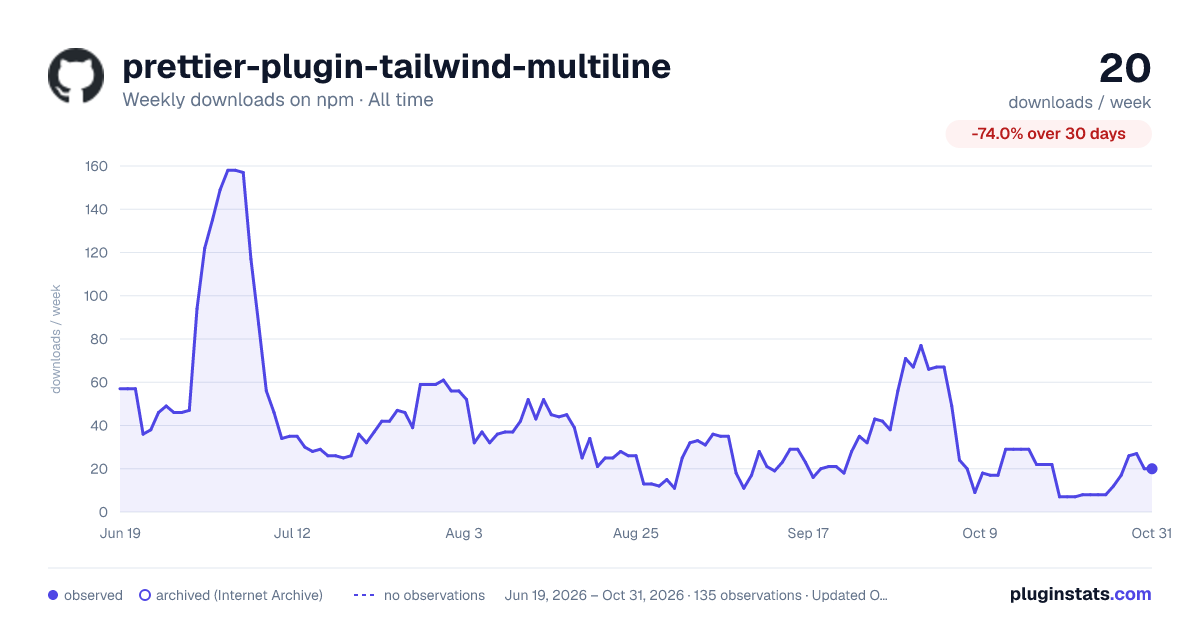

Adoption over time
7/30/90-day growth
Ranking history
Listing placement
Listing placement
Filled points are observed values; hollow points come from Internet Archive snapshots of the listing page. Dashed segments span periods with no observations — values between points are not interpolated.
Each band is one page of 20. Weekly downloads on a linear scale. Placement is projected from weekly downloads, so it can differ from the marketplace's own sort order. Hover a dot to see the listing.
Recent observations
Full history (122)Similar npm Prettier plugins plugins
All 20 prettier-plugin-tailwind-multiline alternatives- 22 weekly downloads-42.1%
- 23 weekly downloads-82.3%
Data source
Weekly downloads (trailing 7 complete days) come from the official npm downloads API. Downloads include CI and mirrors and are not equivalent to installs or users. npm publishes no ratings.
Listing: https://www.npmjs.com/package/prettier-plugin-tailwind-multiline. First seen Oct 16, 2026; last successful collection Oct 20, 2026. See the methodology.