 PluginStats
pi-mcp-extension weekly downloads statistics
By irahardianto · npm · MCP servers
MCP (Model Context Protocol) client extension for the Pi coding agent — connect Pi to any MCP server
pi-mcp-extension has 72,670 recorded weekly downloads on npm, an increase of 360% over the past 30 days, ranking #487 of 2,256 tracked listings.
About pi-mcp-extension
pi-mcp-extension
Connect Pi to any MCP server. Supabase, DeepSource, Playwright, Context7, filesystem, databases — if it speaks MCP, Pi can use it.
pi-mcp-extension is a production-ready Model Context Protocol client extension for the Pi coding agent. It manages server connections, discovers tools, and bridges them into Pi so the LLM can call them directly.
Features
• Multi-transport — stdio subprocesses, streamable-http (including "http" and URL-only shorthand), and legacy sse out of the box • Auto-discovery — Paginated tools/list with cursor following (MCP 2025-03-26 spec) • Live tool refresh — notifications/tools/list_changed triggers re-discovery without restart • Clean cancellation — AbortSignal propagation via notifications/cancelled • Smart reconnection — Fixed delay retry schedule (1s → 3s → 5s → 10s → 30s), configurable max retries, and automatic recovery when a server transport closes unexpectedly • Health checks — Opt-in periodic pings to detect stale connections • Safe process lifecycle — Child PID tracking (StdioClientTransport.pid) with safety-net SIGKILL for orphaned subprocesses • Stable tool names — Sanitized, collision-avoiding names (max 64 chars) that stay constant across reconnects • No tool churn — Activate/deactivate pattern ensures tools don't flicker during reconnection • Layered config & trust boundary — Global /mcp.json, project .pi/mcp.json (loaded only in trusted projects via ctx.isProjectTrusted()), and Pi 1.x extension-registered servers (pi.registerMcpServer()) • Rich tool results & annotations — MCP image content passthrough (ImageContent), plus readOnlyHint, destructiveHint, idempotentHint, openWorldHint surfaced in tool descriptions • On-demand agent tools & commands — mcp_status and mcp_connect agent tools plus /mcp, /mcp:start, /mcp:stop, and /mcp:auth slash commands with server-name autocomplete • Structured error handling — Distinct error codes for config, connection, protocol, and tool-level failures • OAuth 2.1 — Browser and headless/SSH authorization with PKCE, protected-resource discovery, Dynamic Client Registration, startup prompts for eager servers, cross-process lock recovery, token refresh, and secure local persistence (see OAUTH.md)
Installation
Or try without installing:
Quick Start
-
Install the extension:
-
(Pi 1.x) Disable Pi's built-in mcp extension so Pi does not warn that both extensions are enabled at the same time — either run pi config and uncheck mcp under Built-in extensions, or add "extensions": ["-builtin:mcp"] to ~/.pi/agent/settings.json:
-
Create a config file at ~/.pi/agent/mcp.json (global) or .pi/mcp.json (project-level):
-
Start Pi — your MCP tools are ready. Use /mcp to check server status.
Configuration
Servers can be configured via JSON files or registered programmatically by other Pi 1.x extensions:
| Source | Precedence & Scope |
| .pi/mcp.json | Highest — Project-level overrides per server and per explicitly stated setting. Loaded on session_start only when the project is trusted (ctx.isProjectTrusted()); never read at bootstrap or in untrusted projects. | | ~/.pi/agent/mcp.json | Global — Applies to all projects (honors $PI_CODING_AGENT_DIR with ~ expansion when set: /mcp.json). | | pi.registerMcpServer() | Extension-registered — Discovered via pi.getMcpServers() and updated live on mcp_servers_change events when replacing builtin:mcp. Any server with the same name in mcp.json takes precedence. |
Full Example
Global Settings
In project-level .pi/mcp.json, settings keys carry no defaults — only the keys explicitly stated in the project file override global settings.
| Field | Type | Default | Description |
| toolPrefix | string | "mcp" | Prefix for registered tools: _. Must match ^[a-zA-Z][a-zA-Z0-9]*$. | | requestTimeoutMs | number | 30000 | Default per-request timeout in milliseconds | | maxRetries | number | 5 | Max reconnection attempts (0–10) before giving up |
Per-Server Config
For Pi 1.x compatibility, server entries also accept type as an alias for transport, "http" as an alias for "streamable-http", oauth as an alias for auth, and timeout (in seconds) as an alias for requestTimeoutMs.
| Field | Type | Default | Description |
| transport (or type) | "stdio" | "streamable-http" | "http" | "sse" | "stdio" ("streamable-http" when url is set without command) | Transport protocol ("http" is normalized to "streamable-http") | | command | string | — | Executable to spawn (required for stdio) | | args | string[] | [] | Arguments for the command | | env | Record | — | Extra environment variables for the child process (literal values, no ${VAR} interpolation) | | url | string | — | Server URL (required for streamable-http and sse) | | headers | Record | — | Static headers sent with streamable-http and sse requests | | auth (or oauth) | object | — | OAuth 2.1 configuration described below and in OAUTH.md (streamable-http / sse only) | | lifecycle | "eager" | "lazy" | "lazy" ("eager" for pi.registerMcpServer() unless enabled: false) | eager = auto-start on session_start, lazy = connect on request via mcp_connect, /mcp:start, or /mcp:auth | | requestTimeoutMs (or timeout) | number | global setting | Per-server timeout override in ms (timeout is specified in seconds and multiplied by 1000) | | healthCheckIntervalMs | number | disabled | Opt-in ping interval in ms for proactive connection health monitoring |
OAuth Config
Configured under auth (or oauth). Token and client state are persisted per server in /mcp-auth/.json (0700 directory, 0600 files on POSIX) with atomic writes and automatic backup of corrupt state files. See OAUTH.md for architecture and troubleshooting details.
| Field | Type | Default | Description |…
Description from the npm listing.
- pi-package
- mcp
- model-context-protocol
- pi
- pi-extension
- ai-agent
- tool-bridge
README badge
Show your rank in a README or on your website. The badge updates automatically.
Charts
Images: 30d · 1y · all time · 1600×900 dark


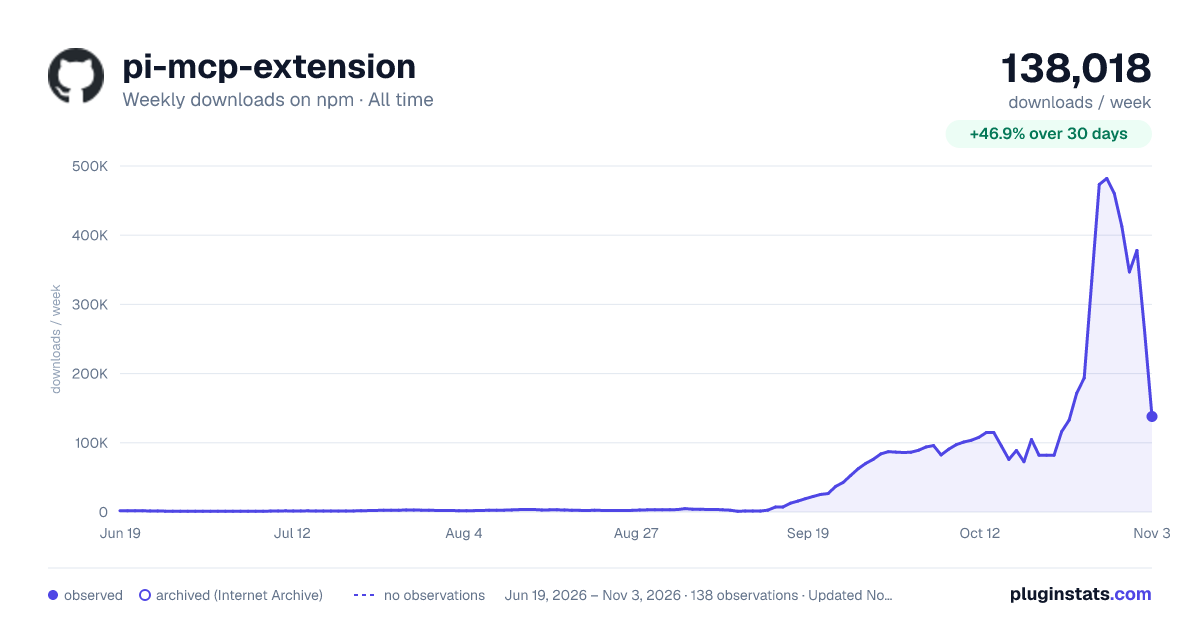

Adoption over time
7/30/90-day growth
Ranking history
Listing placement
Listing placement
Filled points are observed values; hollow points come from Internet Archive snapshots of the listing page. Dashed segments span periods with no observations — values between points are not interpolated.
Each band is one page of 20. Weekly downloads on a linear scale. Placement is projected from weekly downloads, so it can differ from the marketplace's own sort order. Hover a dot to see the listing.
Recent observations
Full history (121)Similar npm MCP servers plugins
All 20 pi-mcp-extension alternativesData source
Weekly downloads (trailing 7 complete days) come from the official npm downloads API. Downloads include CI and mirrors and are not equivalent to installs or users. npm publishes no ratings.
Listing: https://www.npmjs.com/package/pi-mcp-extension. First seen Oct 16, 2026; last successful collection Oct 19, 2026. See the methodology.