 PluginStats
@weppy/roblox-mcp weekly downloads statistics
By weppy · npm · Claude Code
MCP (Model Context Protocol) server for Roblox Studio integration - enables AI coding agents to interact with Roblox Studio in real-time
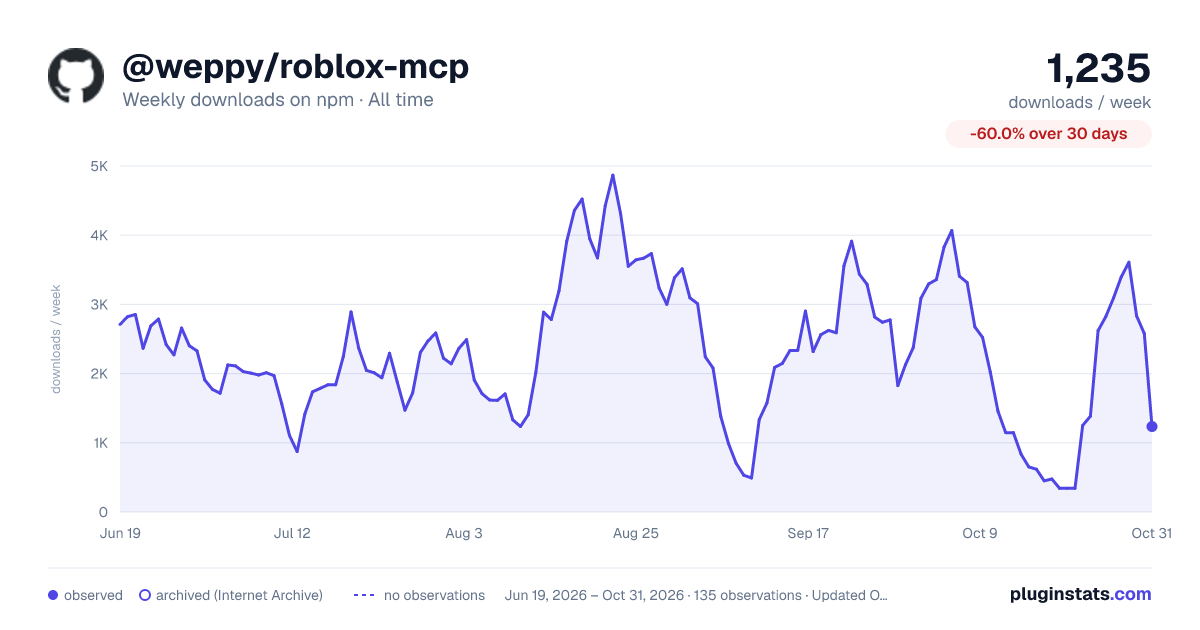
@weppy/roblox-mcp has 450 recorded weekly downloads on npm, a decrease of 80.6% over the past 30 days, ranking #1513 of 2,256 tracked listings.
About @weppy/roblox-mcp
WEPPY Roblox AI Toolkit — AI Game Development for Roblox Studio
WEPPY Roblox AI Toolkit is a Roblox Studio AI development product. It includes the WEPPY MCP Server for AI app connections and the WEPPY Roblox Studio Plugin for live Studio control. Claude Code, Codex, and Antigravity can also install the optional WEPPY AI Agent Plugin for client-native setup and workflow guidance.
Multi-Place Studio work · Generated assets to Roblox · Bidirectional sync · Automated playtest · UI Studio
English | 한국어 | 日本語 | Español | Português | Bahasa Indonesia | Deutsch
Why WEPPY Roblox AI Toolkit?
AI coding agents like Claude, Codex, and Gemini are powerful, but they cannot see or modify anything inside Roblox Studio. The DataModel, scripts, terrain, and lighting are invisible to external tools. Without a bridge, AI can only generate code snippets that you must paste manually.
The WEPPY MCP Server connects AI agents to the WEPPY Roblox Studio Plugin. AI directly creates and modifies instances, scripts, properties, terrain, and more inside Studio, and the changes are reflected immediately in Studio and the dashboard so you can see exactly what changed.
WEPPY is also built for Roblox experiences that are split across several Places. Open up to five Studio windows for Lobby, Game, Shop, Tutorial, or other Places, then tell the agent which Studio ID to use. One request can update several Places without re-explaining context or copying changes by hand.
For assets, an agent can create or prepare an image, save it to the Asset Library, upload it through Roblox Open Cloud, and apply the returned asset URI to a Place. The result is a shorter path from "make this icon/decal" to "it is visible in Studio."
No copy-pasting code or asset IDs. AI does the work, you review the results.
Quick Install
Start from the web install page. It shows the recommended one-line script for your platform first.
👉 Web Install Page
Recommended One-Line Install
On the install page, copy the one-line script and run it in Terminal or PowerShell.
macOS / Linux
Windows (PowerShell)
Then reopen your AI app and restart Roblox Studio.
Automatic WEPPY MCP Server registration supports Claude Code, Claude Desktop, Cursor, Codex CLI/App, Gemini CLI, and Antigravity / Antigravity IDE / Antigravity CLI. For Claude Code, the installer also installs the WEPPY AI Agent Plugin. For Codex, it adds the plugin marketplace and then asks you to install WEPPY AI Agent Plugin from Plugin Directory. For Antigravity, the AI agent plugin is installed only when Antigravity CLI and agy plugin are available; otherwise the installer preserves the direct MCP connection.
Browser Web Install
If terminal or PowerShell is uncomfortable, use the terminal-free web installer on the same install page.
Manual Install
If the one-line install or terminal-free web installer does not work, register the WEPPY MCP Server manually with your AI app.
Use this server command:
Automatic registration supports Claude Code, Claude Desktop, Cursor, Codex CLI, Codex App, Gemini CLI, and Antigravity / Antigravity IDE / Antigravity CLI.
Any MCP-compatible AI client works. The server command is npx -y @weppy/roblox-mcp@latest.
Dola Desktop connects through a local STDIO Custom Connector. It requires Dola's Pro mode and Local computer. Follow the Dola manual setup guide; the one-line installer and GitHub marketplace plugin do not configure Dola.
Optional WEPPY AI Agent Plugin
The WEPPY Roblox AI Toolkit connects to every supported AI app through the WEPPY MCP Server. Claude Code, Codex, and Antigravity can additionally install the WEPPY AI Agent Plugin for client-native setup and workflow guidance for Studio control, sync, and assets.
Claude Code
Codex
After adding the Codex marketplace, restart Codex, open Plugin Directory, and install WEPPY AI Agent Plugin.
Antigravity
Antigravity CLI is required to install the WEPPY AI Agent Plugin. The one-line installer uses agy plugin install with the latest public GitHub release, verifies it with agy plugin list, and publishes the verified skill-only payload to supported IDE surfaces. Existing installs are replaced on every run so they can converge on the latest release.
The installer reports results as installed, updated, reinstalled, repaired, fallback, failed, or skipped. A missing CLI keeps the shared MCP connection at ~/.gemini/config/mcp_config.json working and reports fallback; an existing plugin is never treated as a skip. In a CLI-only profile, verified native plugin MCP replaces the shared direct WEPPY entry. When Antigravity IDE and CLI coexist, both plugin views stay skill-only and one shared direct weppy-roblox-mcp definition serves both. Outside the verified OS and version matrix, native discovery uses the MCP fallback.
On Windows Antigravity, CLI installation has been verified to expose skills and MCP. Windows Antigravity IDE plugin discovery is unverified because the verified environment has no plugin or skills inspection UI, so the shared MCP fallback is preserved. GitHub URLs are not passed directly to agy plugin install; the installer downloads the latest public release and installs from a prepared local path.
Compatibility
| Claude Code | Claude Desktop | Cursor | Codex CLI | Gemini CLI | Antigravity / Antigravity IDE / Antigravity CLI | Dola Desktop |
| ✅ | ✅ | ✅ | ✅ | ✅ | ✅ | Manual setup |
Requirements: Node.js 22+, Roblox Studio, Windows 10+ or macOS 12+
What It Does
- MCP Tools: Direct execution in Studio from natural language
AI can directly handle scripts, instances, properties, terrain, lighting, assets, audio, and animation inside Studio.…
Description from the npm listing.
- mcp
- mcp-server
- model-context-protocol
- roblox
- roblox-studio
- roblox-plugin
- roblox-development
- luau
- ai
- ai-agent
- llm
- coding-agent
- automation
- game-development
- studio-integration
- claude
- claude-code
- codex
- gemini
- cursor
README badge
Show your rank in a README or on your website. The badge updates automatically.
Charts
Images: 30d · 1y · all time · 1600×900 dark



Adoption over time
7/30/90-day growth
Ranking history
Listing placement
Listing placement
Filled points are observed values; hollow points come from Internet Archive snapshots of the listing page. Dashed segments span periods with no observations — values between points are not interpolated.
Each band is one page of 20. Weekly downloads on a linear scale. Placement is projected from weekly downloads, so it can differ from the marketplace's own sort order. Hover a dot to see the listing.
Recent observations
Full history (121)Similar npm Claude Code plugins
All 20 @weppy/roblox-mcp alternativesData source
Weekly downloads (trailing 7 complete days) come from the official npm downloads API. Downloads include CI and mirrors and are not equivalent to installs or users. npm publishes no ratings.
Listing: https://www.npmjs.com/package/@weppy/roblox-mcp. First seen Oct 16, 2026; last successful collection Oct 19, 2026. See the methodology.