 PluginStats
vite-plugin-simple-html weekly downloads statistics
By wojtekmaj (2 listings) · npm · Vite plugins
Vite plugin for HTML processing and minification
vite-plugin-simple-html has 11,941 recorded weekly downloads on npm, a decrease of 29.6% over the past 30 days, ranking #914 of 2,322 tracked listings.
About vite-plugin-simple-html



vite-plugin-simple-html
Vite plugin for HTML processing and minification. "Lite" version of vite-plugin-html, supporting a subset of its features.
tl;dr
- Install by executing
npm install vite-plugin-simple-htmloryarn add vite-plugin-simple-html. - Import by adding
import simpleHtmlPlugin from 'vite-plugin-simple-html'. - Use it by adding
simpleHtmlPlugin()topluginssection of your Vite config.
Usage
Here's an example of basic configuration:
import { defineConfig } from 'vite';
import simpleHtmlPlugin from 'vite-plugin-simple-html';

export default defineConfig({
  plugins: [
    simpleHtmlPlugin({
      inject: {
        data: {
          title: 'My app',
          script: '<script src="index.js"></script>',
        },
        tags: [
          {
            tag: 'meta',
            attrs: {
              name: 'description',
              content: 'My awesome app',
            },
          },
        ],
      },
      minify: true,
    }),
  ],
});
User guide
Minification
Minification is handled by @swc/html.
To minify your HTML files, set minify to true:
import { defineConfig } from 'vite';
import simpleHtmlPlugin from 'vite-plugin-simple-html';

export default defineConfig({
  plugins: [
    simpleHtmlPlugin({
      minify: true,
    }),
  ],
});
The default configuration in this case is:
{
  collapseWhitespaces: 'all',
  minifyCss: true,
  minifyJs: false,
  minifyJson: true,
  quotes: true,
  removeComments: true,
  removeEmptyAttributes: true,
  removeRedundantAttributes: 'all',
  tagOmission: false,
}
You can access that configuration by importing defaultMinifyOptions from the plugin:
import { defaultMinifyOptions } from 'vite-plugin-simple-html';
[!NOTE] The default configuration is designed for compatibility with vite-plugin-html. For more aggressive minification, consider adjusting the settings to better suit your needs.
If you want to customize the minification process, for example to minify JS, you can pass your own configuration object:
import { defineConfig } from 'vite';

export default defineConfig({
  plugins: [
    simpleHtmlPlugin({
      minify: {
        minifyJs: true,
      },
    }),
  ],
});
For a full list of available options, refer to @swc/html documentation.
EJS variables support
You can inject variables into your HTML files using EJS syntax.
import { defineConfig } from 'vite';
import simpleHtmlPlugin from 'vite-plugin-simple-html';

export default defineConfig({
  plugins: [
    simpleHtmlPlugin({
      inject: {
        data: {
          title: 'My app',
        },
      },
    }),
  ],
});
<!doctype html>
<html lang="en">
  <head>
    <title><%= title %></title>
  </head>
  <body>
    <h1><%= title %></h1>
  </body>
</html>
Tag injection
You can inject tags into your HTML files.
import { defineConfig } from 'vite';
import simpleHtmlPlugin from 'vite-plugin-simple-html';

export default defineConfig({
  plugins: [
    simpleHtmlPlugin({
      inject: {
        tags: [
          {
            tag: 'meta',
            attrs: {
              name: 'description',
              content: 'My awesome app',
            },
          },
        ],
      },
    }),
  ],
});
By default, they are injected at the end of the <head> section of your HTML file. You can change that behavior by setting injectTo:
head: Injects tags at the end of the<head>section of your HTML file (default).head-prepend: Injects tags at the beginning of the<head>section of your HTML file.body: Injects tags at the end of the<body>section of your HTML file.body-prepend: Injects tags at the beginning of the<body>section of your HTML file.
Detailed comparison with vite-plugin-html
| Feature | vite-plugin-simple-html | vite-plugin-html |
|---|---|---|
| EJS support | ⚠️ Variables only | ✅ |
| HTML tags injection | ✅ | ✅ |
| HTML/CSS/JS minification | ✅ | ✅ |
| JSON minification | ✅ | ❌ |
| entry script injection | ❌ | ✅ |
| template customization | ❌ | ✅ |
| multi-page support | ❌ | ✅ |
Why bother?
-
vite-plugin-simple-htmlhas considerably fewer dependencies. Compare: -
vite-plugin-simple-htmldoes not suffer from issue that breaks Vite proxy (which was the reason I created this plugin in the first place). -
vite-plugin-simple-htmldoes not use options deprecated in Vite 5, and thus does not produce deprecation warnings:WARN plugin 'vite:html' uses deprecated 'enforce' option. Use 'order' option instead. WARN plugin 'vite:html' uses deprecated 'transform' option. Use 'handler' option instead.
License
The MIT License.
Author…
Description from the npm listing.
- vite
- vite-plugin
- plugin
- html
README badge
Show your rank in a README or on your website. The badge updates automatically.
Charts
Images: 30d · 1y · all time · 1600×900 dark


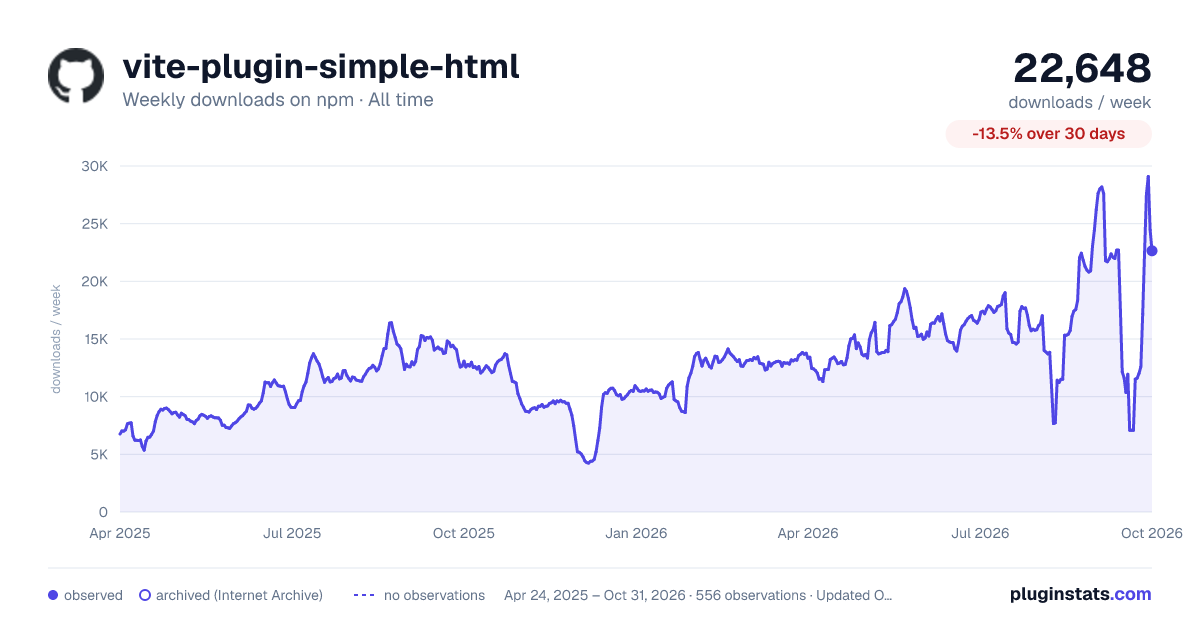

Adoption over time
7/30/90-day growth
Ranking history
Listing placement
Listing placement
Filled points are observed values; hollow points come from Internet Archive snapshots of the listing page. Dashed segments span periods with no observations — values between points are not interpolated.
Each band is one page of 20. Weekly downloads on a linear scale. Placement is projected from weekly downloads, so it can differ from the marketplace's own sort order. Hover a dot to see the listing.
Recent observations
Full history (543)Similar npm Vite plugins plugins
All 20 vite-plugin-simple-html alternativesData source
Weekly downloads (trailing 7 complete days) come from the official npm downloads API. Downloads include CI and mirrors and are not equivalent to installs or users. npm publishes no ratings.
Listing: https://www.npmjs.com/package/vite-plugin-simple-html. First seen Oct 16, 2026; last successful collection Oct 20, 2026. See the methodology.