 PluginStats
webpack-ext-reloader-next weekly downloads statistics
By graybearo · npm · Webpack plugins
Webpack extension reloader for Chrome, Firefox, and Edge. Auto-reloads your browser extension on rebuild. MV3-ready successor to webpack-ext-reloader.
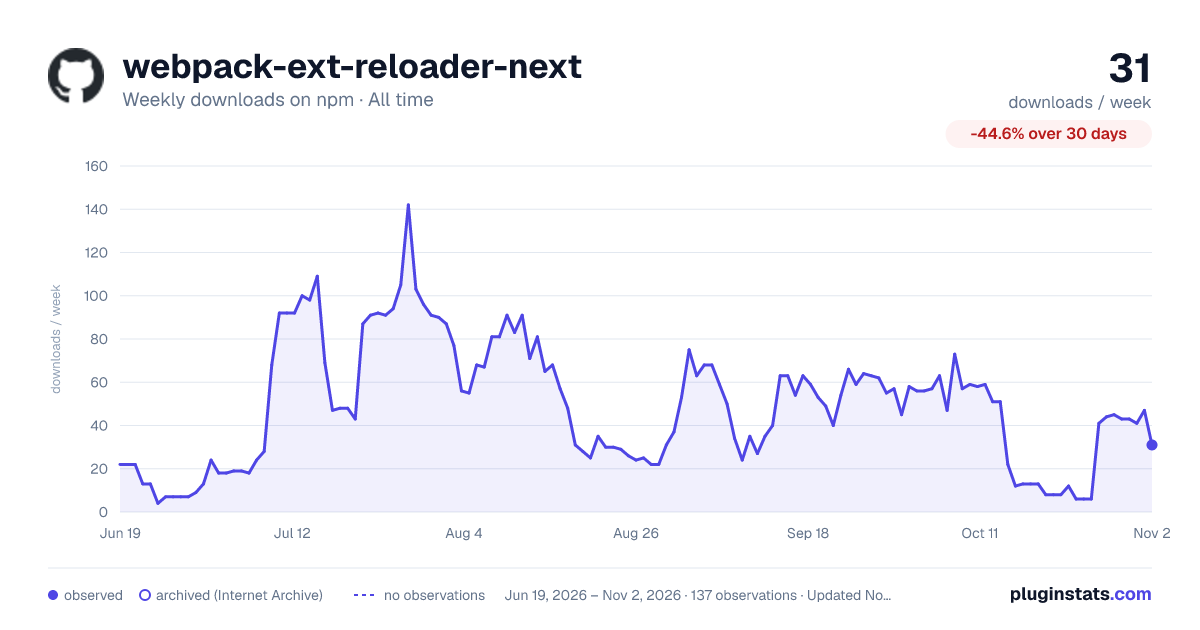
webpack-ext-reloader-next has 13 recorded weekly downloads on npm, a decrease of 78.0% over the past 30 days, ranking #2001 of 2,322 tracked listings.
About webpack-ext-reloader-next
Why this exists
The original webpack-ext-reloader is unmaintained and broken on Manifest
V3 — its WebSocket dies the moment Chrome puts the service worker to
sleep, and it doesn't reconnect. This package is the modern successor.
It picks a port, watches your build, and reloads the extension over a self-healing WebSocket that survives service-worker eviction. No configuration required for the common case.
Install
pnpm add -D webpack-ext-reloader-next
# or: npm i -D webpack-ext-reloader-next
# or: yarn add -D webpack-ext-reloader-next
Quick start
Drop one line into your webpack config. Pick the form that matches your setup:
CommonJS (webpack.config.js or .cjs):
const { ExtReloader } = require("webpack-ext-reloader-next");

module.exports = {
  mode: "development",
  // ...your config
  plugins: [new ExtReloader()],
};
ES Modules (webpack.config.mjs, or with "type": "module"):
import { ExtReloader } from "webpack-ext-reloader-next";

export default {
  mode: "development",
  // ...your config
  plugins: [new ExtReloader()],
};
TypeScript (webpack.config.ts):
import { ExtReloader, type ExtReloaderOptions } from "webpack-ext-reloader-next";
import type { Configuration } from "webpack";

const config: Configuration = {
  mode: "development",
  // ...your config
  plugins: [new ExtReloader()],
};

export default config;
The default export is also available if you prefer
import ExtReloader from "webpack-ext-reloader-next".
That's it. The plugin reads your manifest.json, infers your background
/ content / popup entries, and starts a reload server on a free port
starting at 9012. Run webpack --watch, load the unpacked build into
Chrome, and edit a file — the extension reloads on its own.
The plugin is automatically a no-op when
mode === "production".
Multiple content scripts or pages? Pass entries arrays — the inferred
defaults assume one of each:
new ExtReloader({
  entries: {
    contentScript: ["gmail-content", "inbox-content"],
    extensionPage: ["popup", "options"],
  },
});
What it does on each kind of change
| You edited | What happens |
|---|---|
manifest.json | Full extension reload (chrome.runtime.reload) |
_locales/** | Full extension reload |
| Background service worker | Full extension reload |
| Popup / options / devtools page | Reload the open extension page only |
| Content script JS | Reload tabs matching the script's matches |
| Content script or page CSS | Hot-swap in place — no reload |
| Static asset (image, etc.) | Nothing (just rebuild) |
The CSS hot-swap is the one feature no other webpack extension reloader
ships. Edit a stylesheet — whether it's import-ed from JS (cloned
<link> with a cache-buster) or declared in manifest.json under
content_scripts[].css (re-injected via chrome.scripting.insertCSS) —
and your Gmail (or whatever) tab keeps its scroll position and form
state.
How it works…
Description from the npm listing.
- webpack
- webpack-plugin
- mv3
- manifest-v3
- webpack-ext-reloader
- webpack-extension-reloader
- chrome-extension
- firefox-extension
- edge-extension
- web-extension
- webextension
- hot-reload
- live-reload
- reloader
- browser-extension
README badge
Show your rank in a README or on your website. The badge updates automatically.
Charts
Images: 30d · 1y · all time · 1600×900 dark



Adoption over time
7/30/90-day growth
Ranking history
Listing placement
Listing placement
Filled points are observed values; hollow points come from Internet Archive snapshots of the listing page. Dashed segments span periods with no observations — values between points are not interpolated.
Each band is one page of 20. Weekly downloads on a linear scale. Placement is projected from weekly downloads, so it can differ from the marketplace's own sort order. Hover a dot to see the listing.
Recent observations
Full history (122)Similar npm Webpack plugins plugins
All 20 webpack-ext-reloader-next alternatives- 13 weekly downloads-40.9%
- 14 weekly downloads-72.0%
- 14 weekly downloads-73.6%
- 14 weekly downloads-46.2%
Data source
Weekly downloads (trailing 7 complete days) come from the official npm downloads API. Downloads include CI and mirrors and are not equivalent to installs or users. npm publishes no ratings.
Listing: https://www.npmjs.com/package/webpack-ext-reloader-next. First seen Oct 16, 2026; last successful collection Oct 20, 2026. See the methodology.