 PluginStats
@genkit-ai/vercel-ai has 173 recorded weekly downloads on npm, a decrease of 76.8% over the past 30 days, ranking #1722 of 2,391 tracked listings.
About @genkit-ai/vercel-ai
@genkit-ai/vercel-ai
A Genkit plugin that provides a
Vercel AI SDK ChatTransport for connecting
useChat to Genkit Agents.
Use this plugin to build rich chat UIs in React (Next.js, Vite, etc.) that stream responses from Genkit agents — including multi-turn conversations, tool calls, and interrupt-based human-in-the-loop flows — with zero custom plumbing.
Installation
npm install @genkit-ai/vercel-ai
Peer dependencies
| Package | Required | Notes |
|---|---|---|
genkit | ✅ | >=1.0.0 — the agent API used by this transport lives in the genkit/beta subpath. |
ai | ✅ | ^6.0.0 — provides ChatTransport, UIMessage, etc. |
@ai-sdk/react | Client only | ^3.0.0 — only needed where you call the useChat hook (browser). |
Note:
@ai-sdk/reactis not a declared peer dependency of this package because the server-side entry point does not require it. Install it yourself in any project that usesuseChat.
Quick start
1. Define a Genkit agent (server)
// app/api/chat/weather/route.ts  (Next.js App Router example)
import { appRoute } from '@genkit-ai/next';
import { genkit } from 'genkit/beta';
import { googleAI } from '@genkit-ai/google-genai';

const ai = genkit({ plugins: [googleAI()] });

const weatherAgent = ai.defineAgent({
  name: 'weatherAgent',
  model: 'googleai/gemini-flash-latest',
  tools: [/* your tools here */],
});

export const POST = appRoute(weatherAgent);
Or with Express:
import { expressHandler } from '@genkit-ai/express';
import express from 'express';

const app = express();
app.post('/api/chat/weather', expressHandler(weatherAgent));
app.listen(3000);
2. Connect from the client
'use client';
import { useChat } from '@ai-sdk/react';
import { GenkitChatTransport } from '@genkit-ai/vercel-ai/client';
import { useMemo } from 'react';

export default function Chat() {
  const transport = useMemo(
    () => new GenkitChatTransport({ url: '/api/chat/weather' }),
    []
  );
  // The `useChat` `id` is sent to the agent as its `sessionId`; it must be a UUID.
  const chatId = useMemo(() => crypto.randomUUID(), []);

  const { messages, input, handleInputChange, handleSubmit, status } =
    useChat({ id: chatId, transport });


  return (
    <div>
      {messages.map((m) => (
        <div key={m.id}>
          <strong>{m.role}:</strong>{' '}
          {m.parts
            .filter((p) => p.type === 'text')
            .map((p) => p.text)
            .join('')}
        </div>
      ))}
      <form onSubmit={handleSubmit}>
        <input value={input} onChange={handleInputChange} />
        <button type="submit" disabled={status !== 'ready'}>
          Send
        </button>
      </form>
    </div>
  );
}
That's it — text streaming, multi-turn history, tool calls, and interrupts all work out of the box.
Works with AI Elements
This transport is fully compatible with
AI Elements — the component library and
custom shadcn/ui registry for building AI-native
applications. Since GenkitChatTransport implements the standard
ChatTransport interface, all AI Elements components (Conversation,
Message, Tool, PromptInput, etc.) work out of the box with Genkit
agents.
'use client';
import { useChat } from '@ai-sdk/react';
import { GenkitChatTransport } from '@genkit-ai/vercel-ai/client';
import { useMemo } from 'react';

import {
  Conversation, ConversationContent, ConversationScrollButton,
} from '@/components/ai-elements/conversation';
import { Message, MessageContent, MessageResponse } from '@/components/ai-elements/message';
import {
  PromptInput, PromptInputTextarea, PromptInputFooter, PromptInputSubmit,
} from '@/components/ai-elements/prompt-input';
import { Tool, ToolHeader, ToolContent, ToolInput, ToolOutput } from '@/components/ai-elements/tool';

export default function Chat() {
  const transport = useMemo(
    () => new GenkitChatTransport({ url: '/api/chat/weather' }),
    []
  );
  // The `useChat` `id` is sent to the agent as its `sessionId`; it must be a UUID.
  const chatId = useMemo(() => crypto.randomUUID(), []);
  const { messages, status, sendMessage } = useChat({ id: chatId, transport });


  return (
    <Conversation>
      <ConversationContent>
        {messages.map((message) => (
          <Message key={message.id} from={message.role}>
            <MessageContent>
              {message.parts.map((part, i) => {
                if (part.type === 'text' && part.text) {
                  return <MessageResponse key={i}>{part.text}</MessageResponse>;
                }
                if (part.type.startsWith('tool-')) {
                  const toolPart = part as any;
                  return (
                    <Tool key={i}>
                      <ToolHeader type={toolPart.type} state={toolPart.state} />
                      <ToolContent>
                        <ToolInput input={toolPart.input} />
                        <ToolOutput output={toolPart.output} />
                      </ToolContent>
                    </Tool>
                  );
                }
                return null;
              })}
            </MessageContent>
          </Message>
        ))}
      </ConversationContent>
      <ConversationScrollButton />
      <PromptInput onSubmit={(msg) => sendMessage({ text: msg.text })}>
        <PromptInputTextarea placeholder="Message..." />
        <PromptInputFooter>
          <div />
          <PromptInputSubmit status={status} />
        </PromptInputFooter>
      </PromptInput>
    </Conversation>
  );
}
See the full working example in
js/testapps/vercel-ai-elements which
demonstrates multi-agent selection, tool call rendering, and interrupt-based
human-in-the-loop approval flows — all powered by AI SDK Elements.
Entry points…
Description from the npm listing.
- genkit
- genkit-plugin
- vercel
- vercel-ai
- ai-sdk
- useChat
- ChatTransport
- streaming
- agents
- ai
- genai
- generative-ai
README badge
Show your rank in a README or on your website. The badge updates automatically.
Charts
Images: 30d · 1y · all time · 1600×900 dark


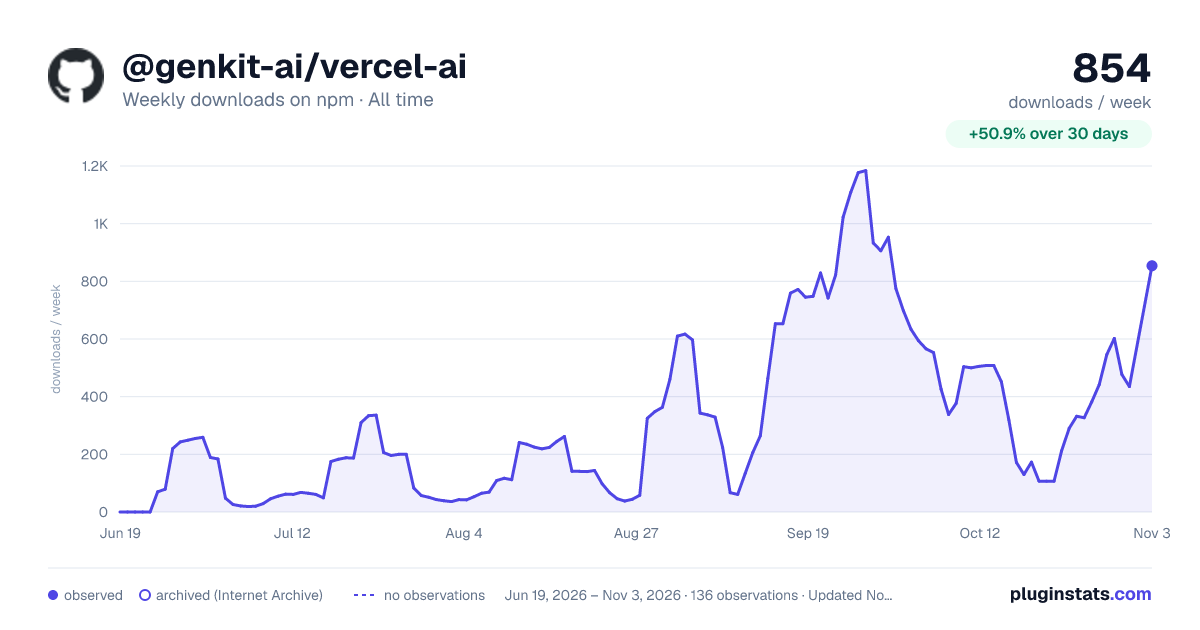

Adoption over time
7/30/90-day growth
Ranking history
Listing placement
Listing placement
Filled points are observed values; hollow points come from Internet Archive snapshots of the listing page. Dashed segments span periods with no observations — values between points are not interpolated.
Each band is one page of 20. Weekly downloads on a linear scale. Placement is projected from weekly downloads, so it can differ from the marketplace's own sort order. Hover a dot to see the listing.
Recent observations
Full history (122)Similar npm AI SDKs plugins
All 20 @genkit-ai/vercel-ai alternativesData source
Weekly downloads (trailing 7 complete days) come from the official npm downloads API. Downloads include CI and mirrors and are not equivalent to installs or users. npm publishes no ratings.
Listing: https://www.npmjs.com/package/@genkit-ai/vercel-ai. First seen Oct 16, 2026; last successful collection Oct 20, 2026. See the methodology.