 PluginStats
@cyanheads/mcp-ts-core weekly downloads statistics
By cyanheads · npm · MCP servers
Agent-native TypeScript framework for building MCP servers.
@cyanheads/mcp-ts-core has 10,331 recorded weekly downloads on npm, a decrease of 34.1% over the past 30 days, ranking #955 of 2,391 tracked listings.
About @cyanheads/mcp-ts-core






Quick start · Capabilities · API reference · Examples
</div>Build AI tools for anything you can describe
Connect an API, a dataset, or a workflow to an AI agent through the Model Context Protocol (MCP). Your project holds the domain code; @cyanheads/mcp-ts-core handles the auth, storage, logging, and transports underneath it.
Agent-native. Every scaffold ships the framework reference and a set of Agent Skills: workflows for designing tools, writing tests, reviewing security, and cutting releases. You decide what the server does; your agent follows the skills to build it.
The framework stays a dependency. Infrastructure fixes arrive as package upgrades. Run the maintenance skill and your agent bumps core, syncs the latest skills, and adopts what changed.
Quick start
Servers run on Bun, Node.js 24+, or Cloudflare Workers.
bunx @cyanheads/mcp-ts-core init my-mcp-server
cd my-mcp-server
bun install
The scaffold includes a source tree, build and test configuration, CLAUDE.md/AGENTS.md, Agent Skills, and plugin metadata for Claude Code and Codex. Open it in Claude Code, Codex, or another agent and describe what you want:
Build an MCP server for my team's inventory API. We need to find products, check stock across warehouses, investigate stock movements, and record adjustments and transfers. Let's get started.
Already have a TypeScript project? Run bun add @cyanheads/mcp-ts-core and register your definitions with createApp().
A tool is a schema and a function
This is a complete server that searches a three-item catalog. To try it, replace the scaffold's src/index.ts with it:
import { createApp, tool, z } from '@cyanheads/mcp-ts-core';

const catalog = ['Notebook', 'Mechanical pencil', 'Desk lamp'];

const search = tool('catalog_search', {
  description: 'Search catalog item names. An empty query lists all items.',
  annotations: { readOnlyHint: true },
  input: z.object({
    query: z.string().describe('Text to find in an item name'),
  }),
  output: z.object({
    items: z.array(z.string()).describe('Matching item names'),
  }),
  async handler({ query }) {
    return {
      items: catalog.filter((name) =>
        name.toLowerCase().includes(query.toLowerCase()),
      ),
    };
  },
});

await createApp({ name: 'catalog-mcp-server', title: 'catalog-mcp-server', tools: [search] });
Build and run it over HTTP:
bun run rebuild
bun run start:http
Point your MCP client at http://127.0.0.1:3010/mcp (Streamable HTTP), or have the client launch it over stdio with bun /absolute/path/to/dist/index.js.
What comes with it
| You need to… | The framework provides |
|---|---|
| Give an assistant useful capabilities | Typed builders for tools, resources, prompts, and interactive MCP Apps |
| Help an agent use those capabilities correctly | Server instructions, result enrichment, and declared errors with recovery guidance |
| Control access and keep state | JWT/OAuth, per-definition scopes, and tenant-scoped storage with swappable backends |
| Run locally or host a service | stdio and HTTP on Bun/Node.js; a separate entry point for Cloudflare Workers |
| Understand failures and catch mistakes | Structured logs, optional OpenTelemetry, definition linting, contract tests, and fuzz testing |
Optional integrations (DuckDB, Supabase, the OpenTelemetry SDK) are peer dependencies; install them when you need them.
Give agents useful results
Two declared contracts shape what an agent gets back. enrichment carries success-path context (totals, the parsed query, empty-result notices), populated with ctx.enrich(). errors lists each expected failure with its recovery guidance, and the handler throws one with the typed ctx.fail().
runSearch(query, limit) stands in for your search backend. It returns { items, total, parsed }, or null when the index is down:
import { createApp, tool, z } from '@cyanheads/mcp-ts-core';
import { JsonRpcErrorCode } from '@cyanheads/mcp-ts-core/errors';…
Description from the npm listing.
- agent
- agent-native
- ai
- ai-agent
- bun
- cloudflare-workers
- declarative
- framework
- mcp
- mcp-server
- mcp-framework
- model-context-protocol
- observability
- opentelemetry
- tools
- typescript
README badge
Show your rank in a README or on your website. The badge updates automatically.
Charts
Images: 30d · 1y · all time · 1600×900 dark


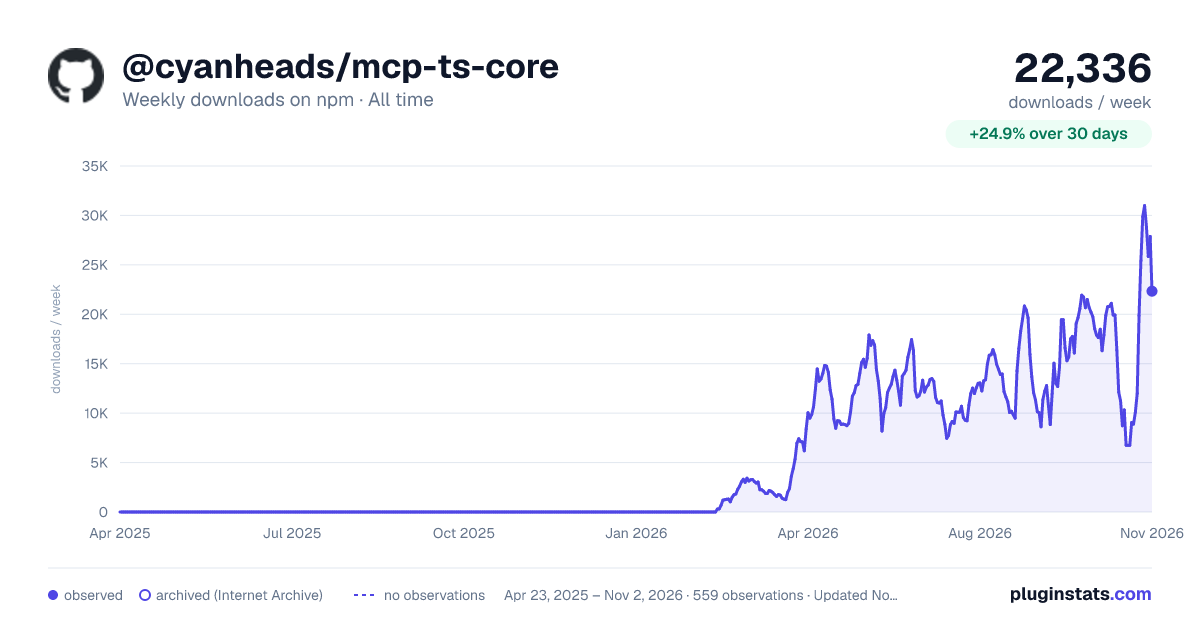

Adoption over time
7/30/90-day growth
Ranking history
Listing placement
Listing placement
Filled points are observed values; hollow points come from Internet Archive snapshots of the listing page. Dashed segments span periods with no observations — values between points are not interpolated.
Each band is one page of 20. Weekly downloads on a linear scale. Placement is projected from weekly downloads, so it can differ from the marketplace's own sort order. Hover a dot to see the listing.
Recent observations
Full history (544)Similar npm MCP servers plugins
All 20 @cyanheads/mcp-ts-core alternativesData source
Weekly downloads (trailing 7 complete days) come from the official npm downloads API. Downloads include CI and mirrors and are not equivalent to installs or users. npm publishes no ratings.
Listing: https://www.npmjs.com/package/@cyanheads/mcp-ts-core. First seen Oct 16, 2026; last successful collection Oct 21, 2026. See the methodology.