 PluginStats
@sergeychuvayev/claude-fleet weekly downloads statistics
By sergeychuvayev · npm · Claude Code
A local control room for Claude Code sessions
@sergeychuvayev/claude-fleet has 120 recorded weekly downloads on npm, a decrease of 75.6% over the past 30 days, ranking #1722 of 2,322 tracked listings.
About @sergeychuvayev/claude-fleet
Claude Fleet
A local control room for Claude Code.
See every Claude Code session on your machine, run agents and teams from one window, and plan your day around what needs you.
<img src="https://img.shields.io/badge/node-%E2%89%A522-2aa889?style=flat-square&labelColor=0c1014" alt="Node 22+"> <img src="https://img.shields.io/badge/binds-127.0.0.1-2aa889?style=flat-square&labelColor=0c1014" alt="Binds to localhost"> <img src="https://img.shields.io/badge/deps-5%20runtime-2aa889?style=flat-square&labelColor=0c1014" alt="Five runtime dependencies"> <img src="https://img.shields.io/badge/license-MIT-2aa889?style=flat-square&labelColor=0c1014" alt="MIT license"> <br> <br> <img src="docs/day-board.png" alt="The Today view in Fleet. The left side is the Day board with two items waiting on you, three proposals to triage and the items planned for today. The right side is the conversation with the Day agent. All names and data are demo data."> </div>What it does
Claude Code is happiest in a terminal, which is fine until you have six of them. Fleet gives that sprawl one window.
- Watch every session. Each row shows what a session is doing, which one failed, which one is close to running out of context, and which one has been waiting on you. Sessions you started in a terminal are watched read-only.
- Launch agents and talk to them. Start an agent from Fleet, then message it, approve its commands, interrupt it or resume it later.
- Hand bigger jobs to a team. A manager plans and delegates, roles implement, and an independent verifier checks the work before it counts as done.
- Plan your day. The Today tab keeps a board of what needs your attention from Slack, Linear, GitHub, meetings and your calendar, and works through it with you.
- Ask across everything. One search box answers questions over every transcript on your machine.
Everything runs on 127.0.0.1 against the Claude account already configured on your
machine. There is no service, no account, and no telemetry. Fleet never injects
keystrokes into a terminal and never kills a process it did not start.
Install and quick start
You need Node 22+ and a working claude on your PATH.
npm install -g @sergeychuvayev/claude-fleet
claude-fleet
That prints the URL it bound to and opens it. To try it without installing anything,
run npx @sergeychuvayev/claude-fleet.
Then:
- Open Sessions. Your running and recent Claude Code sessions are already there.
- Press New agent, pick a folder, write a task and send it. Pick a team instead of a single agent for bigger work.
- Open Today and press Start my day to build your board.
The user guide walks through each of these.
claude-fleet start        # no browser window
PORT=8080 claude-fleet    # pick a port
claude-fleet install-app  # put "Claude Fleet" in ~/Applications (macOS)
claude-fleet update       # install the latest published version
claude-fleet service on   # start Fleet at login and keep it running (macOS)
claude-fleet --help       # every command and variable
If port 7777 is taken, Fleet tries the next ten.
Fleet checks npm for a newer version a few times a day and shows a pill in the
top bar when there is one. Clicking it installs the update and reloads; nothing
is installed without that click. From a git checkout the pill tells you to
git pull instead of offering to overwrite your working copy.
git clone https://github.com/sergey-chuvayev/claude-fleet && cd claude-fleet
npm install
./start.sh
start.sh builds the web app into dist/ (npm run build:frontend, about a second)
and then runs the same entry point as the installed claude-fleet command, so both
prefer the claude already on your PATH over the one bundled with the SDK. Running
node bin/claude-fleet.js directly needs that build first; without it Fleet stops at
startup and says so.
Features in depth
The session list reads like a CI job
Each row is one session: its state, project, branch, context pressure, and the story of its latest turn. The strip of segments is one segment per tool call since your last message, coloured by the kind of work (grey for inspecting, accent for changing files, cyan for commands, violet for sub-agents) and red where a call failed, attributed by exact tool id rather than by name. Beside it, in words, is the step running now or the last step taken. On the right, how long the turn has been going.
Colour never carries meaning alone: every segment names its call on hover, and the row has a spoken summary such as "This turn: 4 inspecting, 2 changing files, 1 failed. Now: Bash Run the test suite."
| State | Meaning |
|---|---|
| Working | Marked busy by Claude |
| Waiting | Alive, waiting for input |
| Stale | Alive but untouched for over three days |
| Offline | Registry entry whose process has exited |
| In terminal | A Fleet conversation currently held by a terminal |
Context turns amber at 75% and red at 90%. A [1m] marker or observed usage
above 200k identifies a 1M context window.
Sessions a program started rather than a person (an SDK run, a plugin's worker, a
background indexer) are kept out of the main list and counted under a
Background filter. They are identified by a registry entrypoint other than
cli. The registry records no parent, so Fleet walks the process tree: when an
ancestor is another session, that session's row shows a ⑂ n badge and the
background row reads "via that session"; when the chain leads to a daemon
instead, the row names the program running it.…
Description from the npm listing.
- claude
- claude-code
- dashboard
- agents
- cli
- anthropic
README badge
Show your rank in a README or on your website. The badge updates automatically.
Charts
Images: 30d · 1y · all time · 1600×900 dark


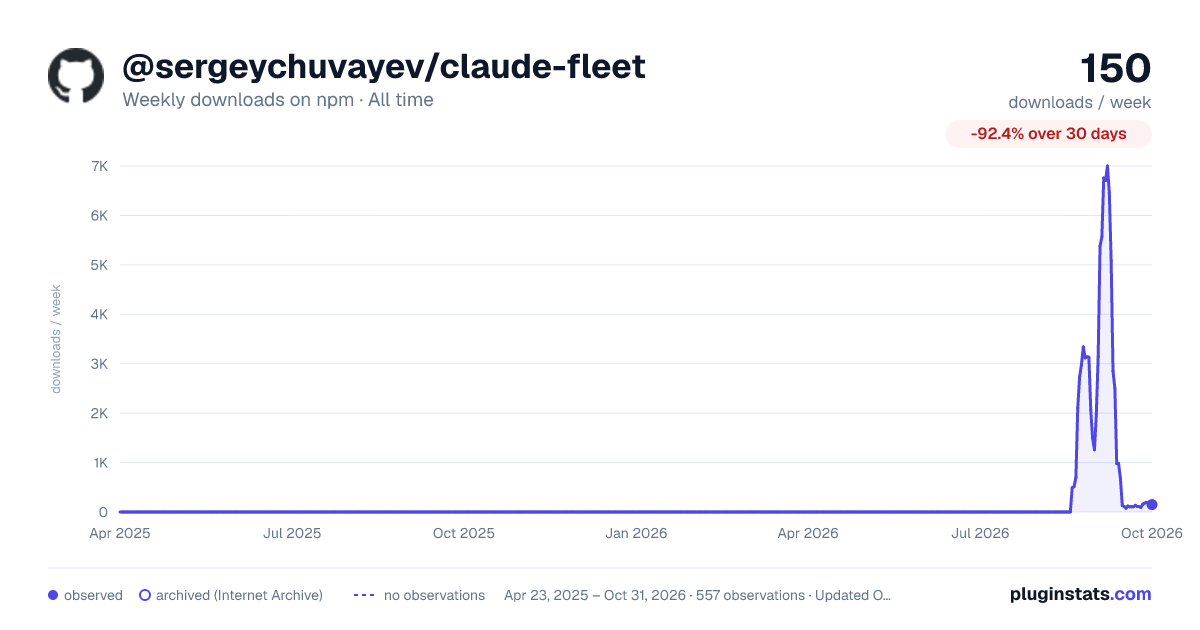

Adoption over time
7/30/90-day growth
Ranking history
Listing placement
Listing placement
Filled points are observed values; hollow points come from Internet Archive snapshots of the listing page. Dashed segments span periods with no observations — values between points are not interpolated.
Each band is one page of 20. Weekly downloads on a linear scale. Placement is projected from weekly downloads, so it can differ from the marketplace's own sort order. Hover a dot to see the listing.
Recent observations
Full history (544)Similar npm Claude Code plugins
All 20 @sergeychuvayev/claude-fleet alternatives- 89 weekly downloads-98.4%
Data source
Weekly downloads (trailing 7 complete days) come from the official npm downloads API. Downloads include CI and mirrors and are not equivalent to installs or users. npm publishes no ratings.
Listing: https://www.npmjs.com/package/@sergeychuvayev/claude-fleet. First seen Oct 16, 2026; last successful collection Oct 20, 2026. See the methodology.