 PluginStats
@julr/vite-plugin-validate-env weekly downloads statistics
By julr · npm · Vite plugins
✅ Vite plugin for validating your environment variables
@julr/vite-plugin-validate-env has 22,184 recorded weekly downloads on npm, a decrease of 41.6% over the past 30 days, ranking #765 of 2,322 tracked listings.
About @julr/vite-plugin-validate-env
vite-plugin-validate-env
A Vite plugin that validates your environment variables at build or dev time. This helps you catch misconfigurations early by failing fast. No more broken builds or 10 minutes of debugging just to realize you forgot a variable 🥲
✅ Features
- Validate environment variables at build time only, zero runtime overhead
- Fully type-safe
- Supports standard-schema — works with Zod, Valibot, ArkType, and more
- Built-in parsing, validation, and transformation
- Custom rules and error messages
Installation
pnpm add -D @julr/vite-plugin-validate-env
Basic Usage
You can use the plugin with the built-in validator for simple use cases, or with libraries like Zod for more advanced schemas.
[!TIP] I would recommend using a dedicated
env.tsfile to keep your Vite config clean and separate from your environment variable definitions. See the Using a Dedicatedenv.tsConfig File section for more details.
Built-in Validator
// vite.config.ts
import { defineConfig } from 'vite'
import { Schema, ValidateEnv } from '@julr/vite-plugin-validate-env'

export default defineConfig({
  plugins: [
    ValidateEnv({
      validator: 'builtin',
      schema: {
        VITE_MY_VAR: Schema.string(),
      },
    }),
  ],
})
Standard Schema Validators
If you want to use Zod or another validator compatible with standard-schema, pass the validator and schema manually:
import { defineConfig } from 'vite'
import { z } from 'zod'
import { ValidateEnv } from '@julr/vite-plugin-validate-env'

export default defineConfig({
  plugins: [
    ValidateEnv({
      validator: 'standard', // 👈
      schema: {
        VITE_MY_VAR: z.string(),
      },
    }),
  ],
})
Built-in Validator Examples
ValidateEnv({
  VITE_STRING: Schema.string(),
  VITE_NUMBER: Schema.number(),
  VITE_BOOLEAN: Schema.boolean(),
  VITE_ENUM: Schema.enum(['foo', 'bar'] as const),

  // Optional
  VITE_OPTIONAL: Schema.boolean.optional(),

  // With format and protocol checks
  VITE_API_URL: Schema.string({ format: 'url', protocol: true }),

  // With custom error message
  VITE_PORT: Schema.number({ message: 'You must set a port!' }),

  // Custom validator + transform function
  VITE_URL_SUFFIXED_WITH_SLASH: (key, value) => {
    if (!value) throw new Error(`Missing ${key}`)

    return value.endsWith('/') ? value : `${value}/`
  },
})
Using Standard Schema
standard-schema provides a common interface for multiple validation libraries.
Here’s how to use it with Zod, Valibot, or ArkType, or any other library that supports it.
import { defineConfig } from '@julr/vite-plugin-validate-env'
import { z } from 'zod'
import * as v from 'valibot'
import { type } from 'arktype'

export default defineConfig({
  validator: 'standard',
  schema: {
    VITE_ZOD_VAR: z.string(),
    VITE_VALIBOT_VAR: v.string(),
    VITE_ARKTYPE_VAR: type.string(),
  },
})
Using a Dedicated env.ts Config File
You can move your env definitions to a separate file like this:
// vite.config.ts
import { defineConfig } from 'vite'
import { ValidateEnv } from '@julr/vite-plugin-validate-env'

export default defineConfig({
  plugins: [
    ValidateEnv({
      // Optional: you can specify a custom path for the config file
      configFile: 'config/env',
    }),
  ],
})
// env.ts
import { defineConfig, Schema } from '@julr/vite-plugin-validate-env'

export default defineConfig({
  validator: 'builtin',
  schema: {
    VITE_MY_VAR: Schema.enum(['foo', 'bar'] as const),
  },
})
Typing import.meta.env
In order to have a type-safe import.meta.env, the ideal is to use the dedicated configuration file env.ts.
Once this is done, you would only need to add an vite-env.d.ts in src/ folder to augment ImportMetaEnv (as suggested here ) with the following content:
/// <reference types="vite/client" />

type ImportMetaEnvAugmented = import('@julr/vite-plugin-validate-env').ImportMetaEnvAugmented<
  typeof import('../env').default
>

interface ViteTypeOptions {
  // Avoid adding an index type to `ImportMetaDev` so
  // there's an error when accessing unknown properties.
  // ⚠️ This option requires Vite 6.3.x or higher
  strictImportMetaEnv: unknown
}

interface ImportMetaEnv extends ImportMetaEnvAugmented {
  // Now import.meta.env is totally type-safe and based on your `env.ts` schema definition
  // You can also add custom variables that are not defined in your schema
}
Validation without Vite
In some cases, you might want to validate environment variables outside of Vite and reuse the same schema. You can do so by using the loadAndValidateEnv function directly. This function will validate and also load the environment variables inside the process.env object.
[!WARNING]
process.envonly accept string values, so don't be surprised if anumberorbooleanvariable comes back as a string when accessing it after validation.
import { loadAndValidateEnv } from '@julr/vite-plugin-validate-env'

const env = await loadAndValidateEnv(
  {
    mode: 'development', // required
    root: import.meta.dirname, // optional
  },
  {
    // Plugin options. Also optional if you
    // are using a dedicated `env.ts` file
    validator: 'builtin',
    schema: { VITE_MY_VAR: Schema.string() },
  },
)

console.log(env.VITE_MY_VAR)
console.log(process.env.VITE_MY_VAR)
💖 Sponsors…
Description from the npm listing.
- env
- env-var
- validation
- vite
- vite-plugin
- zod
README badge
Show your rank in a README or on your website. The badge updates automatically.
Charts
Images: 30d · 1y · all time · 1600×900 dark


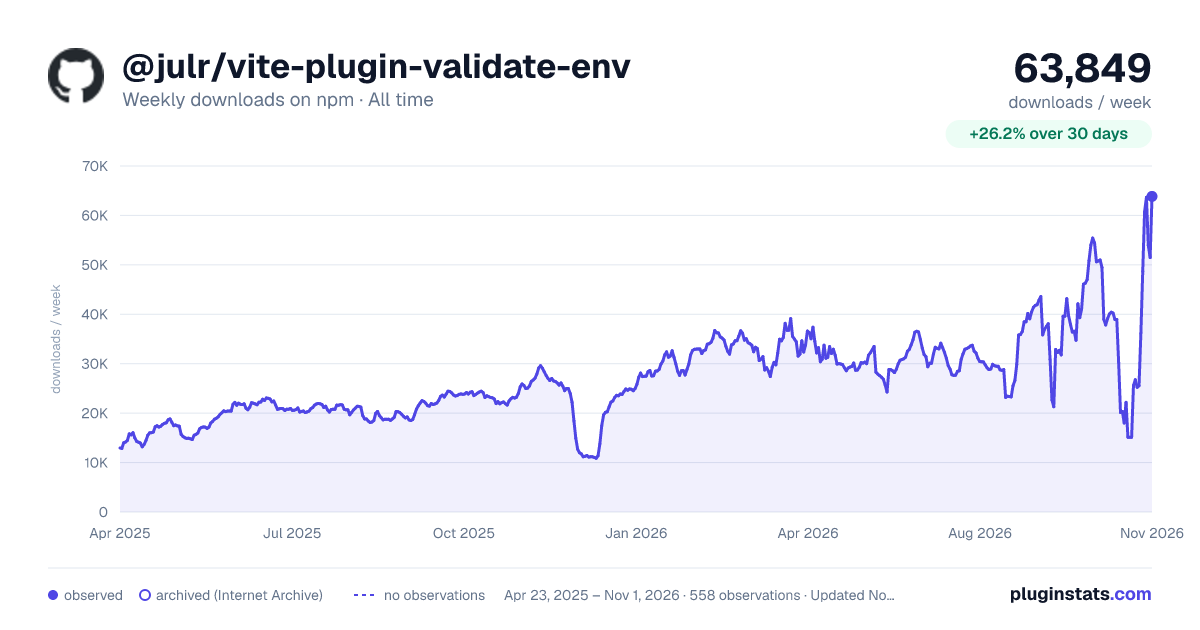

Adoption over time
7/30/90-day growth
Ranking history
Listing placement
Listing placement
Filled points are observed values; hollow points come from Internet Archive snapshots of the listing page. Dashed segments span periods with no observations — values between points are not interpolated.
Each band is one page of 20. Weekly downloads on a linear scale. Placement is projected from weekly downloads, so it can differ from the marketplace's own sort order. Hover a dot to see the listing.
Recent observations
Full history (544)Similar npm Vite plugins plugins
All 20 @julr/vite-plugin-validate-env alternatives- 22.3K weekly downloads-28.0%
- 22.4K weekly downloads-51.4%
- 23.1K weekly downloads-2.4%
Data source
Weekly downloads (trailing 7 complete days) come from the official npm downloads API. Downloads include CI and mirrors and are not equivalent to installs or users. npm publishes no ratings.
Listing: https://www.npmjs.com/package/@julr/vite-plugin-validate-env. First seen Oct 16, 2026; last successful collection Oct 20, 2026. See the methodology.