 PluginStats
elysia-mcp weekly downloads statistics
By kerlos · npm · MCP servers
ElysiaJS plugin for Model Context Protocol with HTTP transport and stateful sessions
elysia-mcp has 14,719 recorded weekly downloads on npm, ranking #1091 of 2,762 tracked listings.
About elysia-mcp
Elysia MCP Plugin
A comprehensive ElysiaJS plugin for implementing Model Context Protocol (MCP) servers with HTTP transport support.
Features
- HTTP Transport: Full HTTP-based MCP transport with Streamable HTTP
- Session Management: Stateful session handling via headers
- Type-Safe: Built with TypeScript and Zod validation
- Easy Integration: Simple plugin architecture for Elysia apps
- Comprehensive Support: Tools, Resources, Prompts, and Logging
- Custom Logger Support: Use any logger (pino, winston, bunyan, etc.)
- Error Handling: Proper JSON-RPC 2.0 error responses
- Testing: Full unit test coverage with Bun test runner
Installation
bun add elysia-mcp
# or
npm install elysia-mcp
Starter Template
To quickly get started with a pre-configured Elysia MCP project, you can use our starter template:
# Create a new project from the starter template
bun create https://github.com/kerlos/elysia-mcp-starter my-mcp-project

# Navigate to the project
cd my-mcp-project

# Install dependencies
bun install

# Start development server
bun run dev
The elysia-mcp-starter template includes:
- Pre-configured Elysia setup with MCP plugin
- TypeScript configuration
- Development scripts
- Basic project structure
- Example MCP server implementation
Quick Start
import { Elysia } from 'elysia';
import { mcp } from 'elysia-mcp';
import { McpServer } from '@modelcontextprotocol/sdk/server/mcp.js';
import { z } from 'zod';

const app = new Elysia()
  .use(
    mcp({
      serverInfo: {
        name: 'my-mcp-server',
        version: '1.0.0',
      },
      capabilities: {
        tools: {},
        resources: {},
        prompts: {},
        logging: {},
      },
      setupServer: async (server: McpServer) => {
        // Register your MCP tools, resources, and prompts here
        server.registerTool(
          'echo',
          {
            description: 'Echoes back the provided text',
            inputSchema: {
              text: z.string().describe('Text to echo back'),
            },
          },
          async (args) => {
            return {
              content: [{ type: 'text', text: `Echo: ${args.text}` }],
            };
          }
        );
      },
    })
  )
  .listen(3000);
Usage
Running the Examples
Basic Example:
# Run the basic example server (port 3000)
bun run example

# Or with development mode (auto-restart)
bun run dev
Multiple Servers Example:
# Run the multiple MCP servers example (port 3000)
bun example:multi
This example demonstrates how to create multiple MCP plugins in a single Elysia application:
-
Math Operations Plugin (
/math) - Basic arithmetic tools:add- Add two numbersmultiply- Multiply two numberspower- Calculate base to the power of exponent
-
Text Utilities Plugin (
/text) - Text processing tools:uppercase- Convert text to uppercaseword_count- Count words in textreverse- Reverse text charactersreplace- Replace text with global matching
Testing with MCP Inspector
-
Install MCP Inspector:
npx @modelcontextprotocol/inspector -
Connect to your server:
- Basic Example:
http://localhost:3000/mcp - Multiple Servers Example:
- Math Plugin:
http://localhost:3000/math - Text Plugin:
http://localhost:3000/text
- Math Plugin:
- Basic Example:
Configuration Options
serverInfo: Server informationcapabilities: MCP capabilities to advertiselogger: Custom logger instance (pino, winston, etc.) - see Custom Logger sectionsetupServer: Callback to register tools, resources, and promptsbasePath: Base path for MCP endpoints (default: '/mcp')enableJsonResponse: Enable JSON response mode instead of SSE streamingstateless: Enable stateless mode (no session management)authentication: Authentication handler for protected routeseventStore: Event store for resumability support
Session Management
The plugin automatically handles session management via the Mcp-Session-Id
header. Each session maintains its own state and can be terminated cleanly.
Modular Handler Architecture
The plugin supports a modular handler architecture that allows you to create specialized endpoints for different MCP capabilities:
import {
  mcp,
  ToolsHandler,
  ResourcesHandler,
  PromptsHandler,
} from 'elysia-mcp';

const app = new Elysia().use(
  mcp({
    /* config */
  })
);
Custom Logger
The plugin supports custom logger instances, allowing you to use any logging library that conforms to the ILogger interface:
interface ILogger {
  info(message: string, ...args: unknown[]): void;
  error(message: string, ...args: unknown[]): void;
  warn(message: string, ...args: unknown[]): void;
  debug(message: string, ...args: unknown[]): void;
}
Using Pino Logger
import { Elysia } from 'elysia';
import { mcp } from 'elysia-mcp';
import pino from 'pino';

const logger = pino({ level: 'debug' });

const app = new Elysia()
  .use(
    mcp({
      logger, // Pass your custom logger
      serverInfo: {
        name: 'my-mcp-server',
        version: '1.0.0',
      },
      // ... other options
    })
  )
  .listen(3000);
Using Winston Logger
import winston from 'winston';

const logger = winston.createLogger({
  level: 'debug',
  format: winston.format.json(),
  transports: [new winston.transports.Console()],
});

const app = new Elysia()
  .use(
    mcp({
      logger, // Pass your winston logger
      // ... other options
    })
  )
  .listen(3000);
Default Console Logger
If you don't provide a custom logger, the plugin will use a default console logger when enableLogging is set to true:…
Description from the npm listing.
- elysia
- mcp
- model-context-protocol
- http
- streaming
- json-rpc
- typescript
- plugin
README badge
Show your rank in a README or on your website. The badge updates automatically.
Charts
Images: 30d · 1y · all time · 1600×900 dark


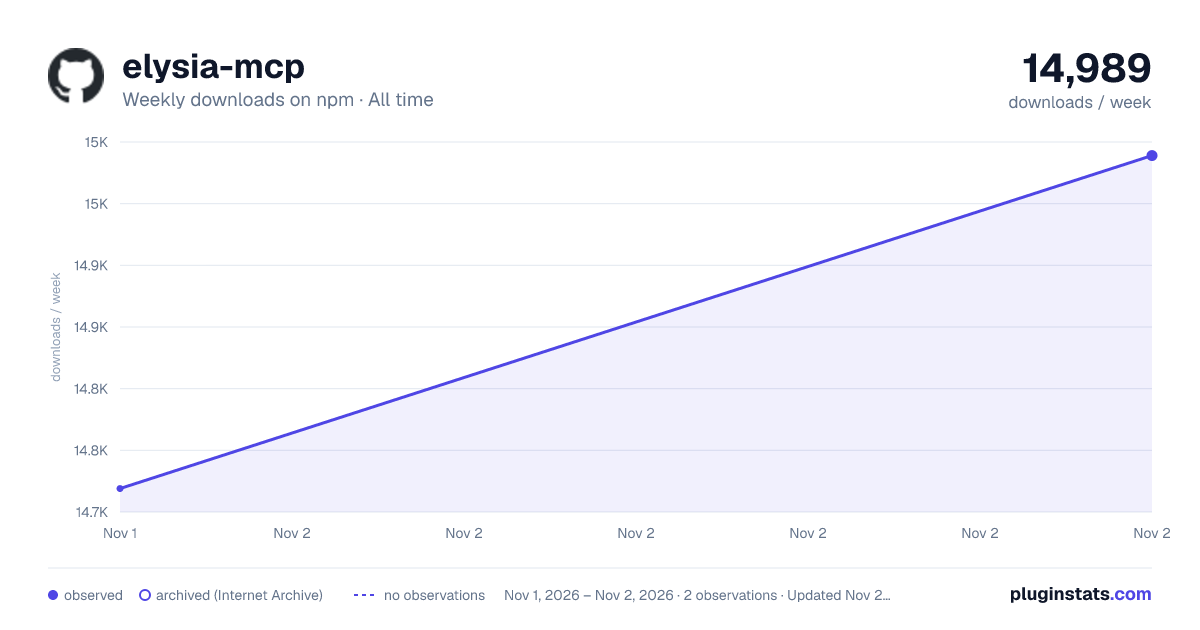

Adoption over time
7/30/90-day growth
Ranking history
Listing placement
Listing placement
Filled points are observed values; hollow points come from Internet Archive snapshots of the listing page. Dashed segments span periods with no observations — values between points are not interpolated.
Each band is one page of 20. Weekly downloads on a linear scale. Placement is projected from weekly downloads, so it can differ from the marketplace's own sort order. Hover a dot to see the listing.
Recent observations
Full history (1)Similar npm MCP servers plugins
All 20 elysia-mcp alternativesData source
Weekly downloads (trailing 7 complete days) come from the official npm downloads API. Downloads include CI and mirrors and are not equivalent to installs or users. npm publishes no ratings.
Listing: https://www.npmjs.com/package/elysia-mcp. First seen Nov 3, 2026; last successful collection Nov 3, 2026. See the methodology.