 PluginStats
@translated/lara-mcp weekly downloads statistics
By translated (2 listings) · npm · MCP servers
Lara API official MCP server
@translated/lara-mcp has 613 recorded weekly downloads on npm, ranking #1475 of 2,644 tracked listings.
About @translated/lara-mcp
Lara Translate MCP Server
A Model Context Protocol (MCP) server for Lara Translate, enabling professional translation capabilities with support for language detection, context-aware translations, translation memories, and glossaries.
Lara leverages Translation Language Models (T-LMs) trained on billions of professionally translated segments, delivering domain-specific translations that capture cultural nuances and industry terminology that general-purpose LLMs often miss.



Quick Start
Pick your client below — no API keys needed, just log in through your browser.
Claude Desktop
- Go to Settings > Connectors
- Click Add Custom Connector
- Enter the name:
Lara - Enter the URL:
https://mcp-v2.laratranslate.com/v1 - Click Add, then click Connect
- Log in with your Lara Translate credentials in the browser
Done — Lara Translate is now available in your conversations.
Cursor
Once Lara Translate is listed in the official Cursor plugin marketplace, install it from inside Cursor:
- Open the plugin browser and search for Lara Translate.
- Click Install.
- The first time you use a Lara tool, your browser will open to authenticate.
In the meantime, or for manual installation, see the Client Setup Guide.
Claude Code
Once Lara Translate is listed in the official Claude Code plugin marketplace, install it from inside Claude Code:
/plugin
Search for Lara Translate and install. The first time you use a Lara tool, your browser will open to authenticate.
In the meantime, or for manual installation, see the Client Setup Guide.
Other Clients
For step-by-step OAuth setup on VS Code (GitHub Copilot), Windsurf, Cline, Continue, and more, see the Client Setup Guide.
If your client isn't listed, the general approach is to add the server URL (https://mcp-v2.laratranslate.com/v1) to your MCP config — the client will handle OAuth authentication automatically.
For a complete list of MCP-compatible clients, visit the official MCP clients page.
Verify It Works
After setup, test with a simple prompt:
Translate with Lara "Hello world" to Spanish
Your client should invoke Lara Translate and return the translation.
Available Tools
Translation
| Tool | Description |
|---|---|
translate | Translate text between languages with support for context, instructions, translation memories, glossaries, and multiple styles (faithful/fluid/creative) |
Language Detection
| Tool | Description |
|---|---|
detect_language | Detect the language of a given text or array of texts |
list_languages | List all supported language codes |
Translation Memories
| Tool | Description |
|---|---|
list_memories | List all translation memories in your account |
create_memory | Create a new translation memory |
update_memory | Update a translation memory's name |
delete_memory | Delete a translation memory |
add_translation | Add a translation unit (source + target pair) to a memory |
delete_translation | Delete a translation unit from a memory |
import_tmx | Import a TMX file into a memory |
check_import_status | Check the status of a TMX import job |
Glossaries
| Tool | Description |
|---|---|
list_glossaries | List all glossaries in your account |
get_glossary | Get details of a specific glossary |
create_glossary | Create a new glossary |
update_glossary | Update a glossary's name |
delete_glossary | Delete a glossary |
add_glossary_entry | Add or replace a term entry in a glossary |
delete_glossary_entry | Delete a term entry from a glossary |
import_glossary_csv | Import entries from a CSV file into a glossary |
check_glossary_import_status | Check the status of a glossary CSV import job |
export_glossary | Export a glossary as CSV |
get_glossary_counts | Get the number of entries in a glossary |
Authentication
OAuth 2.0 (default)
This is the method used in the Quick Start above. You provide only the server URL in your client config — no API keys needed. Your client handles the OAuth flow automatically: it opens your browser, you log in with your Lara Translate credentials, and you're connected.
For per-client OAuth setup instructions, see the Client Setup Guide.
Access Key (alternative)
If you prefer to authenticate with API keys instead of browser login, you can pass your credentials directly in the client config. Get your Access Key ID and Secret from Lara Translate.
See the Access Key section in the Client Setup Guide for config examples.
Self-Hosting
Most users can connect to the hosted endpoint (https://mcp-v2.laratranslate.com/v1) using the Quick Start instructions above. The options below are for running the server yourself.
STDIO via NPX
Requires Node.js.…
Description from the npm listing.
- mcp
- mcpserver
- laratranslate
- lara
- translate
- translation
- ai
- translated
README badge
Show your rank in a README or on your website. The badge updates automatically.
Charts
Images: 30d · 1y · all time · 1600×900 dark


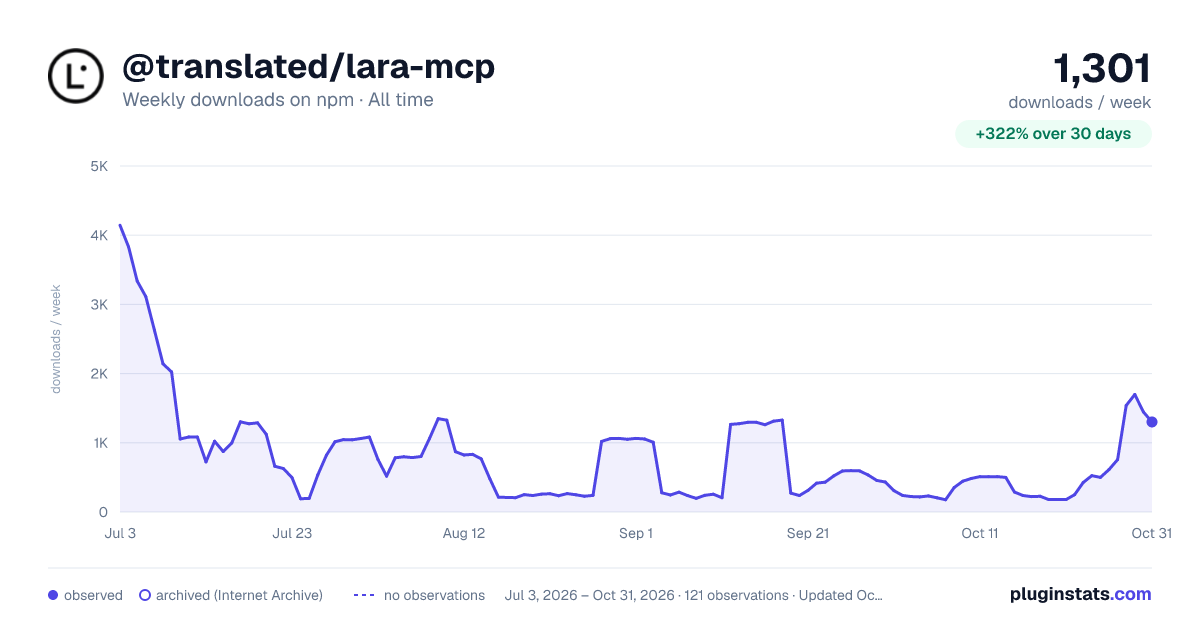

Adoption over time
7/30/90-day growth
Ranking history
Listing placement
Listing placement
Filled points are observed values; hollow points come from Internet Archive snapshots of the listing page. Dashed segments span periods with no observations — values between points are not interpolated.
Each band is one page of 20. Weekly downloads on a linear scale. Placement is projected from weekly downloads, so it can differ from the marketplace's own sort order. Hover a dot to see the listing.
Recent observations
Full history (1)Similar npm MCP servers plugins
All 20 @translated/lara-mcp alternativesData source
Weekly downloads (trailing 7 complete days) come from the official npm downloads API. Downloads include CI and mirrors and are not equivalent to installs or users. npm publishes no ratings.
Listing: https://www.npmjs.com/package/@translated/lara-mcp. First seen Oct 28, 2026; last successful collection Oct 28, 2026. See the methodology.