 PluginStats
@pitlane/assets weekly downloads statistics
By pitlane (3 listings) · npm · Vite plugins
Framework-neutral asset resolution for bundled applications.
@pitlane/assets has 19,131 recorded weekly downloads on npm, ranking #1000 of 2,687 tracked listings.
About @pitlane/assets
@pitlane/assets
Framework-neutral asset resolution for server-rendered apps built with Vite or another bundler.
A server-rendered page has to name its browser entry script, its stylesheets, modulepreload hints, and the chunks of the islands it hydrates. Those URLs differ between vite dev and a production build. This package resolves source paths such as app/entry.browser.ts to the URLs the current dev server or build produced, through a resolver you construct from a manifest. The runtime imports no framework and no bundler. Its methods match the asset server from remix/assets, so it can be passed to Remix's render({ assets }). React, Preact, Vue, and plain HTML renderers use the returned strings directly.
npm install @pitlane/assets
Requires Node ^20.19.0 || >=22.12.0. Install it as a runtime dependency, since application code imports the resolver. vite 8.1 or newer is an optional peer dependency, needed only for @pitlane/assets/vite-plugin.
| Entry point | Contents |
|---|---|
@pitlane/assets | createAssetResolver, renderImportMap, and the manifest types |
@pitlane/assets/manifest | The manifest a build integration supplies |
@pitlane/assets/build | createAssetManifest, for integrations with other bundlers |
@pitlane/assets/vite-plugin | assets(), the Vite integration |
Usage
Add the plugin to your Vite config:
// vite.config.ts
import { assets } from "@pitlane/assets/vite-plugin";
import { defineConfig } from "vite";

export default defineConfig({
    plugins: [assets()],
});
Construct the resolver once, from the manifest the plugin supplies:
// app/assets.ts
import { createAssetResolver } from "@pitlane/assets";
import manifest from "@pitlane/assets/manifest";

export let assets = createAssetResolver(manifest);

export let scriptEntry = await assets.getScriptEntry("app/entry.browser.ts");
export let stylesheets = await assets.getStylesheets("app/entry.server.ts");
scriptEntry is { href, preloads, importMap }: the entry's URL, its chunk and static JavaScript dependencies for modulepreload links, and the client import map. Under vite dev, href is the dev URL, preloads is empty, and the map is { imports: {} }.
Keys are paths from the project root. ./app/x.ts, /app/x.ts, file:app/x.ts, and app/x.ts#Export all name app/x.ts, and a module outside the root keeps its leading ../. A string literal passed to a resolver's getScriptEntry or getHref in server code registers that module as a browser input: a script entry for getScriptEntry, an emitted asset for getHref. The receiver must be the result of createAssetResolver() imported from @pitlane/assets or pitlane/assets, a top-level variable holding one, or such a variable copied, imported, renamed, re-exported (including through export *), or default-exported from another module. Each such name must be declared only once in its module. A namespace import, a function parameter, this, another object's same-named method, a same-named function from another module, or a resolver imported from a dependency Vite externalizes registers nothing. List computed paths, and keys called through those receivers, in assets({ include: [...] }).
| Method | Returns |
|---|---|
getScriptEntry(key) | { href, preloads, importMap } for a browser entry |
getHref(key) | The URL of a browser entry, stylesheet, or other asset |
getPreloads(key | key[]) | modulepreload URLs for scripts, and the URL of an explicitly requested stylesheet |
getStylesheets(key | key[]) | Stylesheets the modules need, from the client graph and the current server graph |
getImportMap(key | key[]) | The complete client import map |
Looking up a module's stylesheets never compiles it for the browser, so getStylesheets("app/entry.server.ts") is safe for server code.
Chunk import maps
Off by default. assets({ chunkImportMap: true }) enables Vite's chunk import maps for the client build, so a dependency's new hash changes one map entry instead of every importing chunk. Deliver the map before any modulepreload link or module script. renderImportMap({ value, nonce }) returns it as a <script type="importmap"> string, with every < escaped so the map cannot close the element, or "" when the map is empty:
import { renderImportMap } from "@pitlane/assets";

let html = renderImportMap({ value: scriptEntry.importMap });
The option requires browser support for import maps and import.meta.resolve, and cannot be combined with Vite's experimental.renderBuiltUrl.
Without Vite
As published, @pitlane/assets/manifest exports { mode: "unavailable" }. A resolver built from it constructs normally and rejects every lookup with instructions for supplying a manifest, so tests and type checkers can import your app/assets.ts.
Other bundlers produce a manifest with createAssetManifest(build) from @pitlane/assets/build. It takes a normalized description of the emitted chunks, their modules, static and dynamic imports, and stylesheets, and computes preloads, stylesheet lists, and public URLs:
import { createAssetManifest } from "@pitlane/assets/build";
import { createAssetResolver } from "@pitlane/assets";…
Description from the npm listing.
- assets
- import-map
- manifest
- modulepreload
- pitlane
- vite
- vite-plugin
README badge
Show your rank in a README or on your website. The badge updates automatically.
Charts
Images: 30d · 1y · all time · 1600×900 dark


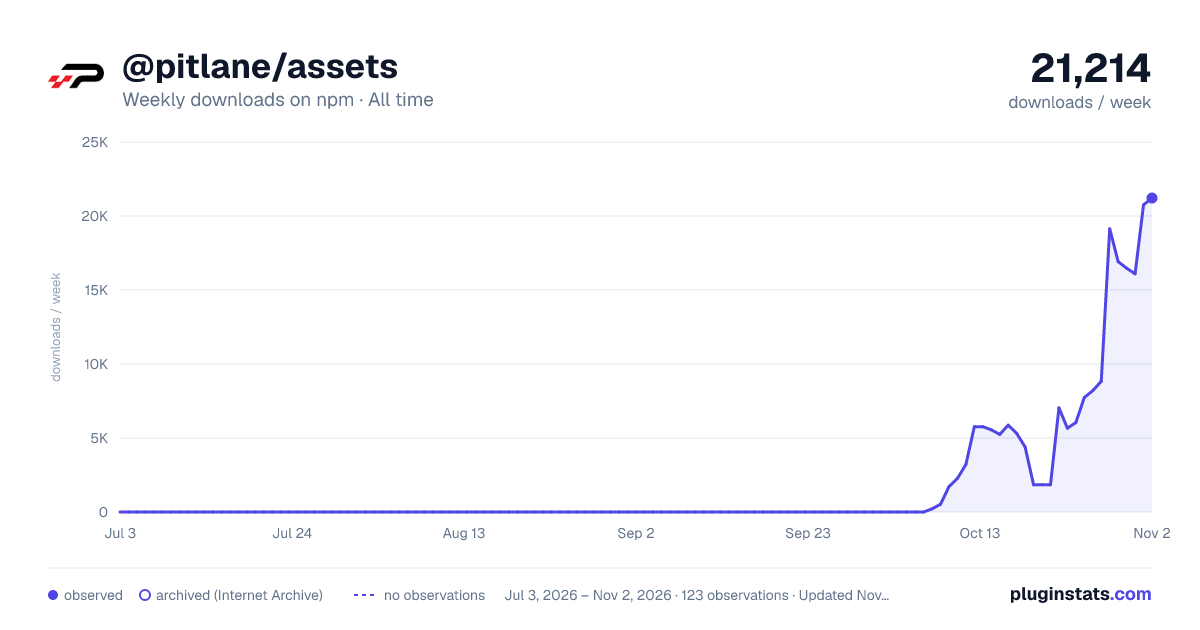

Adoption over time
7/30/90-day growth
Ranking history
Listing placement
Listing placement
Filled points are observed values; hollow points come from Internet Archive snapshots of the listing page. Dashed segments span periods with no observations — values between points are not interpolated.
Each band is one page of 20. Weekly downloads on a linear scale. Placement is projected from weekly downloads, so it can differ from the marketplace's own sort order. Hover a dot to see the listing.
Recent observations
Full history (1)Similar npm Vite plugins plugins
All 20 @pitlane/assets alternativesData source
Weekly downloads (trailing 7 complete days) come from the official npm downloads API. Downloads include CI and mirrors and are not equivalent to installs or users. npm publishes no ratings.
Listing: https://www.npmjs.com/package/@pitlane/assets. First seen Oct 30, 2026; last successful collection Oct 30, 2026. See the methodology.