 PluginStats
@google-cloud/cloud-run-mcp weekly downloads statistics
By google-cloud (6 listings) · npm · MCP servers
Cloud Run MCP deployment tool
@google-cloud/cloud-run-mcp has 3,153 recorded weekly downloads on npm, ranking #1254 of 2,391 tracked listings.
About @google-cloud/cloud-run-mcp
Cloud Run MCP server and Gemini CLI extension
Enable MCP-compatible AI agents to deploy apps to Cloud Run.
"mcpServers":{
  "cloud-run": {
    "command": "npx",
    "args": ["-y", "@google-cloud/cloud-run-mcp"]
  }
}
Deploy from Gemini CLI and other AI-powered CLI agents:
<img src="https://raw.githubusercontent.com/GoogleCloudPlatform/cloud-run-mcp/refs/heads/main/.github/images/deploycli.gif" width="800">Deploy from AI-powered IDEs:
<img src="https://raw.githubusercontent.com/GoogleCloudPlatform/cloud-run-mcp/refs/heads/main/.github/images/deploy_from_ide.gif" width="800">Deploy from AI assistant apps:
<img src="https://raw.githubusercontent.com/GoogleCloudPlatform/cloud-run-mcp/refs/heads/main/.github/images/deploy_from_apps.gif" width="800">Deploy from agent SDKs, like the Google Gen AI SDK or Agent Development Kit.
[!NOTE]
This is the repository of an MCP server to deploy code to Cloud Run, to learn how to host MCP servers on Cloud Run, visit the Cloud Run documentation.
Tools
-
deploy-file-contents: Deploys files to Cloud Run by providing their contents directly. -
list-services: Lists Cloud Run services in a given project and region. -
get-service: Gets details for a specific Cloud Run service. -
get-service-log: Gets Logs and Error Messages for a specific Cloud Run service. -
deploy-local-folder*: Deploys a local folder to a Google Cloud Run service. -
list-projects*: Lists available GCP projects. -
create-project*: Creates a new GCP project and attach it to the first available billing account. A project ID can be optionally specified.
* only available when running locally
Prompts
Prompts are natural language commands that can be used to perform common tasks. They are shortcuts for executing tool calls with pre-filled arguments.
deploy: Deploys the current working directory to Cloud Run. If a service name is not provided, it will use theDEFAULT_SERVICE_NAMEenvironment variable, or the name of the current working directory.logs: Gets the logs for a Cloud Run service. If a service name is not provided, it will use theDEFAULT_SERVICE_NAMEenvironment variable, or the name of the current working directory.
Environment Variables
The Cloud Run MCP server can be configured using the following environment variables:
| Variable | Description |
|---|---|
GOOGLE_CLOUD_PROJECT | The default project ID to use for Cloud Run services. |
GOOGLE_CLOUD_REGION | The default region to use for Cloud Run services. |
DEFAULT_SERVICE_NAME | The default service name to use for Cloud Run services. |
SKIP_IAM_CHECK | Controls whether to check for IAM permissions for a Cloud Run service. Set to false to enable checks. This is true by default which is a recommended way to make the service public. |
ENABLE_HOST_VALIDATION | Prevents DNS Rebinding attacks by validating the Host header. This is disabled by default. |
ALLOWED_HOSTS | Comma-separated list of allowed Host headers (if host validation is enabled). The default value is localhost,127.0.0.1,::1. |
Use as a Gemini CLI extension
To install this as a Gemini CLI extension, run the following command:
-
Install the extension:
gemini extensions install https://github.com/GoogleCloudPlatform/cloud-run-mcp -
Log in to your Google Cloud account using the command:
gcloud auth login -
Set up application credentials using the command:
gcloud auth application-default login
Use in MCP Clients
Learn how to configure your MCP client
Most MCP clients require a configuration file to be created or modified to add the MCP server.
The configuration file syntax can be different across clients. Please refer to the following links for the latest expected syntax:
Once you have identified how to configure your MCP client, select one of these two options to set up the MCP server. We recommend setting up as a local MCP server using Node.js.
Set up as local MCP server
Run the Cloud Run MCP server on your local machine using local Google Cloud credentials. This is best if you are using an AI-assisted IDE (e.g. Cursor) or a desktop AI application (e.g. Claude).
-
Install the Google Cloud SDK and authenticate with your Google account.
-
Log in to your Google Cloud account using the command:…
Description from the npm listing.
- mcp
- cloud-run
- gcp
README badge
Show your rank in a README or on your website. The badge updates automatically.
Charts
Images: 30d · 1y · all time · 1600×900 dark


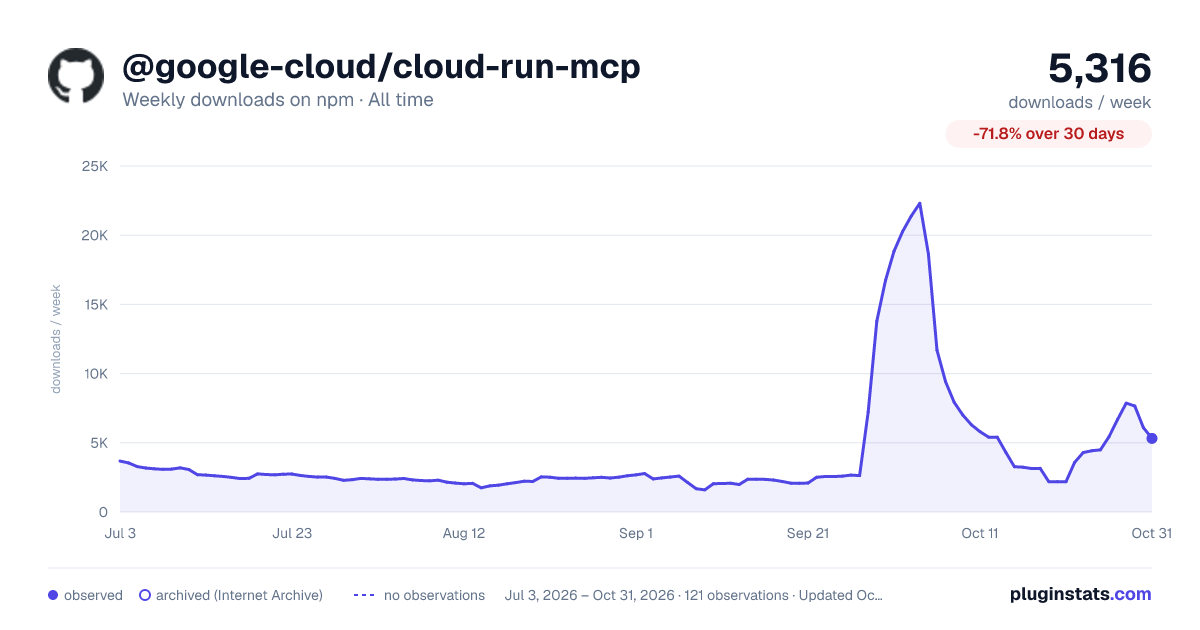

Adoption over time
7/30/90-day growth
Ranking history
Listing placement
Listing placement
Filled points are observed values; hollow points come from Internet Archive snapshots of the listing page. Dashed segments span periods with no observations — values between points are not interpolated.
Each band is one page of 20. Weekly downloads on a linear scale. Placement is projected from weekly downloads, so it can differ from the marketplace's own sort order. Hover a dot to see the listing.
Recent observations
Full history (1)Similar npm MCP servers plugins
All 20 @google-cloud/cloud-run-mcp alternativesData source
Weekly downloads (trailing 7 complete days) come from the official npm downloads API. Downloads include CI and mirrors and are not equivalent to installs or users. npm publishes no ratings.
Listing: https://www.npmjs.com/package/@google-cloud/cloud-run-mcp. First seen Oct 21, 2026; last successful collection Oct 21, 2026. See the methodology.