 PluginStats
mcp-accessibility-scanner weekly downloads statistics
By JustasMonkev · npm · MCP servers
A Model Context Protocol (MCP) server for performing automated accessibility scans of web pages using Playwright and Axe-core
mcp-accessibility-scanner has 1,053 recorded weekly downloads on npm.
About mcp-accessibility-scanner
MCP Accessibility Scanner 🔍
Accessibility checks inside your coding agent: axe scans, keyboard-focus checks and repeatable reports.
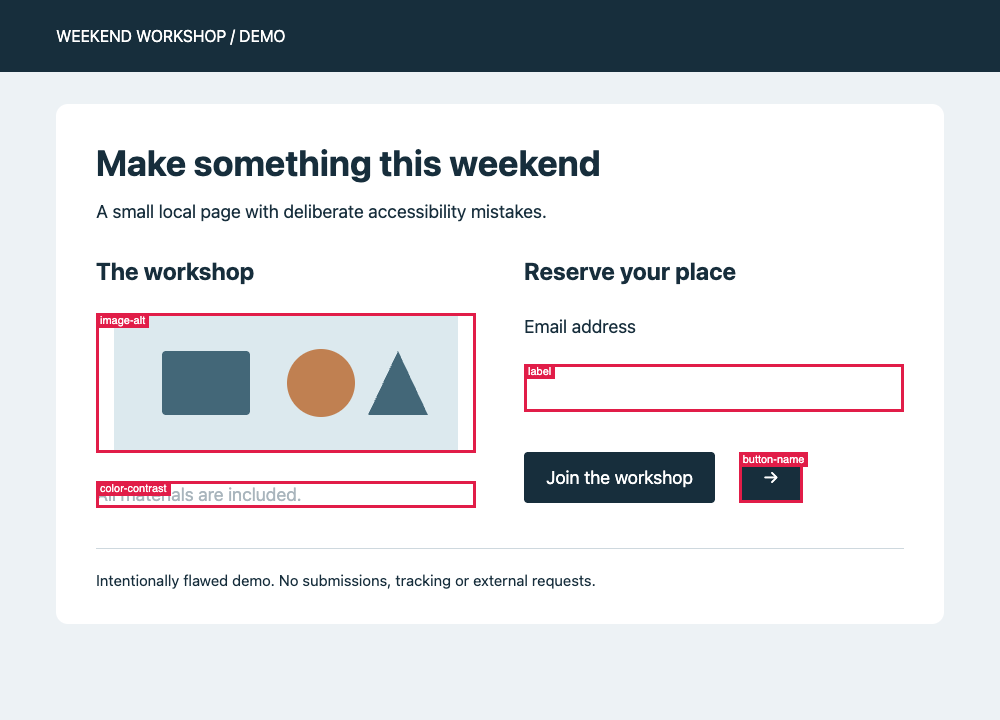
An intentionally flawed local demo page, checked with automated tools. These annotations were generated by scan_page with annotateScreenshot: true, not added by hand.
This MCP server lets your coding agent inspect a page, run axe checks, exercise keyboard focus and save findings for review. Automated checks don't certify WCAG compliance; manual accessibility testing is still needed. audit_screen_reader inspects the browser's accessibility tree, accessible names and element geometry. It does not test with an actual screen reader.
Quickstart: connect your coding agent
Install Google Chrome before the first audit. The configuration below uses system Chrome; installing the npm package does not install a browser. See browser configuration for alternatives.
Install the scanner:
npm install -g mcp-accessibility-scanner --allow-scripts=re2
The flag allows the native re2 dependency to install on npm 12. If a prebuilt binary is unavailable, its installer needs a native build toolchain; see re2's installation notes.
Add this stdio server to your coding agent's MCP configuration, then restart or reconnect the client:
{
  "mcpServers": {
    "accessibility-scanner": {
      "command": "mcp-accessibility-scanner",
      "args": ["--headless", "--isolated", "--output-dir", "./a11y-output"]
    }
  }
}
The client must be able to find the installed command on its PATH. --isolated uses a fresh browser profile, not your personal Chrome session. Output paths are relative to the server's working directory; use an absolute --output-dir if your client starts it elsewhere. Client-specific setup and other installation methods are in the reference below.
Your first audit
Start your app locally, then ask your connected coding agent to run these tools in order, replacing the URL with your app's address:
browser_navigate {"url":"http://localhost:3000"}
scan_page {"annotateScreenshot":true}
audit_keyboard {"maxTabs":30}
audit_screen_reader {}
These are MCP tool calls, not shell subcommands. For terminal use, see interactive mode.
scan_page returns text findings with JSON node details and remediation links. With annotateScreenshot: true, it also saves a full-page annotated PNG and returns a file resource link. It does not save a JSON report. audit_keyboard and audit_screen_reader save JSON reports and return summaries and report links; audit_site and scan_page_matrix also save JSON reports. There is no generated HTML report dashboard. Review incomplete checks, coverage warnings and the page states you haven't tested.
To reproduce the screenshot, serve the demo from this repository with python3 -m http.server 8765 --bind 127.0.0.1 --directory docs/assets, navigate to http://127.0.0.1:8765/accessibility-demo.html, then run scan_page with annotateScreenshot: true. The screenshot used a 1000×720 viewport (--viewport-size 1000,720).
Badges

Star History
Features
Accessibility Scanning
✅ Automated checks for WCAG 2.0/2.1/2.2 criteria (A, AA, AAA levels)
📄 Saved JSON audit reports and scan findings with remediation guidance
🎯 Support for specific violation categories (color contrast, ARIA, forms, keyboard navigation, etc.)
Browser Automation
🖱️ Click, hover, and drag elements using accessibility snapshots
⌨️ Type text and handle keyboard inputs
🔍 Capture page snapshots to discover all interactive elements
📸 Take screenshots and save PDFs
🎯 Support for both element-based and coordinate-based interactions
Advanced Features
📑 Tab management for multi-page workflows
🌐 Monitor console messages and network requests
⏱️ Wait for dynamic content to load
📁 Handle file uploads and browser dialogs
🔄 Navigate through browser history
Installation
You can install the package using any of these methods:
Using npm:
npm install -g mcp-accessibility-scanner --allow-scripts=re2
```…
Description from the npm listing.
- mcp
- accessibility
- a11y
- wcag
- axe-core
- playwright
- claude
- model-context-protocol
README badge
Show your rank in a README or on your website. The badge updates automatically.
Charts
Images: 30d · 1y · all time · 1600×900 dark


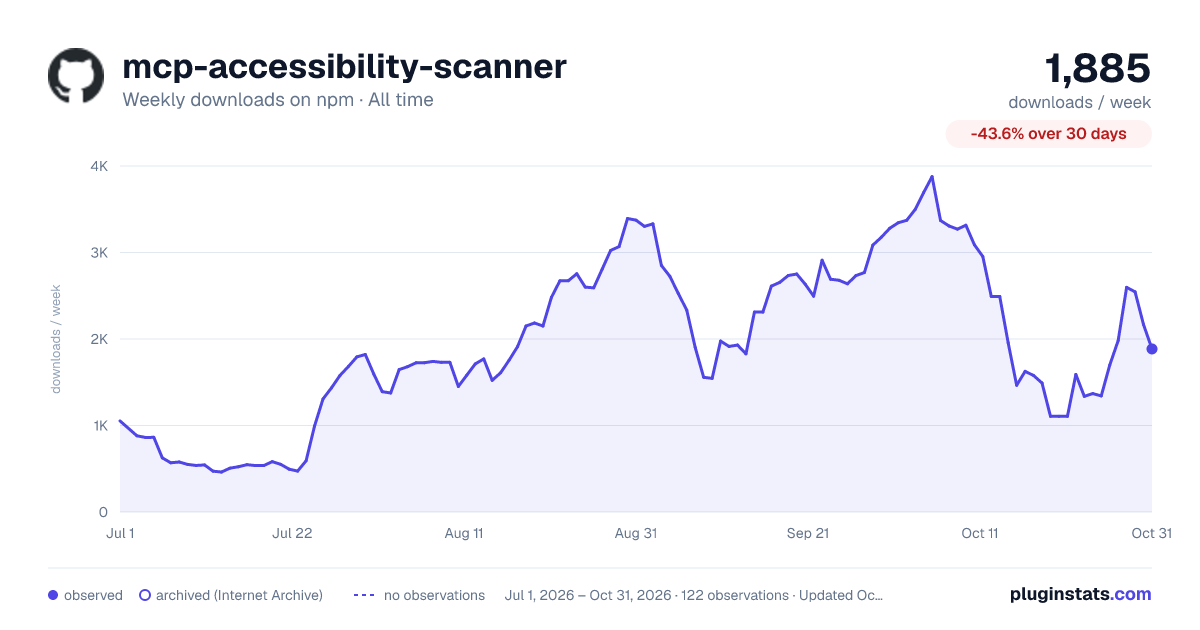

Adoption over time
7/30/90-day growth
Ranking history
Listing placement
Listing placement
Filled points are observed values; hollow points come from Internet Archive snapshots of the listing page. Dashed segments span periods with no observations — values between points are not interpolated.
Each band is one page of 20. Weekly downloads on a linear scale. Placement is projected from weekly downloads, so it can differ from the marketplace's own sort order. Hover a dot to see the listing.
Recent observations
Full history (1)Similar npm MCP servers plugins
All 20 mcp-accessibility-scanner alternativesData source
Weekly downloads (trailing 7 complete days) come from the official npm downloads API. Downloads include CI and mirrors and are not equivalent to installs or users. npm publishes no ratings.
Listing: https://www.npmjs.com/package/mcp-accessibility-scanner. First seen Oct 27, 2026; last successful collection Oct 27, 2026. See the methodology.