 PluginStats
prettier-plugin-spellcheck weekly downloads statistics
By dblock · npm · Prettier plugins
Markdown, HTML, plain-text, and JS/TS spelling checks with opt-in prose autocorrection for Prettier, powered by CSpell.
prettier-plugin-spellcheck has 218 recorded weekly downloads on npm, ranking #1994 of 2,710 tracked listings.
About prettier-plugin-spellcheck
prettier-plugin-spellcheck


Markdown, HTML, plain-text, and JavaScript/TypeScript spelling checks with opt-in prose autocorrection for Prettier, powered by CSpell. Inspired by markdownlint-rule-spellcheck and dylint-spellcheck.
Requires Node.js 22.18 or later and Prettier 3.7 or later (3.x).
Installation
npm install --save-dev prettier prettier-plugin-spellcheck
Usage
No spelling configuration is required. Load the plugin on the command line:
npx prettier --plugin prettier-plugin-spellcheck --check "**/*.{md,html,txt,js,jsx,ts,tsx}"
Alternatively, register it in your normal Prettier configuration:
{
  "plugins": ["prettier-plugin-spellcheck"]
}
Spelling errors fail formatting with line/column locations and suggestions. Prettier has no native spelling-diagnostics interface, so errors are reported as formatter failures, not warnings. Markdown, HTML, and plain-text prose, code comments, and user-facing JSX text are checked by default. MDX is not supported.
Example run:
printf '# helo\n' | npx prettier --plugin prettier-plugin-spellcheck --stdin-filepath example.md
Output (paths shortened):
[error] example.md: Spelling check failed.
[error] example.md:1:3 Misspelled word: "helo". Suggestions: hello, helio, halo.
Configuration
Automatic configuration
The plugin automatically reads spellcheck.json from the process working directory when it exists. If it is absent, bundled American English is used and autocorrection is off. No helper or additional Prettier options are needed.
An optional spellcheck.json:
{
  "autocorrect": false
}
Explicit configuration file
Select a different file with spellcheckConfig in any normal Prettier configuration, without a helper:
{
  "plugins": ["prettier-plugin-spellcheck"],
  "spellcheckConfig": "./config/spellcheck.json"
}
The selected JSON file has the same settings as spellcheck.json. Paths are relative to the process working directory. An explicitly selected missing file is an error; it never falls back to the default file.
Inline configuration
For inline settings, use defineConfig in .prettierrc.mjs:
import { defineConfig } from "prettier-plugin-spellcheck";

export default defineConfig({
  spellcheck: {
    autocorrect: false,
  },
});
The helper registers the plugin and accepts one nested spellcheck object alongside ordinary Prettier settings. Prettier's public plugin options do not accept objects, so the helper serializes inline settings internally.
Priority is inline settings → explicit spellcheckConfig → automatic spellcheck.json → built-in defaults. Inline settings replace, rather than merge with, file settings. Configuration files are reloaded on every format. Invalid configuration is an error.
Dictionaries
In spellcheck.json, an explicit configuration file, or the helper's nested spellcheck object:
{
  "dictionaries": [
    "@cspell/dict-en_us",
    "@cspell/dict-software-terms",
    "@cspell/dict-es-es",
    "./.spellcheck.txt"
  ]
}
An explicit dictionaries array replaces the default, so include @cspell/dict-en_us if you still want English. All configured languages participate together.
Install additional dictionary packages in the project where you run Prettier:
npm install --save-dev @cspell/dict-software-terms @cspell/dict-es-es
Create .spellcheck.txt with one accepted, case-sensitive word per line. Blank lines and # comments are ignored. Vocabulary paths are relative to the process working directory in all configuration forms, and vocabulary is reloaded on every format. Use absolute paths when running Prettier from elsewhere.
No dictionary discovery, network requests, CSpell configuration imports, or Hunspell/system dictionaries are used while formatting. Missing or invalid dictionaries are errors.
Project vocabulary
Collect unknown words, review the candidates to remove actual typos, and add the reviewed dictionary:
npx prettier-plugin-spellcheck collect "**/*.{md,html,txt,js,jsx,ts,tsx}" --output .spellcheck.txt
# Edit .spellcheck.txt: keep only words you want to accept.
npx prettier-plugin-spellcheck add ./.spellcheck.txt
collect respects .gitignore, .prettierignore, per-file Prettier configuration, spelling suppression comments, and configured dictionaries. It checks Markdown, HTML, plain text, and supported code files using the same scope settings as formatting, and skips unsupported languages and MDX. Configured vocabulary files and the selected output are excluded from inputs. It never changes source files; without --refresh, it never overwrites an existing candidate file. Collection does not compute suggestions.
To explicitly rebuild an existing vocabulary, inspired by rubocop-spellcheck:
npx prettier-plugin-spellcheck collect "**/*.{md,html,txt,js,jsx,ts,tsx}" --output .spellcheck.txt --refresh
```…
Description from the npm listing.
- prettier
- prettier-plugin
- markdown
- html
- plaintext
- javascript
- typescript
- jsx
- spellcheck
- cspell
README badge
Show your rank in a README or on your website. The badge updates automatically.
Charts
Images: 30d · 1y · all time · 1600×900 dark


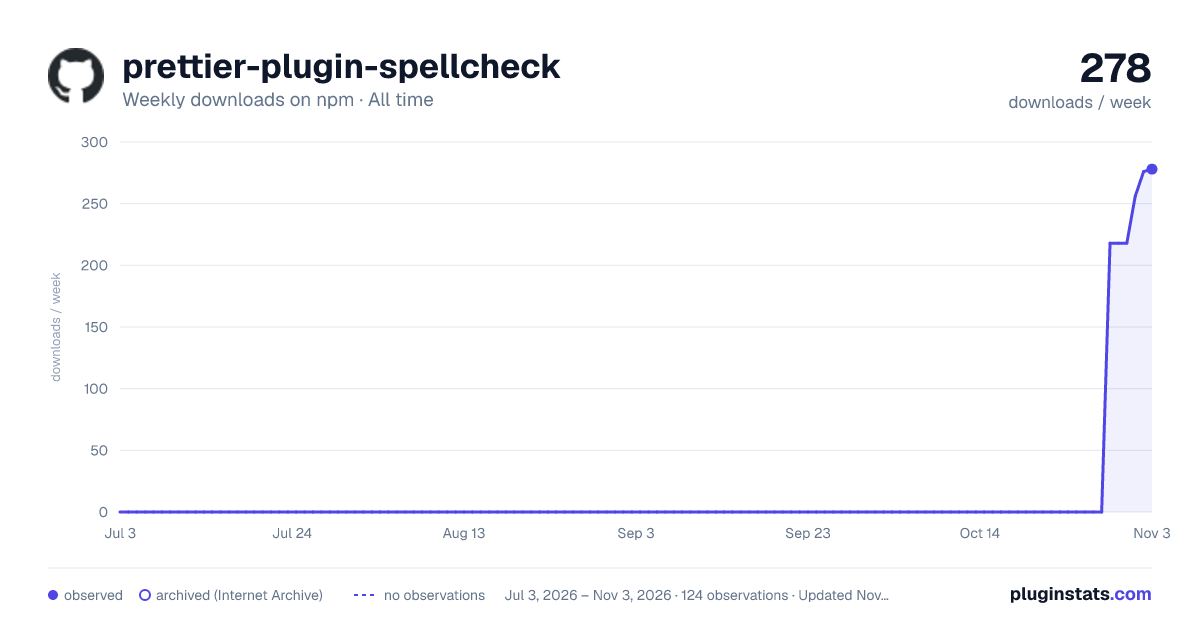

Adoption over time
7/30/90-day growth
Ranking history
Listing placement
Listing placement
Filled points are observed values; hollow points come from Internet Archive snapshots of the listing page. Dashed segments span periods with no observations — values between points are not interpolated.
Each band is one page of 20. Weekly downloads on a linear scale. Placement is projected from weekly downloads, so it can differ from the marketplace's own sort order. Hover a dot to see the listing.
Recent observations
Full history (121)Similar npm Prettier plugins plugins
All 20 prettier-plugin-spellcheck alternatives- 230 weekly downloads+304%
- 230 weekly downloads—
Data source
Weekly downloads (trailing 7 complete days) come from the official npm downloads API. Downloads include CI and mirrors and are not equivalent to installs or users. npm publishes no ratings.
Listing: https://www.npmjs.com/package/prettier-plugin-spellcheck. First seen Oct 30, 2026; last successful collection Nov 1, 2026. See the methodology.