 PluginStats
prettier-plugin-angular-comment weekly downloads statistics
By Angular-RU · npm · Prettier plugins
Format Angular templates in JS/TS template literals with /* Angular */
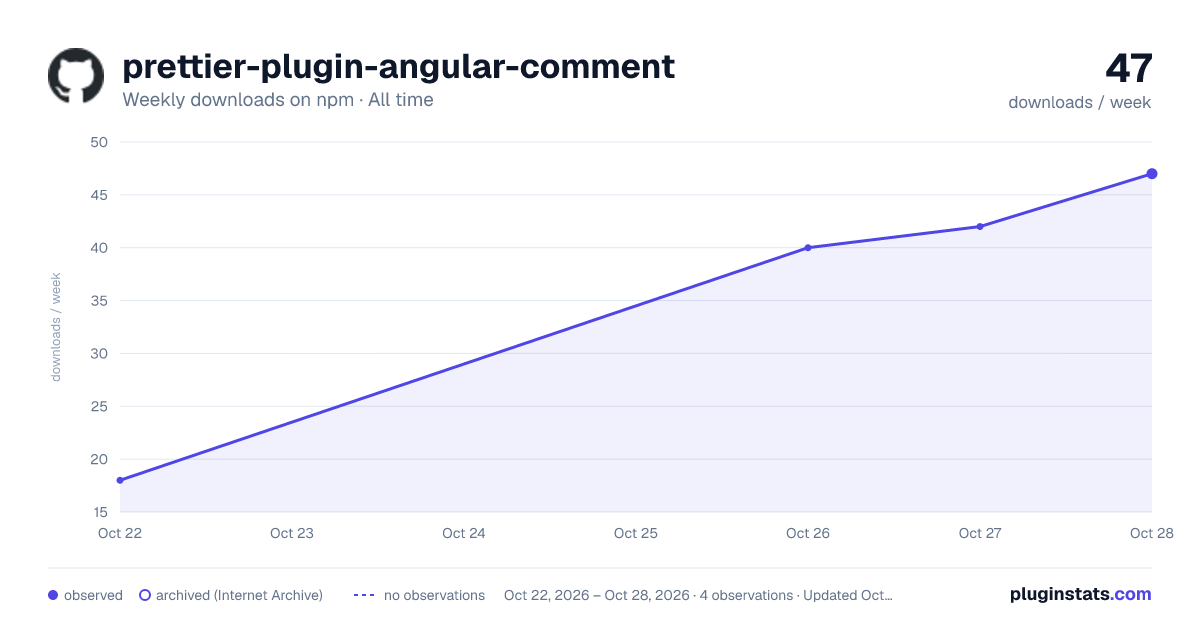
prettier-plugin-angular-comment has 40 recorded weekly downloads on npm, ranking #1781 of 2,644 tracked listings.
About prettier-plugin-angular-comment
prettier-plugin-angular-comment
Format Angular template literals in JavaScript and TypeScript with an explicit /* Angular */ marker.
Community plugin implementing the behavior proposed in prettier/prettier#20317 for #17615, without changing Prettier core.
Install
npm install -D prettier prettier-plugin-angular-comment
Configure Prettier:
{ "plugins": ["prettier-plugin-angular-comment"] }
Usage
const template = /* Angular */ `
  @if (visible) {
    <span>{{ name }}</span>
  } @else {
    <span>Hidden</span>
  }
`;
The marker is case sensitive and applies only to the following template literal. Existing HTML comments, normal templates, and Angular component templates continue to use Prettier's built-in formatting. JS template expressions (${value}) are supported. Changing whitespace inside a template can change its runtime string value; opt in only where appropriate.
API
import * as prettier from "prettier";
import * as plugin from "prettier-plugin-angular-comment";
const result = await prettier.format(source, { parser: "typescript", plugins: [plugin] });
Set embeddedLanguageFormatting: "off" to disable the plugin's embedding, along with other embedded formatting.
Requirements and limitations
- Prettier 3.x / Node 18+.
- Supports JS/TS parsers backed by the built-in
estreeprinter. - May conflict with another plugin that also overrides
estree.embed. Check plugin order. - Invalid Angular embedded syntax falls back to normal formatting, consistent with Prettier's embed error handling.
Development
npm install
npm test
npm pack --dry-run
npm releases (Trusted Publishing / OIDC)
This repository uses npm Trusted Publishing with GitHub Actions. No persistent NPM_TOKEN or NODE_AUTH_TOKEN secret is required.
First release (one-time setup)
npm requires the package to exist before a Trusted Publisher can be configured. If the package has not been published yet, its npm owner must bootstrap it locally:
npm login
npm install
npm test
npm publish --access public
Keep the version in package.json synchronized with the first published version. Do not push a matching tag for the manually published version.
Enable Trusted Publishing
- Open
https://www.npmjs.com/package/prettier-plugin-angular-comment/accessor the package's npm settings, then Trusted publishing → Add trusted publisher → GitHub Actions. - Enter Organization/user:
Angular-RU, Repository:prettier-plugin-angular-comment, Workflow filename:publish.yml(not a path), Environment:npm-publish. - Enable Allow npm publish in the npm trusted publisher's allowed actions. Staging-only permission is insufficient for this workflow.
- In GitHub Settings → Environments, create or configure
npm-publish. Add required reviewers and deployment-tag restrictions if desired, so a release requires approval. - Complete the first successful OIDC publication within 2 days of creating the trusted publisher, or recreate the expired configuration.
Publish the next version
Update package.json to an unpublished version (for example, 0.1.2), merge it to main, and confirm CI is green. Then push the corresponding tag from a commit on main:
git switch main
git pull --ff-only
git tag v0.1.2
git push origin v0.1.2
The publish workflow verifies the exact version and that the tag commit is on main, runs tests without OIDC permissions, and publishes in a separate approval-gated environment. The publisher job disables npm lifecycle scripts and uses npm's short-lived OIDC authentication and automatic provenance. Pinned GitHub Action commit SHAs and disabled release-job caching reduce supply-chain risk.
After the first successful OIDC release, consider selecting Require two-factor authentication and disallow tokens under npm Settings → Publishing access, and protect release tags with a GitHub ruleset. Traditional npm token publishing will then be blocked while OIDC continues working.
License
MIT
Description from the npm listing.
- prettier
- prettier-plugin
- angular
- template-literals
README badge
Show your rank in a README or on your website. The badge updates automatically.
Charts
Images: 30d · 1y · all time · 1600×900 dark



Adoption over time
7/30/90-day growth
Ranking history
Listing placement
Listing placement
Filled points are observed values; hollow points come from Internet Archive snapshots of the listing page. Dashed segments span periods with no observations — values between points are not interpolated.
Each band is one page of 20. Weekly downloads on a linear scale. Placement is projected from weekly downloads, so it can differ from the marketplace's own sort order. Hover a dot to see the listing.
Recent observations
Full history (2)Similar npm Prettier plugins plugins
All 20 prettier-plugin-angular-comment alternativesData source
Weekly downloads (trailing 7 complete days) come from the official npm downloads API. Downloads include CI and mirrors and are not equivalent to installs or users. npm publishes no ratings.
Listing: https://www.npmjs.com/package/prettier-plugin-angular-comment. First seen Oct 20, 2026; last successful collection Oct 28, 2026. See the methodology.