 PluginStats
hyperframes weekly downloads statistics
By heygen-com · npm · Claude Code
Make videos with code and AI agents: write HTML, render MP4. Open source.
hyperframes has 809,606 recorded weekly downloads on npm, ranking #262 of 2,644 tracked listings.
About hyperframes
hyperframes
CLI for creating, previewing, and rendering HTML video compositions.
Install
npm install -g hyperframes
Or use directly with npx:
npx hyperframes <command>
Requirements: Node.js >= 22, FFmpeg
Commands
init
Scaffold a new Hyperframes project from a template:
npx hyperframes init my-video
cd my-video
preview
Start the live preview studio in your browser:
npx hyperframes preview
# Studio: http://localhost:3002/#project/my-video
# Server: http://localhost:3002

npx hyperframes preview --port 4567
In an interactive terminal, the preview stays attached until you press
Ctrl+C. In a non-interactive shell such as a coding-agent session, the same
command starts a managed preview that survives after the command returns. Use
--background or --foreground to choose explicitly, and manage persistent
previews with --status, --stop, --list, and --kill-all. Add --json to
managed lifecycle commands for machine-readable output. --foreground --json
prints the ready-session envelope once, then remains attached until stopped.
audio
Measure where sounds land: onsets, the moment each sound peaks, loudness and silence. Give files, or query the film's own clips in film time:
npx hyperframes audio sfx/whoosh.mp3
npx hyperframes audio --at 12 --json
normalize-audio
Measure two local authored audio clips with integrated LUFS and match the target
to the unchanged reference. The command is a dry run unless --write is passed:
npx hyperframes normalize-audio --reference target-audio --target user-audio
npx hyperframes normalize-audio --reference target-audio --target user-audio --write
It updates only the target element's data-volume and refuses unsafe boosts
that exceed Studio's +12 dB ceiling or would clip.
render
Render a composition to MP4. Run from the project directory; the positional
argument is the project directory (not a file), so render the project's
index.html directly, or point at a specific composition file with -c:
npx hyperframes render -o output.mp4
npx hyperframes render -c ./my-composition.html -o output.mp4
A render stops when the process that started it exits. To keep one running after
its launcher exits, set HYPERFRAMES_RENDER_DETACHED=1 and start it in its own
process group, e.g. bash -c 'set -m; HYPERFRAMES_RENDER_DETACHED=1 npx hyperframes render -o out.mp4 < /dev/null > render.log 2>&1 &'.
Piped, non-quiet renders emit a single @hf-diagnostic JSON line when an audio
failure reaches the CLI error handler. Version 1 has operation: "render" and
at most 16 audioFailures: allowlisted stage, reason, owner, retryable, and
optional subprocess exit code, signal, termination reason and OS code. It omits
messages, stderr, source paths/URLs, element IDs and command arguments. Consumers
must ignore unknown versions and fields. This is local CLI output; uploading it
requires the caller's existing consent and privacy checks. Quiet mode (including
batch JSON mode) emits no diagnostic line.
This covers audio preparation and mix failures, including the typed external interruption path. Probe failures retain their existing stage/reason but do not gain subprocess evidence here; browser/FX failures remain classified as internal. Desktop ingestion and live report delivery are separate changes.
publish
Upload a project directory and get a hosted URL that keeps working after the CLI exits. Published projects are private by default:
npx hyperframes publish
npx hyperframes publish ./my-video
npx hyperframes publish --public
npx hyperframes publish --yes
Signed-out publishing returns an authentication-required claim URL; opening it
lets someone sign in and claim the project. Sign in first with
npx hyperframes auth login to publish an owned project you can update. Use
--public to make the claimed project visible to anyone. --yes only skips the
confirmation prompt and does not change visibility.
Signed-in publishers can use --update <url-or-id> to target an existing project
or --space <space-id> to publish into a shared team space. If the requested
project is missing or inaccessible, publishing can create a new project instead;
check the printed URL and status.
See the publish reference for all options, including video proxy settings.
lint
Validate your Hyperframes HTML:
npx hyperframes lint ./my-composition
npx hyperframes lint ./my-composition --json      # JSON output for CI/tooling
npx hyperframes lint ./my-composition --verbose   # Include info-level findings
By default only errors and warnings are shown. Use --verbose to also display informational findings (e.g., external script dependency notices). Use --json for machine-readable output with errorCount, warningCount, infoCount, and a findings array.
compositions
List compositions found in the current project:
npx hyperframes compositions
benchmark
Run rendering benchmarks:
npx hyperframes benchmark ./my-composition.html
doctor
Check your environment for required dependencies (Chrome, FFmpeg, Node.js):
npx hyperframes doctor
browser
Manage the bundled Chrome/Chromium installation:
npx hyperframes browser
info
Print version and environment info:
npx hyperframes info
docs
Open the documentation in your browser:
npx hyperframes docs
upgrade
Check for updates and show upgrade instructions:
npx hyperframes upgrade
npx hyperframes upgrade --check --json  # machine-readable for agents
Documentation
Full documentation: hyperframes.heygen.com/packages/cli
Related packages…
Description from the npm listing.
- ai-agents
- animation
- claude-code
- codex
- cursor
- gsap
- html-to-video
- hyperframes
- motion-graphics
- mp4
- remotion-alternative
- render
- video
- video-editor
README badge
Show your rank in a README or on your website. The badge updates automatically.
Charts
Images: 30d · 1y · all time · 1600×900 dark


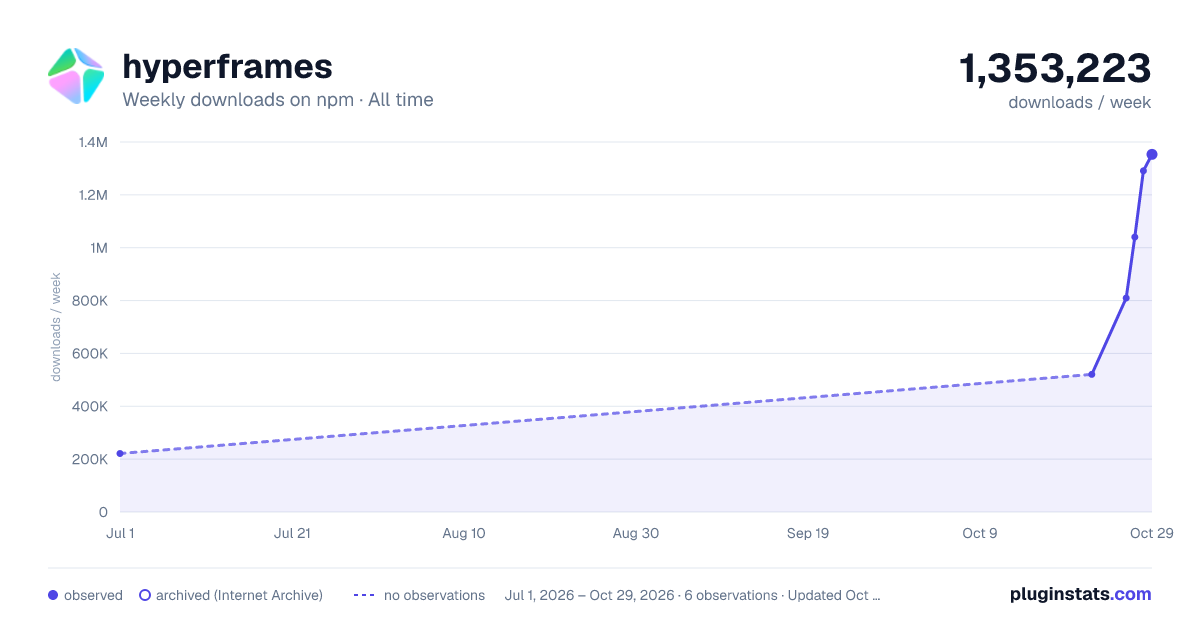

Adoption over time
7/30/90-day growth
Ranking history
Listing placement
Listing placement
Filled points are observed values; hollow points come from Internet Archive snapshots of the listing page. Dashed segments span periods with no observations — values between points are not interpolated.
Each band is one page of 20. Weekly downloads on a linear scale. Placement is projected from weekly downloads, so it can differ from the marketplace's own sort order. Hover a dot to see the listing.
Recent observations
Full history (3)Similar npm Claude Code plugins
All 20 hyperframes alternativeshyperframes on other marketplaces
Data source
Weekly downloads (trailing 7 complete days) come from the official npm downloads API. Downloads include CI and mirrors and are not equivalent to installs or users. npm publishes no ratings.
Listing: https://www.npmjs.com/package/hyperframes. First seen Oct 26, 2026; last successful collection Oct 28, 2026. See the methodology.