 PluginStats
@agfpd/iapeer weekly downloads statistics
By agfpd · npm · Claude Code
Run Claude Code and Codex CLI as local background agents that message each other, wake on demand, and share one memory.
@agfpd/iapeer has 1,236 recorded weekly downloads on npm.
About @agfpd/iapeer
iapeer
Run Claude Code and Codex CLI as local background agents that message each other, wake on demand, and share one memory.




iapeer keeps a team of AI agents, humans, and services on one host always reachable, every one a single message away. Each participant is a peer: a Claude Code or Codex CLI agent, a person on Telegram, or a scheduler/watcher service. Any agent reaches any other with one call, send_to_peer(<name>, <text>); if the recipient is asleep, the daemon wakes it and delivers.
Agents on Claude and on Codex are different AI runtimes from different vendors, yet they talk as equal peers. Humans take part over Telegram, or directly in the terminal by attaching to a peer's live session with iapeer attach.
How it works
send_to_peer(name, text)   ← from any peer
        │
        ▼
router daemon              — always on; finds the recipient, checks liveness, delivers
        │
        ▼
recipient peer             — asleep? the daemon wakes it and delivers on wake
What makes it different
- Real interactive CLI sessions, not headless one-shots. Each AI peer is a full Claude Code or Codex CLI session, not a disposable
claude -p/codex execcall. - Warm on demand, always reachable. A live session answers fast; when it goes idle the daemon parks it and brings it back — context resumed — on the next message. Availability never depends on a human keeping the session open. Lifecycle and daemon.
- One identity across runtimes, with one memory. A peer's
personalityis decoupled from its runtime: the same peer runs on Claude or Codex, switched with a command. By default (set up byiapeer onboard) it carries one shared memory (iapeer-memory) keyed to the personality, not the runtime — one personality, one memory, whatever runtime it runs on. - Heterogeneous peers, one protocol. AI agents, humans (Telegram), and services (timer = cron, watcher = event) are all first-class, addressed the same way over an always-on MCP daemon that exposes exactly one tool,
send_to_peer.
Quick start
Requirements: macOS (Linux is on the Roadmap) and at least one agent runtime — Claude Code or Codex CLI (each AI peer is a live session of one). The installer handles the rest (bun and ~/.local/bin on PATH).
Install — one line. Installs bun if missing, builds the iapeer binary, then hands off to the interactive onboard:
curl -fsSL https://agfpd.github.io/iapeer/install.sh | sh
Prefer not to pipe a script into your shell? Run the same steps by hand (needs bun on PATH):
# install — the iapeer binary and the ~/.iapeer layout
npx @agfpd/iapeer            # or: bunx @agfpd/iapeer

# set up the host — router daemon, scheduler peers, Telegram, shared memory
iapeer onboard
Either path runs onboard interactively: it surfaces the security checks (runtime sign-in, macOS Full Disk Access) and asks before installing the memory provider — nothing is auto-approved behind your back. You can read install.sh before running it, or preview every step with IAPEER_INSTALL_DRYRUN=1.
Then create your agents and put them in touch. A Claude peer and a Codex peer talk as equals — create one on each runtime:
# create two peers, one per runtime
iapeer create architect --runtime claude
iapeer create implementer --runtime codex

# message one from your terminal
iapeer send implementer --message "Draft the parser API; the architect will review."

# or join a peer's live session — detach with Ctrl-] (or just close it; the agent keeps running)
iapeer attach architect
Inside a peer's own session the agent reaches others with send_to_peer(<name>, <text>); iapeer send is the terminal equivalent.
Already have a project folder? In step 3, use init instead of create: cd into the project and register that folder itself as a peer.
cd ~/projects/myagent
iapeer init
The peer's name is the folder name, normalized (myagent). create sets up a fresh folder under ~/.iapeer/peers/<name>; init turns the folder you are in into a peer. The setup is identical either way.
Two ways to work with an agent locally in your terminal:
-
Join its live session —
iapeer attach architect. The daemon wakes the peer first if it is asleep. Detach withCtrl-]— or just close the terminal — and the session keeps running in the background; reattach withiapeer attachwhenever you need it. -
Open a fresh session in the peer's folder — go to the peer's directory and launch its runtime:
cd ~/.iapeer/peers/architect
iapeer claude
This starts a full session with the peer's identity and doctrine and drops you straight into it. In effect,
iapeer claudeisclaudefor that peer — the same interactive CLI, but the session has a stable identity, its own memory, and an address other peers can reach.
Agents reach each other with send_to_peer; you can also message any peer over Telegram.
Bypass Permissions mode…
Description from the npm listing.
- claude-code
- codex-cli
- codex
- mcp
- shared-memory
- peer-to-peer
- background-agents
- ai-agents
- multi-agent
- telegram
- macos
- launchd
README badge
Show your rank in a README or on your website. The badge updates automatically.
Charts
Images: 30d · 1y · all time · 1600×900 dark


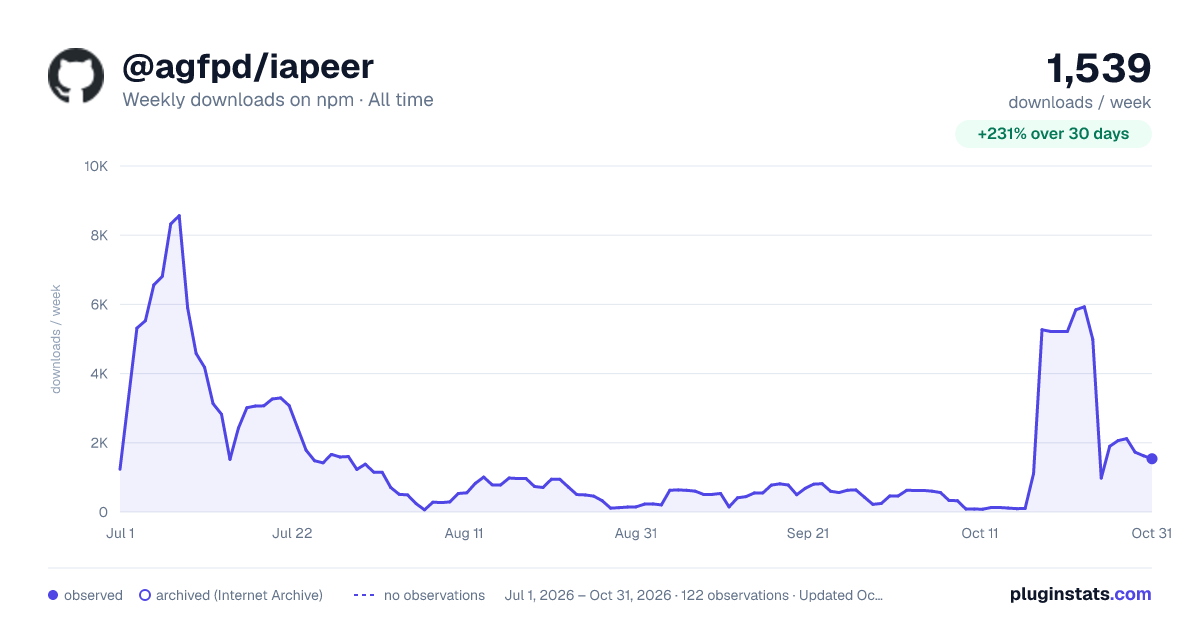

Adoption over time
7/30/90-day growth
Ranking history
Listing placement
Listing placement
Filled points are observed values; hollow points come from Internet Archive snapshots of the listing page. Dashed segments span periods with no observations — values between points are not interpolated.
Each band is one page of 20. Weekly downloads on a linear scale. Placement is projected from weekly downloads, so it can differ from the marketplace's own sort order. Hover a dot to see the listing.
Recent observations
Full history (1)Similar npm Claude Code plugins
All 20 @agfpd/iapeer alternativesData source
Weekly downloads (trailing 7 complete days) come from the official npm downloads API. Downloads include CI and mirrors and are not equivalent to installs or users. npm publishes no ratings.
Listing: https://www.npmjs.com/package/@agfpd/iapeer. First seen Oct 27, 2026; last successful collection Oct 27, 2026. See the methodology.