 PluginStats
@telora/daemon weekly downloads statistics
By telora · npm · Claude Code
Agent orchestration daemon for Telora - spawns and manages Claude Code instances
@telora/daemon has 1,310 recorded weekly downloads on npm.
About @telora/daemon
@telora/daemon
Agent orchestration daemon for Telora - spawns and manages Claude Code instances to work on deliveries autonomously.
Overview
The Telora daemon watches for active focuses in your Telora organization and spawns Claude Code Agent Teams to execute them. Each focus gets a single Agent Team that coordinates work across all deliveries and issues.
Key features:
- Focus-level Agent Teams: One team per focus manages all deliveries, building a task DAG and coordinating parallel execution
- Multi-repo support: Multiple daemons can run against the same Telora org, each handling focuses for different repos
- Integration branch workflow: Teams work on isolated branches, auto-merge to integration on success
- Worktree isolation: Each team gets its own git worktree
- Dynamic delivery pickup: Teams detect and incorporate new deliveries added mid-execution
Installation
For long-running daemon hosts, install globally so telora-daemon update and the in-process auto-updater can replace the binary in place:
npm install -g @telora/daemon
npx is supported only for one-shot bootstrap commands (init, connect, check-update). The long-running daemon (run/start) refuses to run from an npx cache and exits with the global-install instruction: the cache makes the running binary effectively immutable -- npm install -g writes to the global prefix while the process keeps loading the cached copy, so a daemon launched via npx could never self-update. Install on disk (npm install -g @telora/daemon) and start telora-daemon run. (The refusal is overridable for false positives via TELORA_ALLOW_NPX_RUN=1, but a non-updating daemon is not recommended.)
Note: The
.mcp.jsonfile for Claude Code integration is auto-generated bytelora-daemon init.
Quick Start
Option 1: Interactive Setup (Recommended)
npm install -g @telora/daemon
cd /path/to/your/repo
telora-daemon init
The setup wizard will guide you through:
- Telora URL configuration
- Organization ID
- Integration branch name
- Max concurrent agents
Then set your tracker ID and start the daemon:
export TELORA_TRACKER_ID=your-tracker-id-here
telora-daemon run
Option 2: Manual Setup
-
Get your Tracker ID from Telora:
- Go to Settings → AI Work Trackers
- Click "Generate Tracker ID" on your profile
- Copy the tracker ID
-
Configure environment variables beside the daemon's config. The daemon reads the
.envin the directory of the config file it loads (~/.telora/.envfor~/.telora/daemon.json, or the--configfile's directory) and falls back to the working directory's.envonly when that file is absent; startup logs which.envit loaded, the tower mode in force and where this package's tower runbook is:
mkdir -p ~/.telora

# Create .env file
cat > ~/.telora/.env << EOF
TELORA_URL=https://your-telora-instance.supabase.co
TELORA_TRACKER_ID=your-tracker-id-here
TELORA_ORGANIZATION_ID=your-org-id-here
EOF
- Start the daemon:
telora-daemon run
Option 3: One-shot via npx
npx -p @telora/daemon telora-daemon init   # interactive setup (one-shot)
npm install -g @telora/daemon              # then install on disk
telora-daemon run                          # start the daemon
npx is fine for the one-shot init, but the long-running daemon refuses to run
from an npx cache -- it can't update itself there. Install globally with
npm install -g @telora/daemon and start telora-daemon run for any host you
expect to leave running.
Updating
telora-daemon check-update   # report whether a newer version exists
telora-daemon update         # stop, install latest, apply migrations, restart
When installed globally or from a git checkout, the daemon also self-updates on a periodic timer (configurable via autoUpdate.intervalMs in .telora/daemon.json, or disable with --no-auto-update).
The long-running daemon refuses to run from an npx cache, so there is no auto-updating npx mode. If you reach an npx-cache daemon via the TELORA_ALLOW_NPX_RUN override, telora-daemon update cannot restart it in place (the running process loads from a cache it just cleared); install on disk instead -- npm install -g @telora/daemon, then telora-daemon run.
Configuration
The daemon is configured via environment variables:
| Variable | Required | Default | Description |
|---|---|---|---|
TELORA_URL | Yes | - | Telora API URL |
TELORA_TRACKER_ID | Yes | - | Your tracker ID for authentication |
TELORA_ORGANIZATION_ID | Yes | - | Organization to watch for work |
TELORA_REPO_PATH | No | cwd() | Path to git repository |
TELORA_INTEGRATION_BRANCH | No | integration | Branch for agent merges |
TELORA_WORKTREE_DIR | No | .telora/worktrees | Directory for git worktrees |
TELORA_LOG_DIR | No | .telora/logs | Directory for agent logs |
CLAUDE_CODE_PATH | No | claude | Path to Claude Code executable |
MAX_TOTAL_SESSIONS | No | 5 | Max concurrent agents |
SESSION_TIMEOUT_MS | No | 3600000 | Session timeout (1 hour) |
TOKEN_LIMIT | No | 200000 | Max tokens per session |
COST_LIMIT | No | 10.0 | Max cost per session ($) |
TELORA_TOWER_MODE | No | observe | The tower rollout mode: off, observe or enforce. Runbook: docs/runbook-tower.md in this package (node_modules/@telora/daemon/docs/runbook-tower.md) |
telora-daemon env lists every operational environment variable the installed daemon reads, with its kind, default and description.
CLI Options
telora-daemon [options]

Options:
  -V, --version        Output version number
  -v, --verbose        Enable verbose logging
  -c, --config <path>  Path to config file (default: .telora/daemon.json)
  --dry-run            Print configuration and exit
  -h, --help           Display help
```…
Description from the npm listing.
- telora
- agent
- claude
- claude-code
- orchestration
- ai-agent
README badge
Show your rank in a README or on your website. The badge updates automatically.
Charts
Images: 30d · 1y · all time · 1600×900 dark


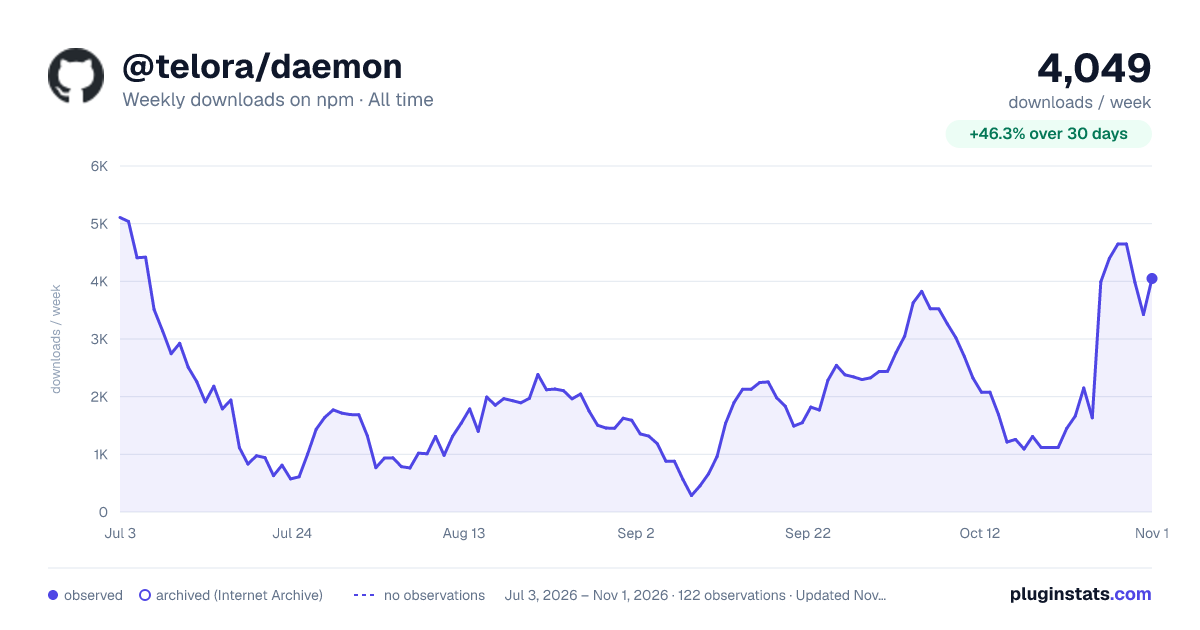

Adoption over time
7/30/90-day growth
Ranking history
Listing placement
Listing placement
Filled points are observed values; hollow points come from Internet Archive snapshots of the listing page. Dashed segments span periods with no observations — values between points are not interpolated.
Each band is one page of 20. Weekly downloads on a linear scale. Placement is projected from weekly downloads, so it can differ from the marketplace's own sort order. Hover a dot to see the listing.
Recent observations
Full history (1)Similar npm Claude Code plugins
All 20 @telora/daemon alternativesData source
Weekly downloads (trailing 7 complete days) come from the official npm downloads API. Downloads include CI and mirrors and are not equivalent to installs or users. npm publishes no ratings.
Listing: https://www.npmjs.com/package/@telora/daemon. First seen Oct 22, 2026; last successful collection Oct 22, 2026. See the methodology.