 PluginStats
@digitalocean/mcp weekly downloads statistics
By digitalocean (2 listings) · npm · MCP servers
DigitalOcean MCP Implementation,
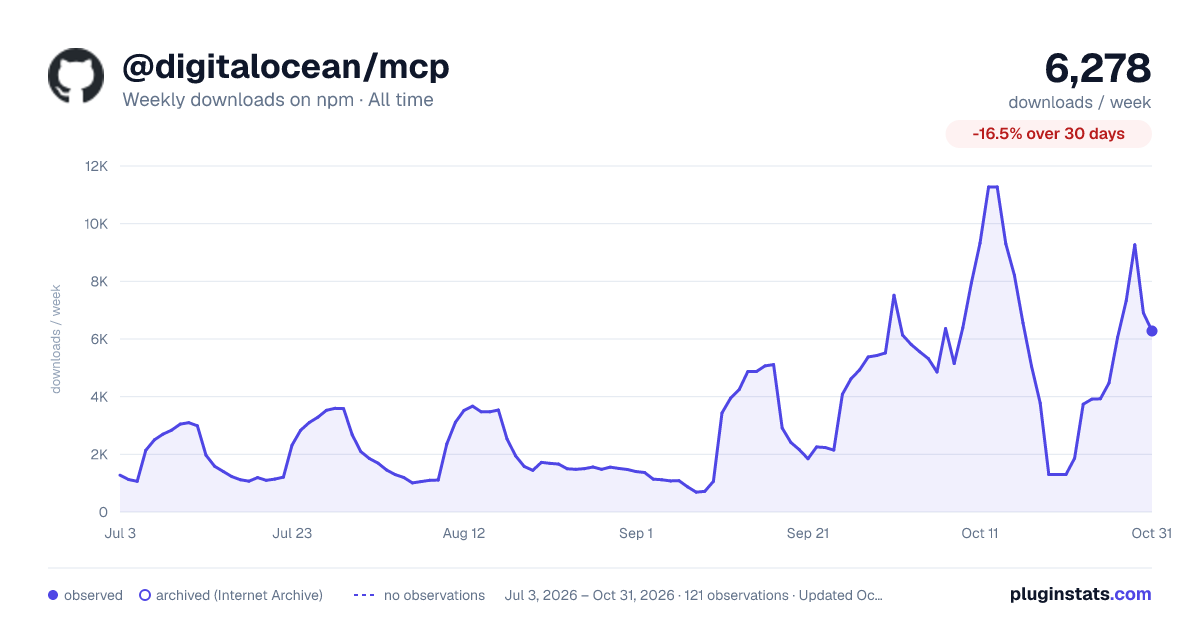
@digitalocean/mcp has 4,472 recorded weekly downloads on npm, ranking #1156 of 2,644 tracked listings.
About @digitalocean/mcp
MCP DigitalOcean Integration
MCP DigitalOcean Integration is an open-source project that provides a comprehensive interface for managing DigitalOcean resources and performing actions using the DigitalOcean API. Built on top of the godo library and the MCP framework, this project exposes a wide range of tools to simplify cloud infrastructure management.
DISCLAIMER: "Use of MCP technology to interact with your DigitalOcean account can come with risks"
Authentication
The hosted (remote) MCP servers support two ways to authenticate:
- OAuth 2.0 (recommended). Just add the server URL — no
Authorizationheader. Your client opens a browser to sign in to DigitalOcean on first use, so there's no token to create, store, or rotate. Supported clients (e.g. recent Claude and Cursor) handle this automatically, and you can skip Steps 1–2 below. - API token. For local installs or clients without OAuth support, use a DigitalOcean personal access token via an
Authorization: Bearerheader (remote) or theDIGITALOCEAN_API_TOKENenvironment variable (local). See Steps 1–2 below.
Security: Never Hardcode Your API Token
WARNING: Do NOT paste your DigitalOcean API token directly into any config file (e.g.,
claude_desktop_config.json,~/.cursor/config.json, VS Code settings). If you commit these files to GitHub, your token will be exposed and GitHub will automatically block or revoke it to protect your account.
The safe approach is to store your token in an environment variable on your machine and reference it from your config file. Follow the steps below for your operating system before proceeding with any client installation.
Step 1: Set Up Your API Token as an Environment Variable
macOS / Linux
Option A: Set it in your shell profile (Recommended — persists across reboots)
-
Open a terminal.
-
Determine which shell you are using:
echo $SHELL- If it outputs
/bin/zsh→ edit~/.zshrc - If it outputs
/bin/bash→ edit~/.bashrcor~/.bash_profile
- If it outputs
-
Open the file in a text editor:
# For zsh (default on macOS Monterey and later) nano ~/.zshrc # For bash nano ~/.bashrc -
Add the following line at the bottom of the file:
export DIGITALOCEAN_API_TOKEN="your_actual_token_here"Replace
your_actual_token_herewith your real token from the DigitalOcean API Tokens page. -
Save and exit:
- In
nano: pressCtrl + O, thenEnterto save, thenCtrl + Xto exit.
- In
-
Reload your shell to apply the change:
source ~/.zshrc # or source ~/.bashrc -
Verify it is set correctly:
echo $DIGITALOCEAN_API_TOKENYou should see your token printed in the terminal.
Option B: Use a .env file (for project-level isolation)
-
In your project root folder, create a
.envfile:touch .env -
Open it and add:
DIGITALOCEAN_API_TOKEN=your_actual_token_here -
Immediately add
.envto your.gitignoreso it is never committed:echo ".env" >> .gitignore -
To load the
.envfile into your current terminal session:export $(grep -v '^#' .env | xargs) -
Verify:
echo $DIGITALOCEAN_API_TOKEN
Note: Option B only sets the variable for the current terminal session. You need to run step 4 each time you open a new terminal. For a permanent solution, use Option A.
Windows
Option A: Set it as a System Environment Variable (Recommended — persists across reboots)
- Open Start Menu and search for "Environment Variables".
- Click "Edit the system environment variables".
- In the System Properties dialog, click the "Environment Variables..." button.
- Under "User variables", click "New...".
- Fill in:
- Variable name:
DIGITALOCEAN_API_TOKEN - Variable value:
your_actual_token_here
- Variable name:
- Click OK on all dialogs to save.
- Restart your terminal (Command Prompt or PowerShell) for the change to take effect.
- Verify in PowerShell:
Or in Command Prompt:echo $env:DIGITALOCEAN_API_TOKENecho %DIGITALOCEAN_API_TOKEN%
Option B: Set it temporarily in PowerShell (current session only)
$env:DIGITALOCEAN_API_TOKEN = "your_actual_token_here"
Option C: Use a .env file on Windows
-
In your project folder, create a file named
.env(no extension) with this content:DIGITALOCEAN_API_TOKEN=your_actual_token_here -
Add
.envto your.gitignore:.env -
To load it in PowerShell:
Get-Content .env | ForEach-Object { if ($_ -match "^\s*([^#][^=]*)=(.*)$") { [System.Environment]::SetEnvironmentVariable($matches[1].Trim(), $matches[2].Trim(), "Process") } } -
Verify:
echo $env:DIGITALOCEAN_API_TOKEN
Step 2: Get Your DigitalOcean API Token
- Log in to your DigitalOcean account.
- Navigate to API → Tokens in the left sidebar, or go directly to:
https://cloud.digitalocean.com/account/api/tokens - Click "Generate New Token".
- Give it a name (e.g.,
mcp-local-dev), set expiry, and choose the required scopes. - Copy the token immediately — it will only be shown once.
- Store it using one of the methods described in Step 1 above.
Installation
Remote MCP (Recommended)…
Description from the npm listing.
- digitalocean
- mcp
- model-context-protocol
README badge
Show your rank in a README or on your website. The badge updates automatically.
Charts
Images: 30d · 1y · all time · 1600×900 dark



Adoption over time
7/30/90-day growth
Ranking history
Listing placement
Listing placement
Filled points are observed values; hollow points come from Internet Archive snapshots of the listing page. Dashed segments span periods with no observations — values between points are not interpolated.
Each band is one page of 20. Weekly downloads on a linear scale. Placement is projected from weekly downloads, so it can differ from the marketplace's own sort order. Hover a dot to see the listing.
Recent observations
Full history (1)Similar npm MCP servers plugins
All 20 @digitalocean/mcp alternativesData source
Weekly downloads (trailing 7 complete days) come from the official npm downloads API. Downloads include CI and mirrors and are not equivalent to installs or users. npm publishes no ratings.
Listing: https://www.npmjs.com/package/@digitalocean/mcp. First seen Oct 28, 2026; last successful collection Oct 28, 2026. See the methodology.