 PluginStats
@genkit-ai/mcp weekly downloads statistics
By genkit-ai (2 listings) · npm · MCP servers
A Genkit plugin that provides interoperability between Genkit and Model Context Protocol (MCP). Both client and server use cases are supported.
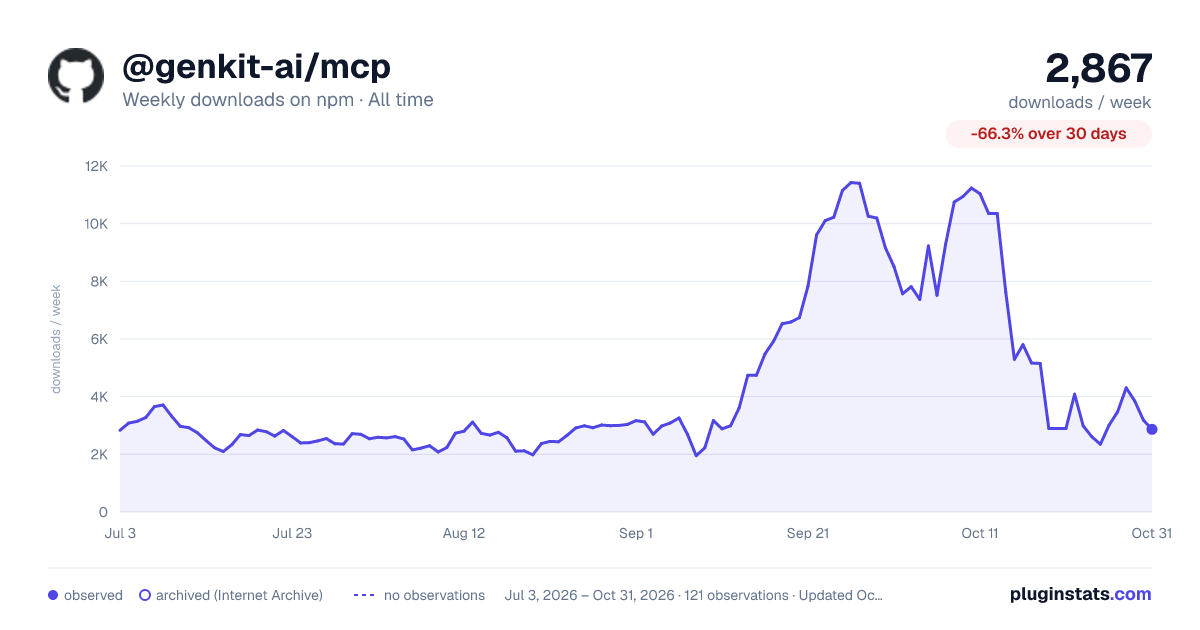
@genkit-ai/mcp has 5,152 recorded weekly downloads on npm, ranking #1139 of 2,391 tracked listings.
About @genkit-ai/mcp
Genkit MCP
This plugin provides integration between Genkit and the Model Context Protocol (MCP). MCP is an open standard allowing developers to build "servers" which provide tools, resources, and prompts to clients. Genkit MCP allows Genkit developers to:
- Consume MCP tools, prompts, and resources as a client using
createMcpHostorcreateMcpClient. - Provide Genkit tools and prompts as an MCP server using
createMcpServer.
Installation
To get started, you'll need Genkit and the MCP plugin:
npm i genkit @genkit-ai/mcp
MCP Host
To connect to one or more MCP servers, you use the createMcpHost function. This function returns a GenkitMcpHost instance that manages connections to the configured MCP servers.
import { googleAI } from '@genkit-ai/google-genai';
import { createMcpHost } from '@genkit-ai/mcp';
import { genkit } from 'genkit';

const mcpHost = createMcpHost({
  name: 'myMcpClients', // A name for the host plugin itself
  mcpServers: {
    // Each key (e.g., 'fs', 'git') becomes a namespace for the server's tools.
    fs: {
      command: 'npx',
      args: ['-y', '@modelcontextprotocol/server-filesystem', process.cwd()],
    },
    memory: {
      command: 'npx',
      args: ['-y', '@modelcontextprotocol/server-memory'],
    },
  },
});

const ai = genkit({
  plugins: [googleAI()],
});

(async () => {
  // Provide MCP tools to the model of your choice.
  const { text } = await ai.generate({
    model: googleAI.model('gemini-2.0-flash'),
    prompt: `Analyze all files in ${process.cwd()}.`,
    tools: await mcpHost.getActiveTools(ai),
    resources: await mcpHost.getActiveResources(ai),
  });

  console.log(text);

  await mcpHost.close();
})();
The createMcpHost function initializes a GenkitMcpHost instance, which handles the lifecycle and communication with the defined MCP servers.
createMcpHost() Options
-
name: (optional, string) A name for the MCP host plugin itself. Defaults to 'genkitx-mcp'. -
version: (optional, string) The version of the MCP host plugin. Defaults to "1.0.0". -
rawToolResponses: (optional, boolean) Whentrue, tool responses are returned in their raw MCP format; otherwise, they are processed for Genkit compatibility. Defaults tofalse. -
mcpServers: (required, object) An object where each key is a client-side name (namespace) for an MCP server, and the value is the configuration for that server.Each server configuration object can include:
disabled: (optional, boolean) Iftrue, this server connection will not be attempted. Defaults tofalse.- One of the following server connection configurations:
- Parameters for launching a local server process using the stdio MCP transport.
command: (required, string) Shell command path for launching the MCP server (e.g.,npx,python).args: (optional, string[]) Array of string arguments to pass to the command.env: (optional, Record<string, string>) Key-value object of environment variables.
url: (string) The URL of a remote server to connect to using the Streamable HTTP MCP transport.transport: An existing MCP transport object for connecting to the server.
- Parameters for launching a local server process using the stdio MCP transport.
MCP Client (Single Server)
For scenarios where you only need to connect to a single MCP server, or prefer to manage client instances individually, you can use createMcpClient.
import { googleAI } from '@genkit-ai/google-genai';
import { createMcpClient } from '@genkit-ai/mcp';
import { genkit } from 'genkit';

const myFsClient = createMcpClient({
  name: 'myFileSystemClient', // A unique name for this client instance
  mcpServer: {
    command: 'npx',
    args: ['-y', '@modelcontextprotocol/server-filesystem', process.cwd()],
  },
  // rawToolResponses: true, // Optional: get raw MCP responses
});

// In your Genkit configuration:
const ai = genkit({
  plugins: [googleAI()],
});

(async () => {
  await myFsClient.ready();

  // Retrieve tools from this specific client
  const fsTools = await myFsClient.getActiveTools(ai);

  const { text } = await ai.generate({
    model: googleAI.model('gemini-2.0-flash'), // Replace with your model
    prompt: 'List files in ' + process.cwd(),
    tools: fsTools,
  });
  console.log(text);

  await myFsClient.disable();
})();
createMcpClient() Options
The createMcpClient function takes an McpClientOptions object:
name: (required, string) A unique name for this client instance. This name will be used as the namespace for its tools and prompts.version: (optional, string) Version for this client instance. Defaults to "1.0.0".- Additionally, it supports all options from
McpServerConfig(e.g.,disabled,rawToolResponses, and transport configurations), as detailed in thecreateMcpHostoptions section.
Using MCP Actions (Tools, Prompts)
Both GenkitMcpHost (via getActiveTools()) and GenkitMcpClient (via getActiveTools()) discover available tools from their connected and enabled MCP server(s). These tools are standard Genkit ToolAction instances and can be provided to Genkit models.
MCP prompts can be fetched using McpHost.getPrompt(serverName, promptName) or mcpClient.getPrompt(promptName). These return an ExecutablePrompt.
All MCP actions (tools, prompts, resources) are namespaced.
- For
createMcpHost, the namespace is the key you provide for that server in themcpServersconfiguration (e.g.,localFs/read_file). - For
createMcpClient, the namespace is thenameyou provide in its options (e.g.,myFileSystemClient/list_resources).
Tool Responses…
Description from the npm listing.
- genkit
- genkit-plugin
- mcp
- model-context-protocol
- ai
- genai
- generative-ai
README badge
Show your rank in a README or on your website. The badge updates automatically.
Charts
Images: 30d · 1y · all time · 1600×900 dark



Adoption over time
7/30/90-day growth
Ranking history
Listing placement
Listing placement
Filled points are observed values; hollow points come from Internet Archive snapshots of the listing page. Dashed segments span periods with no observations — values between points are not interpolated.
Each band is one page of 20. Weekly downloads on a linear scale. Placement is projected from weekly downloads, so it can differ from the marketplace's own sort order. Hover a dot to see the listing.
Recent observations
Full history (1)Similar npm MCP servers plugins
All 20 @genkit-ai/mcp alternativesData source
Weekly downloads (trailing 7 complete days) come from the official npm downloads API. Downloads include CI and mirrors and are not equivalent to installs or users. npm publishes no ratings.
Listing: https://www.npmjs.com/package/@genkit-ai/mcp. First seen Oct 21, 2026; last successful collection Oct 21, 2026. See the methodology.