 PluginStats
robotrock weekly downloads statistics
By robotrock-io · npm · AI SDKs
Human-in-the-loop approval workflows for AI agents
robotrock has 7 recorded weekly downloads on npm, ranking #2193 of 2,667 tracked listings.
About robotrock
robotrock
Human-in-the-loop approval workflows for AI agents.
Installation
npm install robotrock
# or
bun add robotrock
Agent skill (Cursor, Claude Code, etc.)
Install the RobotRock agent skill from skills.sh to teach coding agents how to integrate the SDK:
npx skills add robotrock-io/robotrock-skills --skill robotrock
For Trigger.dev, also install @trigger.dev/sdk.
Quick Start
Create a shared client in its own module (for example lib/robotrock.ts), then import it wherever you create tasks.
// lib/robotrock.ts
import { createClient } from "robotrock";

export const robotrock = createClient({
  app: "budgeting-service",
  webhook: {
    url: "https://your-app.com/api/robotrock/webhook",
    headers: {
      // place your headers here
    },
  },
});
import { robotrock } from "./lib/robotrock";

const response = await robotrock.sendToHuman({
  type: "budget-approval",
  name: "Q1 Budget Approval",
  description: "Please review and approve the Q1 budget",
  actions: [
    { id: "approve", title: "Approve" },
    { id: "reject", title: "Reject" },
  ],
  idempotencyKey: "budget-q1-approval-v1",
});

console.log("Task created:", response.task.taskId);
Set ROBOTROCK_API_KEY in your environment (create a named key in the RobotRock dashboard under Settings → API Keys). The client reads it when you omit apiKey on createClient.
Inbox routing
Set app on createClient to control dashboard inbox grouping for every task from that client.
When app is omitted on the client, the API uses your API key name as the inbox bucket.
Client webhook
Configure a single webhook on the client. It is applied to every action when you call sendToHuman:
export const robotrock = createClient({
  webhook: {
    url: "https://your-app.com/api/robotrock/webhook",
    headers: {
      // place your headers here
    }, // optional, defaults to {}
  },
});
Automatic fallback polling
When the client has no webhook, sendToHuman polls until a human handles the task or throws TaskExpiredError / TaskTimeoutError. Configure polling on createClient (not on sendToHuman). Polling stops at the earlier of polling.timeoutMs and the task's validUntil. You cannot set both webhook and polling on the same client.
import { createClient, TaskExpiredError, TaskTimeoutError } from "robotrock";

const robotrock = createClient({
  app: "my-service",
  polling: {
    intervalMs: 2_000,
    timeoutMs: 5 * 60 * 1_000,
  },
});

const actions = [
  {
    id: "approve",
    title: "Approve",
    schema: {
      type: "object",
      required: ["ticket"],
      properties: {
        ticket: { type: "string" },
      },
    },
  },
  {
    id: "reject",
    title: "Reject",
    schema: {
      type: "object",
      required: ["reason"],
      properties: {
        reason: { type: "string" },
      },
    },
  },
] as const;

const result = await robotrock.sendToHuman({
  type: "approval",
  name: "Review change",
  actions,
});

if (result.mode === "created") {
  console.log("Task created:", result.task.taskId);
} else if (result.actionId === "approve") {
  console.log("Approved with ticket", result.data.ticket);
} else {
  console.log("Rejected because", result.data.reason);
}
Thread updates
Send short status updates (1-2 sentences) to a thread. The newest update shows in a status bar at the top of the inbox task detail, with an icon and color from an optional status; every update is logged in an expandable history. Updates are scoped to a threadId.
// Standalone update against an existing thread
const update = await robotrock.sendUpdate({
  threadId, // from response.task.threadId
  message: "Deployment started, running smoke tests.",
  status: "running", // optional, defaults to "info"
});

// Or log an initial update when creating the task
await robotrock.sendToHuman({
  type: "deploy-approval",
  name: "Approve production rollout",
  threadId: `deploy_${deploymentId}`,
  update: { message: "Build finished, awaiting approval.", status: "waiting" },
  actions: [{ id: "approve", title: "Approve" }],
});
status is optional and one of: info | queued | running | waiting | succeeded | failed | cancelled. The update field is top-level (like threadId and assignTo), not inside context.
Updates are fire-and-forget, so the integration packages expose them too:
// Vercel Workflow: durable step, returns immediately (no suspend)
import { sendUpdateInWorkflow } from "robotrock/workflow";
await sendUpdateInWorkflow({ threadId, message: "Build started.", status: "running" });

// Vercel AI SDK: let an agent report progress on its thread
import { createSendUpdateTool } from "robotrock/ai";
const sendUpdate = createSendUpdateTool(robotrock, { threadId });

// Trigger.dev: no wrapper needed — call the SDK directly inside a task
await robotrock.sendUpdate({ threadId, message: "Job running.", status: "running" });
Other client methods
await robotrock.getTask("task_...");
await robotrock.cancelTask("task_...");
Webhook verification helper
import {
  verifyRobotRockWebhook,
  RobotRockWebhookError,
  isPlatformTerminalAction,
  isPlatformRejectRequestAction,
  parsePlatformRejectRequestData,
  type RobotRockWebhookPayload,
} from "robotrock";

export async function POST(request: Request) {
  try {
    const payload: RobotRockWebhookPayload = await verifyRobotRockWebhook(request);
    console.log(payload.action.id, payload.headers["x-request-id"]);…
Description from the npm listing.
- robotrock
- human-in-the-loop
- approval
- workflow
- trigger.dev
- vercel-ai-sdk
- ai-sdk
README badge
Show your rank in a README or on your website. The badge updates automatically.
Charts
Images: 30d · 1y · all time · 1600×900 dark


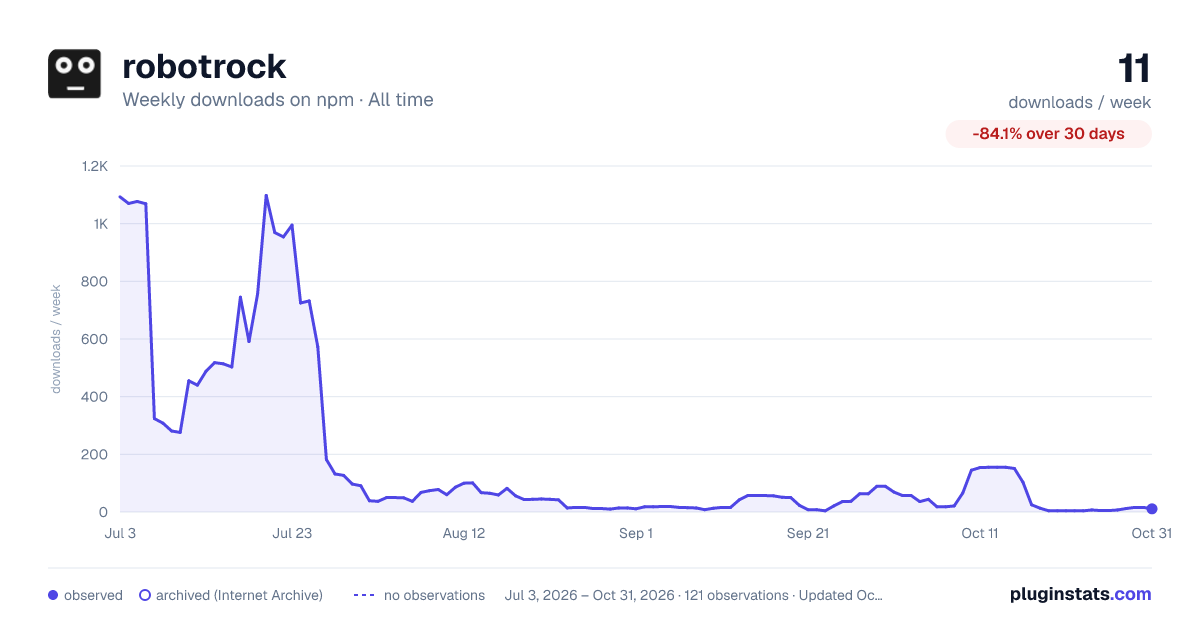

Adoption over time
7/30/90-day growth
Ranking history
Listing placement
Listing placement
Filled points are observed values; hollow points come from Internet Archive snapshots of the listing page. Dashed segments span periods with no observations — values between points are not interpolated.
Each band is one page of 20. Weekly downloads on a linear scale. Placement is projected from weekly downloads, so it can differ from the marketplace's own sort order. Hover a dot to see the listing.
Recent observations
Full history (1)Similar npm AI SDKs plugins
All 20 robotrock alternativesData source
Weekly downloads (trailing 7 complete days) come from the official npm downloads API. Downloads include CI and mirrors and are not equivalent to installs or users. npm publishes no ratings.
Listing: https://www.npmjs.com/package/robotrock. First seen Oct 29, 2026; last successful collection Oct 29, 2026. See the methodology.