 PluginStats
@mastergo/magic-mcp weekly downloads statistics
By mastergo · npm · MCP servers
MasterGo MCP standalone service
@mastergo/magic-mcp has 3,673 recorded weekly downloads on npm.
About @mastergo/magic-mcp
MasterGo Magic MCP


MasterGo Magic MCP is a standalone MCP (Model Context Protocol) service designed to connect MasterGo design tools with AI models. It enables AI models to directly retrieve DSL data from MasterGo design files.
Key Features
- Retrieves DSL data from MasterGo design files
- Runs directly with npx
- No external dependencies required, only Node.js environment needed
Tutorial
Example Prompts
Once the MCP server is connected, you can use the following prompts in your AI chat:
Extract SVG and preview in HTML:
Extract SVG and preview in HTML: https://{domain}/file/{fileId}?layer_id={layerId}
Restore a design to code:
Restore design: https://{domain}/file/{fileId}?layer_id={layerId}
Replace {domain}, {fileId}, and {layerId} with your actual values. You can also use short links:
Restore design: https://{domain}/goto/{shortLink}
Restore a design and save as an HTML file:
Restore design, save as HTML file: https://{domain}/file/{fileId}?layer_id={layerId}
You can also use short links:
Restore design, save as HTML file: https://{domain}/goto/{shortLink}
Usage
Obtaining MG_MCP_TOKEN
- Visit https://mastergo.com
- Enter personal settings
- Click the Security Settings tab
- Find the personal access token
- Click to generate the token
Permission Requirements
Important: If the tool is connected but returns a "no permission" error, please check the following conditions:
-
Account Version Requirement:
- Requires Team Edition or higher MasterGo account
- Personal free edition does not support MCP tool access
-
File Location Requirement:
- Design files must be placed in Team Projects
- Files in draft box cannot be accessed via MCP tools
Command Line Options
npx @mastergo/magic-mcp --token=YOUR_TOKEN [--url=API_URL] [--rule=RULE_NAME] [--proxy=PROXY_URL] [--format=FORMAT] [--header "Key: Value"] [--debug] [--no-rule] [--no-prefix]
Parameters:
--token=YOUR_TOKEN(required): MasterGo API token for authentication--url=API_URL(optional): API base URL, defaults to http://localhost:3000--rule=RULE_NAME(optional): Add design rules to apply, can be used multiple times--proxy=PROXY_URL(optional): HTTP/HTTPS proxy URL (e.g.,http://127.0.0.1:7890), also supportsHTTPS_PROXY/HTTP_PROXYenvironment variables--header "Key: Value"(optional): Custom HTTP request header, can be used multiple times. Quote the value when it contains spaces. Custom headers override the defaults — includingContent-Typeand the auth token — so match the default key exactly when overriding. Also settable via theMG_EXTRA_HEADERSenvironment variable as a JSON object (e.g.MG_EXTRA_HEADERS='{"X-Custom":"val"}'); CLI headers take precedence over env.--format=FORMAT(optional): Default output format for design-data tools — one ofjson(default),yaml,tree. An explicit per-callformattool parameter overrides this. Also settable via theDEFAULT_FORMATenvironment variable.--debug(optional): Enable debug mode for detailed error information--no-rule(optional): Disable default rules--no-prefix(optional): Register tools without themcp__name prefix (e.g.getDslinstead ofmcp__getDsl). Some MCP clients (such as Grok Build) silently skip tools whose fully-qualifiedserver__toolname contains more than one__separator — since the server is already prefixed, amcp__getDsltool name becomesserver__mcp__getDsland is dropped. Enable this flag for those clients. Also settable via theMG_NO_PREFIXenvironment variable (1/true/yes).
You can also use space-separated format for parameters:
npx @mastergo/magic-mcp --token YOUR_TOKEN --url API_URL --rule RULE_NAME --proxy PROXY_URL --format FORMAT --header "Key: Value" --debug
Environment Variables
Alternatively, you can use environment variables instead of command line arguments:
MG_MCP_TOKENorMASTERGO_API_TOKEN: MasterGo API tokenAPI_BASE_URL: API base URLRULES: JSON array of rules (e.g.,'["rule1", "rule2"]')DEFAULT_FORMAT: Default output format for design-data tools (json|yaml|tree); the--formatargument and an explicit per-callformattool parameter take precedence.MG_NO_PREFIX: Set to1/true/yesto register tools without themcp__name prefix (the--no-prefixargument takes priority).HTTPS_PROXY/https_proxy/HTTP_PROXY/http_proxy: HTTP(S) proxy URL (the--proxyargument takes priority)
Tool Output Format
The design-data tools (mcp__getDesignSections, mcp__getDsl, mcp__getDesignSvgs, mcp__getDesignTexts, mcp__extractSvg, mcp__getMeta) accept an optional format parameter that controls how the payload is serialized. It defaults to json, or to the value set via --format / DEFAULT_FORMAT (see Command Line Options).
| Value | Description |
|---|---|
json | Default. Compact JSON — useful when piping output into tools that expect JSON. Byte-identical to the prior behavior. |
yaml | Fewer tokens than JSON for typical designs (flat layouts with repeated values benefit most). |
tree | Experimental compact format. Structural keys (id, name, type) are encoded positionally on each node line, and style values stay deduplicated in a globalVars block. Designs with heavy style reuse see the largest token savings. |
Description from the npm listing.
- mastergo
- mcp
- ai
README badge
Show your rank in a README or on your website. The badge updates automatically.
Charts
Images: 30d · 1y · all time · 1600×900 dark


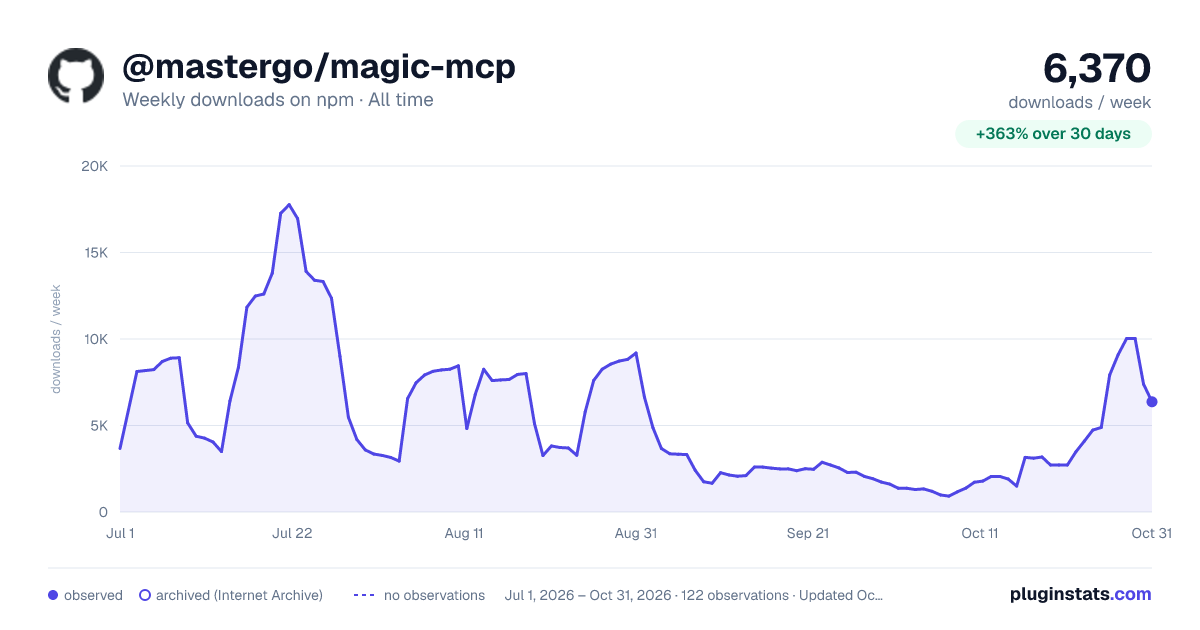

Adoption over time
7/30/90-day growth
Ranking history
Listing placement
Listing placement
Filled points are observed values; hollow points come from Internet Archive snapshots of the listing page. Dashed segments span periods with no observations — values between points are not interpolated.
Each band is one page of 20. Weekly downloads on a linear scale. Placement is projected from weekly downloads, so it can differ from the marketplace's own sort order. Hover a dot to see the listing.
Recent observations
Full history (1)Similar npm MCP servers plugins
All 20 @mastergo/magic-mcp alternativesData source
Weekly downloads (trailing 7 complete days) come from the official npm downloads API. Downloads include CI and mirrors and are not equivalent to installs or users. npm publishes no ratings.
Listing: https://www.npmjs.com/package/@mastergo/magic-mcp. First seen Oct 27, 2026; last successful collection Oct 27, 2026. See the methodology.