 PluginStats
storybook-addon-angular-manifest weekly downloads statistics
By ethriel3695 · npm · MCP servers
Storybook addon for Angular component manifest generation with Compodoc integration
storybook-addon-angular-manifest has 1,109 recorded weekly downloads on npm, ranking #1387 of 2,644 tracked listings.
About storybook-addon-angular-manifest
storybook-addon-angular-manifest
A Storybook addon that generates component manifests for Angular components using Compodoc documentation. This enables AI-powered tools like Storybook MCP to understand your Angular component library.
Features
- Compodoc Integration: Extracts component inputs, outputs, properties, and methods from Compodoc JSON
- Angular Template Snippets: Generates Angular template syntax snippets for each story
- JSDoc Support: Extracts
@summary,@desc, and other JSDoc tags from your stories - MCP Compatible: Outputs manifests in a format compatible with the Storybook MCP addon
Prerequisites
- Compodoc: Generate documentation for your Angular project:
npx compodoc -p tsconfig.json
This creates a documentation.json file that this addon reads.
- Storybook 8+: This addon requires Storybook 8.0.0 or later.
Installation
npm install storybook-addon-angular-manifest
# or
pnpm add storybook-addon-angular-manifest
# or
yarn add storybook-addon-angular-manifest
Usage
Add the addon to your .storybook/main.js (or .storybook/main.ts):
export default {
  framework: '@storybook/angular',
  addons: [
    'storybook-addon-angular-manifest', // Must come before addon-docs
    '@storybook/addon-docs',
    '@storybook/addon-mcp', // Optional: for AI integration
  ],
};
If you are using @storybook/addon-mcp docs tools, enable the manifest route with the flag that matches your Storybook version:
// .storybook/main.ts
export default {
  features: {
    // Storybook 10.2.x
    experimentalComponentsManifest: true,
    // Storybook 10.3+
    // componentsManifest: true,
  },
};
Addon Order
The order of addons matters:
- storybook-addon-angular-manifest - Generates component manifests
- @storybook/addon-docs - Attaches MDX documentation to components
- @storybook/addon-mcp - Exposes manifests via MCP for AI tools
Story requirements
This addon requires meta.component so it can resolve the Angular component name during CSF parsing:
export default {
  title: 'Example/Button',
  component: ButtonComponent,
};
If meta.component is missing, the manifest entry is generated with an error and MCP tooling will not have reliable component metadata.
Configuring a selector prefix
When Compodoc supplies a selector we use it verbatim. If Compodoc is missing data we now fall back to a bare kebab-case selector (e.g. ButtonComponent → button). Projects that rely on the Angular CLI-style prefix can opt back in by adding a global parameter in .storybook/preview.ts(x):
// .storybook/preview.ts
export const parameters = {
  angularManifest: {
    selectorPrefix: 'app',
  },
};
Restart Storybook after changing this value so the manifest regeneration picks it up. If your Storybook config directory lives somewhere other than .storybook, set STORYBOOK_MANIFEST_CONFIG_DIR to point at it (relative paths are resolved from the project root).
Configuring the Compodoc JSON path
By default, the addon auto-discovers documentation.json from story locations (including nested Nx library folders) and falls back to the workspace root (documentation.json or .compodoc/documentation.json).
If your file is generated in a custom location, set an explicit path:
// .storybook/preview.ts
export const parameters = {
  angularManifest: {
    compodocPath: 'libs/tile-selector-modal/documentation.json',
  },
};
compodocPath may be relative to the workspace root or absolute.
Configuring @storybook/addon-mcp compatibility
Current versions of @storybook/mcp format get-documentation from reactDocgen or reactDocgenTypescript. Angular compodocData is preserved in /manifests/components.json, but it is not rendered directly by those MCP docs tools yet.
To improve the current docs output without changing the base manifest shape for every consumer, you can opt into a compatibility layer:
// .storybook/preview.ts
export const parameters = {
  angularManifest: {
    addonMcpCompatibility: true,
  },
};
This works with the standard Angular docs setup in .storybook/preview.ts, including files that import Compodoc JSON for setCompodocJson(...). You do not need a separate preview file just for angularManifest settings.
When enabled, the addon:
- Synthesizes
reactDocgen.propsfrom Angular inputs soget-documentationcan render them under## Props - Appends an
## Outputssection to the component description using Compodoc outputs - Leaves
compodocDataunchanged
This mode is intentionally temporary and opt-in. It exists to improve current @storybook/addon-mcp docs output and is not the canonical Angular manifest contract.
How It Works
- When Storybook starts, this addon reads your
documentation.jsonfile (generated by Compodoc) - For each story file, it:
- Parses the CSF (Component Story Format) file
- Matches components to their Compodoc documentation
- Extracts inputs, outputs, and descriptions
- Generates Angular template snippets
- The resulting manifest is served at
/manifests/components.json
Compodoc Tips
For best results with Compodoc:
/**
 * A button component for user interactions.
 *
 * @summary Primary action button
 */
@Component({
  selector: 'app-button',
  // ...
})
export class ButtonComponent {
  /** The button's label text */
  @Input() label: string = 'Click me';

  /** Whether the button is disabled */
  @Input() disabled: boolean = false;

  /** Emitted when the button is clicked */
  @Output() clicked = new EventEmitter<void>();
}
Generated Manifest Example…
Description from the npm listing.
- storybook-addon
- angular
- compodoc
- mcp
- ai
README badge
Show your rank in a README or on your website. The badge updates automatically.
Charts
Images: 30d · 1y · all time · 1600×900 dark


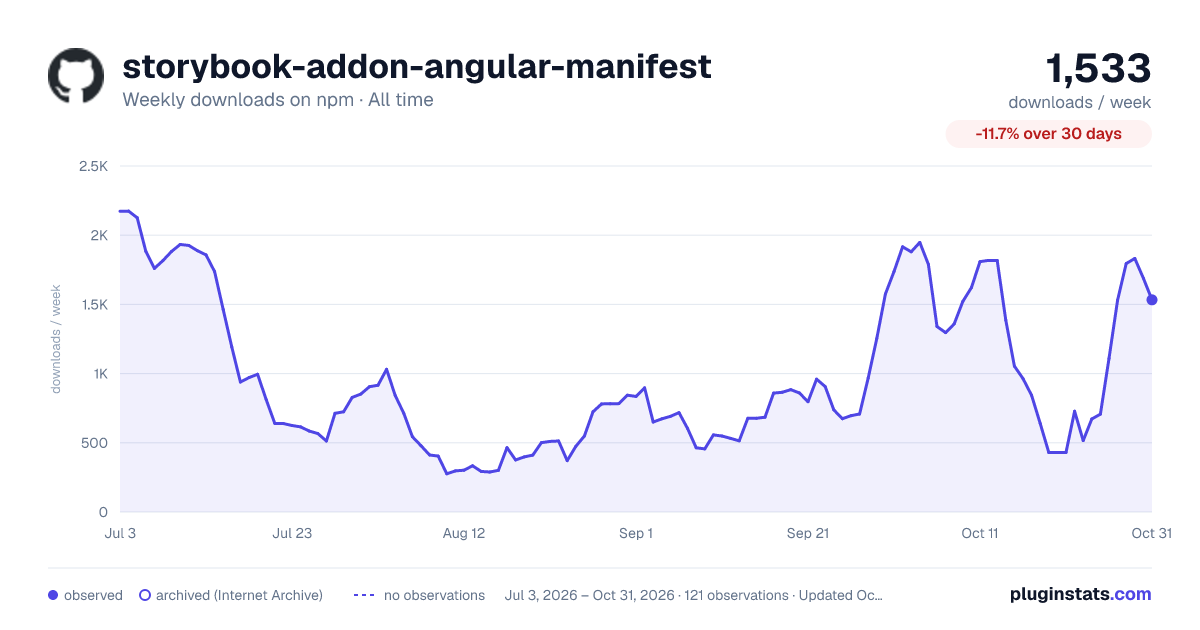

Adoption over time
7/30/90-day growth
Ranking history
Listing placement
Listing placement
Filled points are observed values; hollow points come from Internet Archive snapshots of the listing page. Dashed segments span periods with no observations — values between points are not interpolated.
Each band is one page of 20. Weekly downloads on a linear scale. Placement is projected from weekly downloads, so it can differ from the marketplace's own sort order. Hover a dot to see the listing.
Recent observations
Full history (1)Similar npm MCP servers plugins
All 20 storybook-addon-angular-manifest alternativesData source
Weekly downloads (trailing 7 complete days) come from the official npm downloads API. Downloads include CI and mirrors and are not equivalent to installs or users. npm publishes no ratings.
Listing: https://www.npmjs.com/package/storybook-addon-angular-manifest. First seen Oct 28, 2026; last successful collection Oct 28, 2026. See the methodology.