 PluginStats
@jencube/revly-mcp-server weekly downloads statistics
By jencube · npm · MCP servers
MCP server exposing Revly's local AI Agent Gateway to MCP-compatible AI tools (Claude Code, Codex, Gemini CLI, etc.) - runs locally and only ever talks to your own machine's Revly desktop app.
@jencube/revly-mcp-server has 43 recorded weekly downloads on npm.
About @jencube/revly-mcp-server
@jencube/revly-mcp-server
MCP server that connects AI coding tools (Claude Code, Codex, Gemini CLI, etc.) directly to Revly's local AI Agent Gateway - so an AI assistant can register a project, create snapshots, cut checkpoints and releases, manage branches, push/pull shared-folder contributions, read and change app-wide settings, run the project, and create a backup, without leaving your editor.
This runs entirely on your own machine. It only ever talks to your own Revly desktop app at
http://127.0.0.1:4317 - none of your project's code or history passes through any external server.
Install
With Claude Code:
claude mcp add --transport stdio revly -- npx -y @jencube/revly-mcp-server
Or add it manually to any MCP-compatible client's config:
{
  "mcpServers": {
    "revly": {
      "command": "npx",
      "args": ["-y", "@jencube/revly-mcp-server"]
    }
  }
}
Usage
- Set up - just ask your AI assistant to set up Revly here. It should ask you whether to
watch the current folder (or which folder to use instead), then call
revly_projectwith that choice - this only remembers it, nothing is created yet. - Connect - the assistant calls
revly_connectwith no token. This asks the Revly desktop app to create the project (if it isn't tracked yet) and opens a pending connection request, giving the assistant a short pairing code to relay to you. - Approve - open the Revly desktop app -> the project -> AI Sessions, find the pending
request matching that pairing code, choose which permissions to grant, and copy the token it
reveals (starts with
rvl_, only shown once). You always choose the permissions yourself - the agent can't grant itself any. - Finish connecting - paste the token into your AI chat. It calls
revly_connectagain with that token, and reports back exactly which permissions it was granted. - Work normally - from here the AI can use any of the tools below, gated by whatever permissions you granted in step 3. It can never grant itself more permissions, and it can never trigger a file/code deployment or a database schema deploy - both always require a human working directly in the desktop app.
The connection can be to a project's root, or to one of its branch dashboards (a branch checked out into its own folder) - sandboxed to just that branch's own working copy either way. Deployment Center, Database, Backups, and full contribution management (everything except pushing a branch) always require the connection to be the project's root, whichever one it is.
Prefer to set things up yourself instead? Skip revly_project/revly_connect's pairing flow and
open the Revly desktop app -> the project -> AI Sessions -> Connect Agent directly to
create a token up front, then give it to your assistant to use with revly_connect.
Call revly_workflow_guide at any time for guidance on when to checkpoint, how to version a
release, and deployment best practices.
Requirements
- Node.js >= 18
- The Revly desktop app running on the same machine
Tools
Connection
| Tool | Description |
|---|---|
revly_project | Choose which folder to watch (no token required, nothing created yet). |
revly_connect | With no token, trigger a connection request (pairing code); with a token, connect. Root or a branch dashboard. |
revly_whoami | Show the current connection and granted permissions. |
Status & history
| Tool | Description |
|---|---|
revly_status | Current branch and pending-change count. |
revly_changes | Files changed since the last snapshot. |
revly_list_snapshots / revly_create_snapshot | List or create snapshots. |
revly_list_checkpoints / revly_create_checkpoint | List or create checkpoints. |
revly_create_release | Turn a resolved checkpoint into a draft release. |
Branches
| Tool | Description |
|---|---|
revly_list_branches / revly_branch | List or create branches. |
revly_switch_branch | Check out a different branch (auto-snapshots first). |
revly_merge | Merge one branch into another; aborts cleanly on a real conflict. |
revly_merge_status | Check whether a merge conflict is currently unresolved. |
revly_delete_branch | Force-delete a local branch ref. |
Shared-folder contributions (a GitHub-style PR workflow with no server - see revly_workflow_guide)
| Tool | Description |
|---|---|
revly_list_contributions | List available-to-pull and already-pulled-but-unresolved contributions. Root only. |
revly_push_contribution | Push a branch to the shared folder; runs a secret scan first. Root or a branch dashboard. |
revly_preview_contribution | Preview a contribution's changed files before pulling. Root only. |
revly_pull_contribution | Pull a contribution into a local branch. Root only. |
revly_merge_contribution / revly_reject_contribution | Merge or reject a pulled contribution. Root only. |
Settings (app-wide, not project-scoped)
| Tool | Description |
|---|---|
revly_get_settings | Read display name, editor path, snapshot naming, and read-only Cloud & Team status. |
revly_set_display_name | Change the checkpoint/contribution author name. |
revly_set_editor_path | Change or clear the "Open in Editor" external editor. |
revly_set_snapshot_naming | Change the auto-snapshot message template/date format. |
Database schema (read-only - a schema deploy itself always requires a human)
| Tool | Description |
|---|---|
revly_check_schema | Force an immediate check of the connected local database for structure changes. Root only. |
revly_preview_schema_deploy | Preview the SQL a schema deploy would run against a target database. Root only. |
Other actions…
Description from the npm listing.
- mcp
- model-context-protocol
- revly
- git
- ai-agent
README badge
Show your rank in a README or on your website. The badge updates automatically.
Charts
Images: 30d · 1y · all time · 1600×900 dark


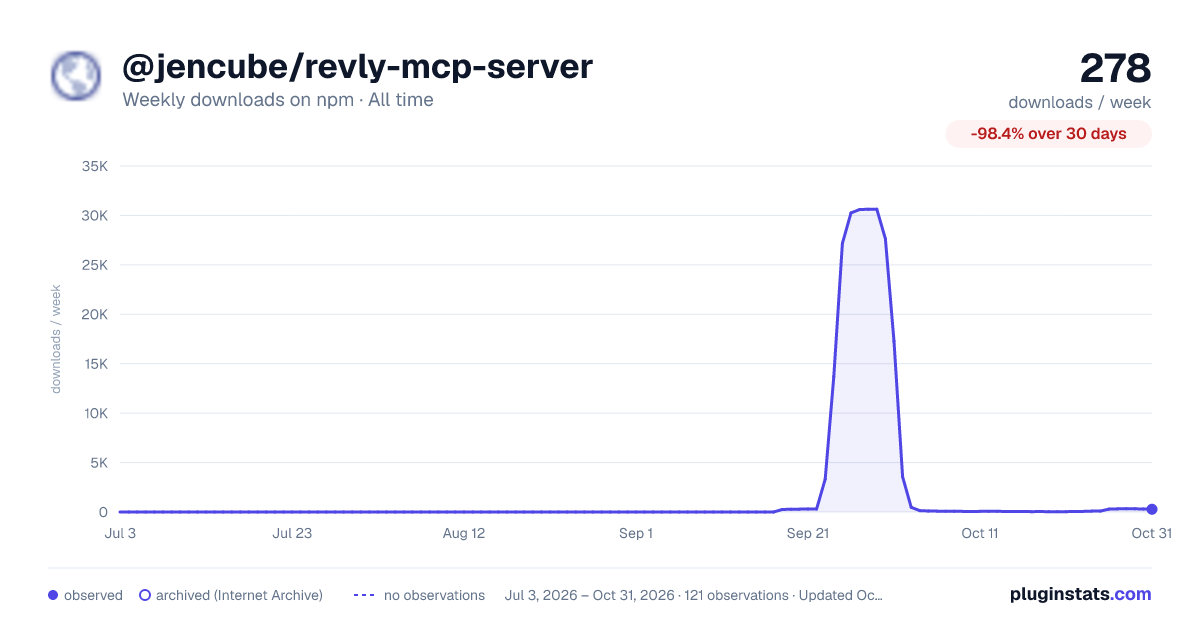

Adoption over time
7/30/90-day growth
Ranking history
Listing placement
Listing placement
Filled points are observed values; hollow points come from Internet Archive snapshots of the listing page. Dashed segments span periods with no observations — values between points are not interpolated.
Each band is one page of 20. Weekly downloads on a linear scale. Placement is projected from weekly downloads, so it can differ from the marketplace's own sort order. Hover a dot to see the listing.
Recent observations
Full history (1)Similar npm MCP servers plugins
All 20 @jencube/revly-mcp-server alternativesData source
Weekly downloads (trailing 7 complete days) come from the official npm downloads API. Downloads include CI and mirrors and are not equivalent to installs or users. npm publishes no ratings.
Listing: https://www.npmjs.com/package/@jencube/revly-mcp-server. First seen Oct 22, 2026; last successful collection Oct 22, 2026. See the methodology.