 PluginStats
@mulmoclaude/chart-plugin weekly downloads statistics
By mulmoclaude (4 listings) · npm · Claude Code
ECharts visualization plugin (presentChart) — shared gui-chat-protocol plugin for MulmoClaude and MulmoTerminal. Server-side write goes through the generic files.artifacts runtime capability.
@mulmoclaude/chart-plugin has 1,120 recorded weekly downloads on npm, ranking #1450 of 2,391 tracked listings.
About @mulmoclaude/chart-plugin
@mulmoclaude/chart-plugin
ECharts visualization plugin (presentChart) — shared gui-chat-protocol plugin for MulmoClaude and MulmoTerminal. Server-side write goes through the generic files.artifacts runtime capability.
A plugin for MulmoClaude and MulmoTerminal — loaded by the host, not run standalone.
Drawing from a spreadsheet
A chart entry may carry source: { spreadsheet, range } instead of inline data — the path
presentSpreadsheet reported and a range such as Summary!A1:C13. The View draws option with
dataset: { source: rows }, where rows is the range calculated, and draws it again whenever the
host announces that the workbook changed (file:<path> on the plugin's runtime channel). So
editing the sheet moves the chart.
The host does the reading: it passes sources: { read(source) } in the execute context (a plugin
does not import the spreadsheet plugin), and routes the View's dispatch({ kind: "readSource" })
to the same execute. A host without sources still draws inline charts, and refuses a sourced
one with a message telling the agent to pass the data inline.
Shapes of a range, and several ranges
A source may ask for its rows reshaped before they become the dataset (src/core/sourceShapes.ts):
layout: "matrix"— the range is a cross table (categories along the top row and down the first column, such as a correlation matrix). It is drawn as one[X, Y, Value]row per cell, which is what a heatmap reads.groupBy: { column, x?, value? }— the range is a long table (Date, Region, Sales). It is drawn with one column per value ofcolumn(Date, East, West), so each group becomes a series. Rows meeting in one cell are added up. A column that is not in the header is refused, naming it.
sources: [...] instead of source reads several ranges, the i-th into dataset[i] (a lower and
an upper bound kept on different sheets, say); transform datasets go after them.
Recipes for the agent
The option parameter's description carries recipes (src/core/recipes.ts): the ECharts option
for a boxplot, a Pareto chart, two value axes, a scatter drawn from a range, and so on. They sit
there rather than in the top-level description because Claude Code cuts that one at 2048
characters and passes parameter descriptions whole. Every recipe is drawn by ECharts in
test/plugins/chart/test_chartRecipes.ts, so an option that stops rendering fails the suite.
Statistical transforms
The View registers two of echarts-stat's dataset
transforms, ecStat:regression (linear, exponential, logarithmic, polynomial) and
ecStat:histogram. Put one in a second dataset after the source and point a series at it with
datasetIndex: 1; with source, the rows fill the first dataset, so the fit and the bins are
recomputed whenever the sheet changes.
Two transforms are the plugin's own (src/core/ownTransforms.ts):
mulmo:clustering— k-means overconfig.dimensionswithconfig.clusterCount, adding aClustercolumn. ecStat's clustering is not registered: its k-means starts from random centroids without retrying, so it split well-separated groups wrongly now and then and differently on each redraw. This one seeds k-means++ from a fixed seed, keeps the best of several starts, and numbers clusters in row order, so the same sheet gives the same groups every time.mulmo:boxplotColumns— one box per column (ECharts'boxplottransform takes each row as a group), with ECharts' quantiles and whiskers (config.boundIQR, 1.5 by default, or"none"). Its second result holds the outliers; ECharts drops that result's column names, so a series reads it in column order.
Number and date formats
The option is JSON, so a formatter cannot be a function. Instead, a formatter or
valueFormatter may be a format object, which the plugin turns into a function before ECharts
sees it (src/core/formats.ts; nothing is evaluated):
{ "kind": "number", "digits"?, "grouping"?, "compact"?, "prefix"?, "suffix"? }{ "kind": "percent", "digits"? }— a ratio,0.12→12%{ "kind": "currency", "currency": "JPY", "digits"? }{ "kind": "date", "pattern": "{yyyy}-{MM}-{dd}" }— ECharts' time template
Each takes "template", e.g. "{b}: {value}" ({a} series name, {b} item name, {d} pie
percent). It works on an axis label or axis-pointer label, the tooltip's or a series'
valueFormatter, and a series' label, endLabel and emphasis.label. A format anywhere else,
or a malformed one, is refused with its place named. Numbers are written in the host's locale.
Colour or size by value needs no function: use visualMap.
Maps and 3D
Loaded only when a chart uses them (src/core/extensions.ts), because they are large:
- Maps —
worldandjapan(prefectures) ship with the plugin, from Natural Earth (public domain; seesrc/maps/README.md).world-ja/japan-jaare the same shapes named in Japanese (東京都, アメリカ合衆国), so a sheet's Japanese names find their regions. Use them asseries[].maporgeo.map. - 3D — echarts-gl (
scatter3D,bar3D,surface,line3D,grid3D,globe, …).
echarts-gl is a dependency but external to the build, like echarts, so the host bundles one
ECharts it registers with. The server's trial draw loads the maps
first; a 3D chart needs WebGL, so on the server only its formats are
checked, and its card has no SVG export.
Word clouds…
Description from the npm listing.
- chart
- echarts
- visualization
- mulmoclaude
- mulmoclaude-plugin
- gui-chat-protocol
- claude-code
- mulmoterminal
README badge
Show your rank in a README or on your website. The badge updates automatically.
Charts
Images: 30d · 1y · all time · 1600×900 dark


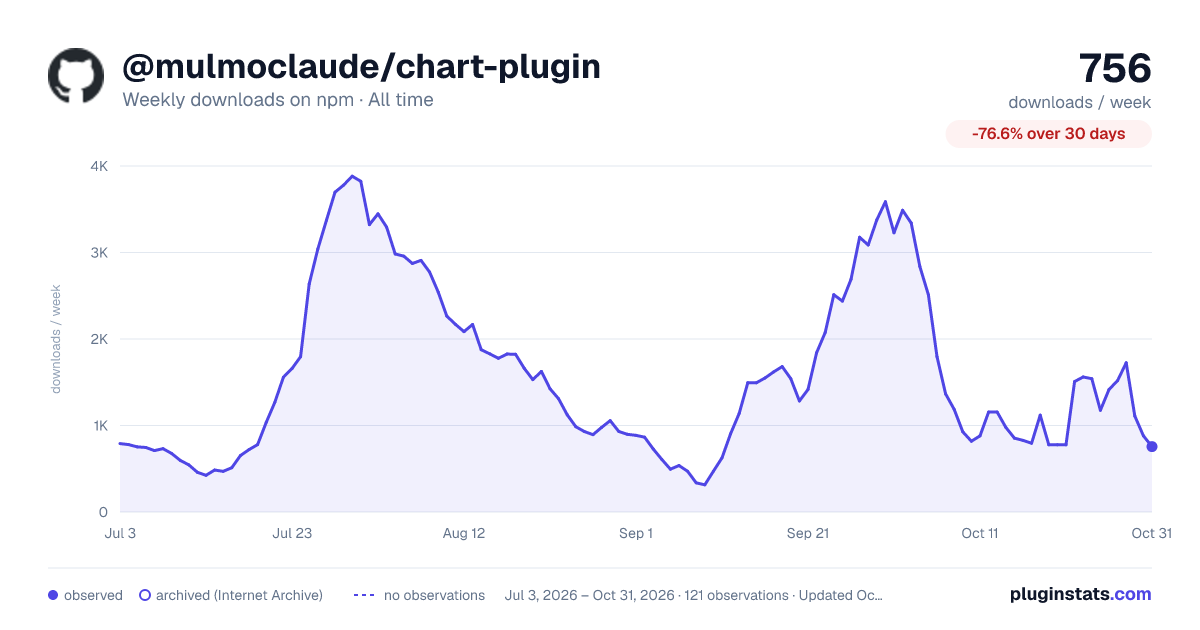

Adoption over time
7/30/90-day growth
Ranking history
Listing placement
Listing placement
Filled points are observed values; hollow points come from Internet Archive snapshots of the listing page. Dashed segments span periods with no observations — values between points are not interpolated.
Each band is one page of 20. Weekly downloads on a linear scale. Placement is projected from weekly downloads, so it can differ from the marketplace's own sort order. Hover a dot to see the listing.
Recent observations
Full history (1)Similar npm Claude Code plugins
All 20 @mulmoclaude/chart-plugin alternativesData source
Weekly downloads (trailing 7 complete days) come from the official npm downloads API. Downloads include CI and mirrors and are not equivalent to installs or users. npm publishes no ratings.
Listing: https://www.npmjs.com/package/@mulmoclaude/chart-plugin. First seen Oct 21, 2026; last successful collection Oct 21, 2026. See the methodology.