 PluginStats
@gnldev/scheduler has 419 recorded weekly downloads on npm.
About @gnldev/scheduler
@gnldev/scheduler
Cron, interval and one-shot triggers for durable workflows. Several workers can poll the same schedule: a run-lock picks one winner per fire and every write to the trigger's state is CAS-fenced, so a slot is never double-advanced or rolled back — see the lock section for what that does and does not promise about the workflow body.
Install
Install:
pnpm add @gnldev/scheduler— or use it from a repo clone:pnpm install && pnpm -r build.
npm i @gnldev/scheduler
Schedule something
import { scheduleWorkflow, createScheduler, pollScheduler } from '@gnldev/scheduler';

await scheduleWorkflow(journal, {
  id: 'nightly-invoices',
  cron: '0 3 * * *',
  name: 'invoices',          // the workflow name handed to runner.runWorkflow
});

// in your worker loop. The runner is an object with runWorkflow — createGnl() is one.
setInterval(() => pollScheduler(journal, gnl), 30_000);
Give exactly one of at (epoch ms), every (ms, greater than 0) or cron (5 fields, UTC unless you
give tz — see Time zones). A spec that
could not fire — a cron with hour 25, every: 0, two of the three, 0 0 30 2 * (there is no 30
February) — is refused before anything is written. Whether a cron can fire does not depend on the date
you ask: 0 0 29 2 * fires on every leap day, four (across 2100, eight) years apart.
Calling scheduleWorkflow again with the same spec for the same id is a no-op, so every boot can call
it. A different spec for an id that already exists is refused, naming both, until you say which one you
want:
import { scheduleWorkflow } from '@gnldev/scheduler';
import { InMemoryJournal } from '@gnldev/durable';
const journal = new InMemoryJournal();

await scheduleWorkflow(journal, { id: 'nightly', name: 'report', cron: '0 4 * * *', ifExists: 'replace' });
'replace' applies the new spec (next time from it, attempts reset, a fire count no run has used);
'keep' leaves the stored trigger as it is; or use a new id. A stored definition that cannot fire (left
by 0.9.0) is replaced by the next valid registration whatever ifExists says, and the poller fails it
instead of firing it.
Time zones
cron is read in UTC unless the spec names an IANA zone in tz:
import { scheduleWorkflow } from '@gnldev/scheduler';
import { InMemoryJournal } from '@gnldev/durable';
const journal = new InMemoryJournal();

await scheduleWorkflow(journal, { id: 'berlin-standup', name: 'standup', cron: '0 9 * * 1-5', tz: 'Europe/Berlin' });
That is 09:00 in Berlin all year. A UTC cron cannot say it: 0 8 * * * UTC is 09:00 in Berlin on 155
days of 2026 and 10:00 on the other 210. On the two DST days a year:
- a wall time that does not exist (02:30 when clocks go 02:00 → 03:00) fires once, shifted forward by the gap — 03:30. A daily job still runs that day.
- a wall time that happens twice (02:30 when clocks go 03:00 → 02:00) fires once, at the first 02:30 —
unless the hour field is
*. Then every real hour is its own occurrence: an hourly cron runs 25 times on a 25-hour day.
tz is only for cron (an every period and an at instant have no zone) and must be a zone the
runtime knows; anything else is refused before a write. The canonical name is stored, so
'europe/berlin' and 'Europe/Berlin' are the same spec. Zone rules come from Node's own Intl.
Stop, pause, resume
import { unscheduleWorkflow, pauseTrigger, resumeTrigger } from '@gnldev/scheduler';
import { InMemoryJournal } from '@gnldev/durable';
const journal = new InMemoryJournal();

await pauseTrigger(journal, { id: 'nightly-invoices' });        // kept, not fired
await resumeTrigger(journal, { id: 'nightly-invoices' });       // fires again from the next slot
await unscheduleWorkflow(journal, { id: 'nightly-invoices' });  // gone
await unscheduleWorkflow(journal, { id: 'ayse-weekly', resourceId: 'ayse', orgId: 'acme' }); // an owned one
Name the trigger as you scheduled it: the id (or the workflow name, if you gave no id) and the same
owner. Each returns true when the trigger is in the asked-for state and false when there was nothing
to act on (no such trigger; or, for pause and resume, one that is removed, done or failed).
- Removing makes the trigger never fire again and drops it from
listTriggers. A fire already in flight finishes (the run is not aborted), and its result is discarded, so it cannot bring the trigger back. Scheduling the id again later is a new trigger, with run ids the old one never used. If your boot code registers the trigger, remove that call too, or the next boot schedules it again. - Pausing keeps everything (schedule, fire count, attempts) and shows
status: 'paused'. The boot-timescheduleWorkflowcall does not lift it, and neither doesifExists: 'replace'. A fire in flight when you pause is recorded under the pause, so resuming never runs that occurrence again. - Resuming does not catch up. Occurrences that fell inside the pause are not run, whatever
misfiresays: the pause was the decision not to run them (misfireis for occurrences missed because no poller ran). The next fire is the first slot after the resume, on the same grid. A one-shotatwhose time passed during the pause fires once, right away: skipping its only occurrence would delete it.
Each is a single write to the trigger's state, compared against the state it read, so it never overwrites a fire it did not see.
Triggers for an end user
A trigger can work for one user in one organization. Each fire's run belongs to that user: they can see it and approve it.
import { scheduleWorkflow, createScheduler } from '@gnldev/scheduler';
import { createGnl, scopeConfigToOrg } from '@gnldev/durable';…
Description from the npm listing.
- ai
- agent
- llm
- typescript
- ai-sdk
- durable
- exactly-once
- cron
- triggers
README badge
Show your rank in a README or on your website. The badge updates automatically.
Charts
Images: 30d · 1y · all time · 1600×900 dark


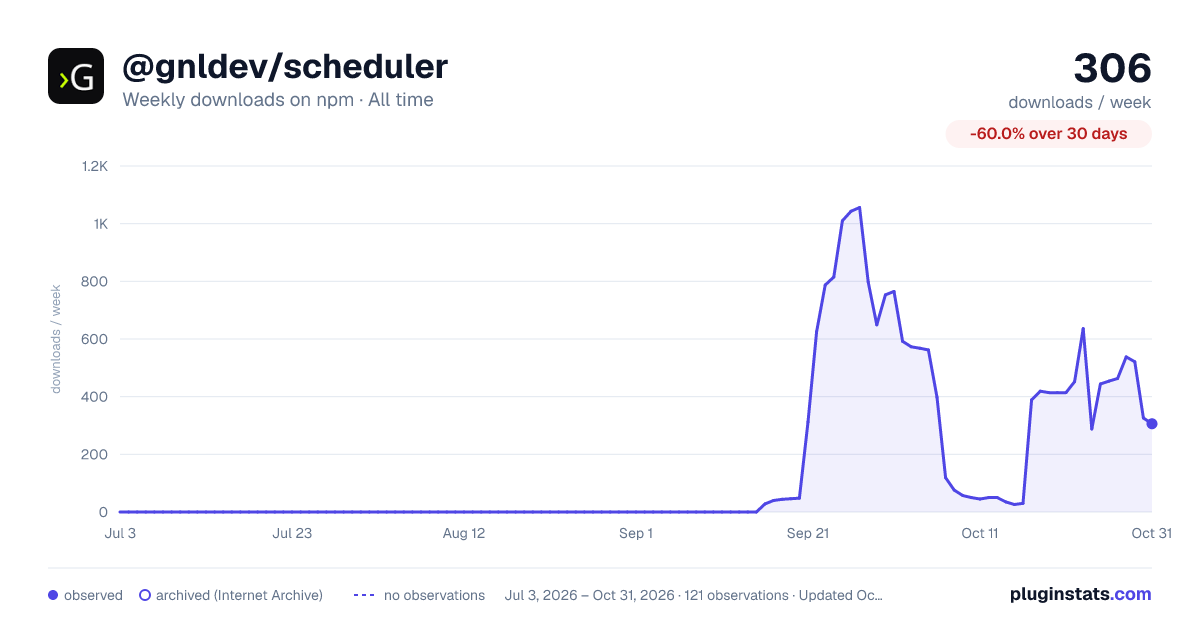

Adoption over time
7/30/90-day growth
Ranking history
Listing placement
Listing placement
Filled points are observed values; hollow points come from Internet Archive snapshots of the listing page. Dashed segments span periods with no observations — values between points are not interpolated.
Each band is one page of 20. Weekly downloads on a linear scale. Placement is projected from weekly downloads, so it can differ from the marketplace's own sort order. Hover a dot to see the listing.
Recent observations
Full history (1)Similar npm AI SDKs plugins
All 20 @gnldev/scheduler alternativesData source
Weekly downloads (trailing 7 complete days) come from the official npm downloads API. Downloads include CI and mirrors and are not equivalent to installs or users. npm publishes no ratings.
Listing: https://www.npmjs.com/package/@gnldev/scheduler. First seen Oct 22, 2026; last successful collection Oct 23, 2026. See the methodology.