 PluginStats
cc-hooks-ts weekly downloads statistics
By sushichan044 · npm · Claude Code
Write claude code hooks with type safety
cc-hooks-ts has 1,404 recorded weekly downloads on npm.
About cc-hooks-ts
cc-hooks-ts
Define Claude Code hooks with full type safety using TypeScript.
See examples for more usage examples.
<!-- TOC -->- cc-hooks-ts
[!NOTE] Starting with versions 2.0.42, we will raise our version number to match Claude Code whenever Hook-related changes occur.
This ensures we can adopt newer type definitions while maintaining compatibility.
Installation
# npm
npm i cc-hooks-ts

# yarn
yarn add cc-hooks-ts

# pnpm
pnpm add cc-hooks-ts

# Bun
bun add cc-hooks-ts

# Deno
deno add npm:cc-hooks-ts
Basic Usage
Define a Hook
import { defineHook } from "cc-hooks-ts";

const hook = defineHook({
  // Specify the event(s) that trigger this hook.
  trigger: {
    SessionStart: true,
  },
  // Implement what you want to do.
  run: (context) => {
    // Do something great here
    return context.success({
      messageForUser: "Welcome to your coding session!",
    });
  },
});

// import.meta.main is available in Node.js 24.2+ and Bun and Deno
if (import.meta.main) {
  const { runHook } = await import("cc-hooks-ts");
  await runHook(hook);
}
Configure Claude Code
Then, load defined hooks in your Claude Code settings at ~/.claude/settings.json.
{
  "hooks": {
    "SessionStart": [
      {
        "hooks": [
          {
            "type": "command",
            "command": "bun run -i --silent path/to/your/sessionHook.ts"
          }
        ]
      }
    ]
  }
}
Tool Specific Hooks
In PreToolUse, PostToolUse, PostToolUseFailure, PermissionRequest, and PermissionDenied events, you can define hooks specific to tools by specifying tool names in the trigger configuration.
For example, you can create a hook that only runs before the Read tool is used:
const preReadHook = defineHook({
  trigger: { PreToolUse: { Read: true } },
  run: (context) => {
    // context.input.tool_input is typed as { file_path: string; limit?: number; offset?: number; }
    const { file_path } = context.input.tool_input;

    if (file_path.includes(".env")) {
      return context.blockingError("Cannot read environment files");
    }

    return context.success();
  },
});

if (import.meta.main) {
  const { runHook } = await import("cc-hooks-ts");
  await runHook(preReadHook);
}
Then configure it in Claude Code settings:
{
  "hooks": {
    "PreToolUse": [
      {
        "matcher": "Read",
        "hooks": [
          {
            "type": "command",
            "command": "bun run -i --silent path/to/your/preReadHook.ts"
          }
        ]
      }
    ]
  }
}
The same trigger shape also works for permission hooks:
const permissionRequestHook = defineHook({
  trigger: { PermissionRequest: { Bash: true } },
  run: (context) => {
    // context.input.tool_input is typed as BashInput
    const { command } = context.input.tool_input;

    if (command.includes("rm -rf")) {
      return context.blockingError("Refusing destructive command");
    }

    return context.success();
  },
});
Custom Tool Types Support
You can add support for custom tools by extending the tool type definitions.
This is useful when you want to your MCP-defined tools to have type-safe hook inputs.
import { defineHook } from "cc-hooks-ts";

// Example: type-safe hooks for DeepWiki MCP Server tools
declare module "cc-hooks-ts" {
  interface ToolSchema {
    mcp__deepwiki__ask_question: {
      input: {
        question: string;
        repoName: string;
      };
      response: unknown;
    };
  }
}

const deepWikiHook = defineHook({
  trigger: { PreToolUse: { mcp__deepwiki__ask_question: true } },
  run: (context) => {
    // context.input.tool_input is typed as { question: string; repoName: string; }
    const { question, repoName } = context.input.tool_input;

    if (question.length > 500) {
      return context.blockingError("Question is too long");
    }

    return context.success();
  },
});
Advanced Usage
Conditional Hook Execution
You can conditionally execute hooks based on runtime logic using the shouldRun function.
If shouldRun returns false, the hook will be skipped.
import { defineHook } from "cc-hooks-ts";

const hook = defineHook({
  trigger: {
    Notification: true,
  },
  // Only run this hook on macOS
  shouldRun: () => process.platform === "darwin",
  run: (context) => {
    // Some macOS-specific logic like sending a notification using AppleScript
    return context.success();
  },
});
Advanced JSON Output
Use context.json() to return structured JSON output with advanced control over hook behavior.
For detailed information about available JSON fields and their behavior, see the official documentation.
Async JSON Output (Experimental)
[!WARNING] This behavior is undocumented by Anthropic and may change.…
Description from the npm listing.
- anthropic
- claude
- claude-code
- hooks
- type-safety
- typescript
README badge
Show your rank in a README or on your website. The badge updates automatically.
Charts
Images: 30d · 1y · all time · 1600×900 dark


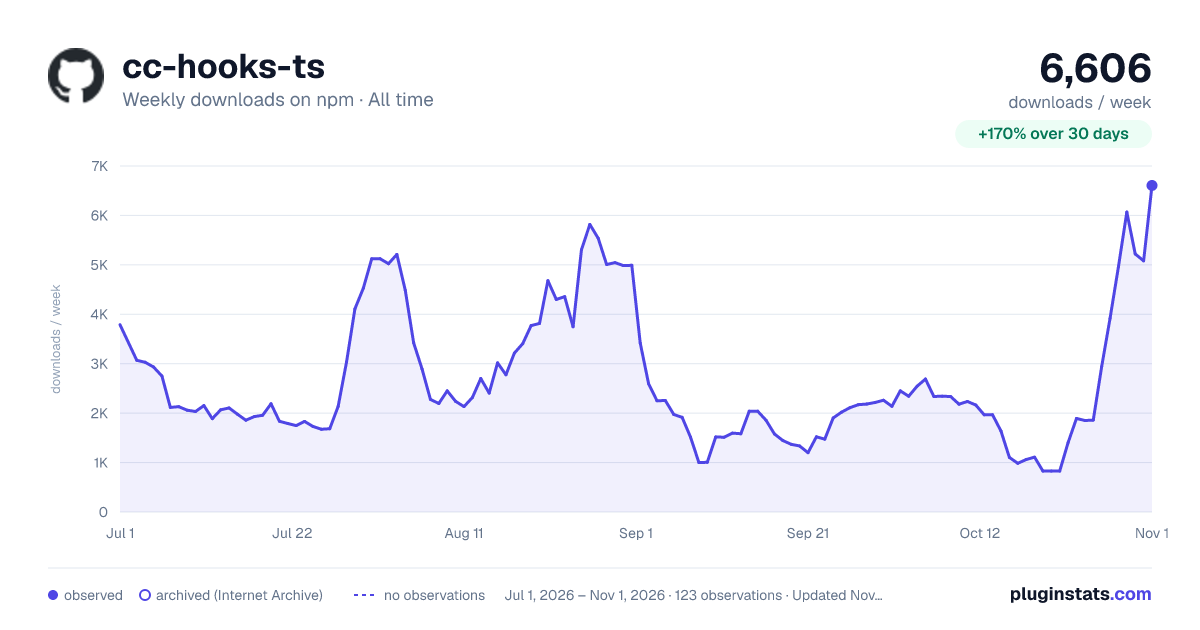

Adoption over time
7/30/90-day growth
Ranking history
Listing placement
Listing placement
Filled points are observed values; hollow points come from Internet Archive snapshots of the listing page. Dashed segments span periods with no observations — values between points are not interpolated.
Each band is one page of 20. Weekly downloads on a linear scale. Placement is projected from weekly downloads, so it can differ from the marketplace's own sort order. Hover a dot to see the listing.
Recent observations
Full history (2)Similar npm Claude Code plugins
All 20 cc-hooks-ts alternativesData source
Weekly downloads (trailing 7 complete days) come from the official npm downloads API. Downloads include CI and mirrors and are not equivalent to installs or users. npm publishes no ratings.
Listing: https://www.npmjs.com/package/cc-hooks-ts. First seen Oct 26, 2026; last successful collection Oct 27, 2026. See the methodology.