 PluginStats
@byokit/connect has 385 recorded weekly downloads on npm, ranking #1539 of 2,644 tracked listings.
About @byokit/connect
@byokit/connect
Connect a person's online files, mail, calendar, notes, designs, code or other remote account. Sign-in opens the provider's own page. Credentials stay in the keystore the app passes, scoped to that person on their device. There is no account pool, proxy, ambient credential lookup, logging or extra opt-in switch.
npm install @byokit/connect
The main export is portable to Node, Electron, browsers and PWAs. It needs fetch,
Web Crypto, btoa, and URL APIs; native hosts must provide those globals before
importing it. The optional /node export owns only the loopback callback listener.
The main entry has no runtime dependency on Node or keystore backends.
Test-only endpoint overrides
For local integration tests only, ConnectOptions.endpoints accepts full provider URLs; omitted values use production endpoints. For example, emulate 0.12.2 serves Google authorize at http://localhost:4000/o/oauth2/v2/auth, token at http://localhost:4000/oauth2/token, and Gmail API base at http://localhost:4000/gmail/v1. Pass the same endpoints object to MailReader or MailSender to route Gmail calls to its Google API. Connection.apiBase exposes the configured provider API base for app-owned calls; the kit itself makes no GitHub REST API calls. GitHub device-code and token URLs can be overridden for a local device-flow server because emulate 0.12.2 does not implement those routes.
Sign in with an app-supplied redirect
import { connect } from '@byokit/connect';
import type { Keystore } from '@byokit/secrets';

// Supply your app's store, scoped to this person on this device.
declare const store: Keystore;
const drive = connect('drive', {
  store,
  person: 'Umer',
  redirectUri: 'https://your-app.example/connect/callback',
  client: { id: 'your-google-client-id', secret: 'your-google-client-secret' },
});

const flow = await drive.signIn();
// Open flow.url in the host's browser/auth session.
// Route its complete callback URL to the same flow instance:
await flow.finish('https://your-app.example/connect/callback?state=...&code=...');

const accessToken = await drive.token(); // Trusted API calls only; never show/log it.
await drive.disconnect();
connect(target, options) creates a handle. signIn() returns { url, redirectUri, finish, cancel }. Call cancel() when closing the sign-in sheet. Calls to
connected(), token() and disconnect() work after reconstructing the handle
with the same store, person, target and configured client ID. The redirect port
can change without losing the saved connection. A newer sign-in invalidates the
older flow; callbacks have a 15-minute deadline and can be used only once.
Google requires the host's registered client. Use a Desktop client with loopback,
or register the exact HTTPS/native redirect for that client. Presets keep Google's
offline/consent parameters and request one service at a time: google (identity),
drive (drive.file), gmail (read-only; pass scopes to send) and calendar (events). The host owns
Google consent-screen publishing and API enablement. The kit does not probe
undocumented provider pages or impose a product-specific approval policy.
notion, canva and arbitrary HTTPS MCP URLs discover their protected-resource
metadata, authorization server and dynamic registration endpoint. If the server
does not offer registration, pass the app's registered client. Custom Provider
objects can supply oauth endpoints, an issuer, scopes and extra authorization
parameters. Options scopes override the preset/discovered scopes; security
parameters (state, PKCE, response type, client and redirect) cannot be overridden
through extra. A sign-in with explicitly incomplete granted scopes is not saved.
The house Google client
One Google OAuth client serves every Google route the house runs: this kit's Gmail reader and sender, and Crewhouse's Google connections.
- Client: type Desktop app, in the house's own Google Cloud project, with the
Gmail, Calendar and Drive APIs enabled. Desktop clients accept any loopback port, so
connectLoopbackneeds no redirect registration. - Consent: audience External, published (In production; Testing grants stop
after 7 days). The consent screen lists
gmail.readonly,gmail.send,calendar.eventsanddrive.file. Each connection still asks for one service; sending addsgmail.sendthroughscopes. - Secret: the JSON Google offers to download, unchanged, at
~/.config/byokit/google-oauth-client.json, mode 600. Never in a repository, a log or a test HOME.
import { homedir } from 'node:os';
import { join } from 'node:path';
import { connectLoopback, googleClientFile } from '@byokit/connect/node';
import type { Keystore } from '@byokit/secrets';

declare const store: Keystore;
declare const yourApp: { openExternal(url: string): Promise<void>; setUpGoogle(): never };

const client = await googleClientFile(join(homedir(), '.config', 'byokit', 'google-oauth-client.json'));
if (!client) yourApp.setUpGoogle(); // No file yet: Google is not set up on this computer.
const attempt = await connectLoopback('gmail', { store, person: 'Umer', client,
  scopes: ['https://www.googleapis.com/auth/gmail.readonly', 'https://www.googleapis.com/auth/gmail.send'],
  open: url => yourApp.openExternal(url) });
await attempt.done; // Then MailReader/MailSender on attempt.connection.
googleClientFile(path) reads only the path the host passes. It returns null when
the file is absent, and refuses a file other users can read, a non-regular file
at the path, or any client type other than Desktop app, with a plain message
that never repeats the file's contents.
Check app details and inspect grant lifetime
import type { Connection } from '@byokit/connect';

declare const drive: Connection;
declare const enteredClientId: string;
declare const enteredClientSecret: string;…
Description from the npm listing.
- typescript
- ai
- ai-sdk
- react-native
- web
- privacy
README badge
Show your rank in a README or on your website. The badge updates automatically.
Charts
Images: 30d · 1y · all time · 1600×900 dark


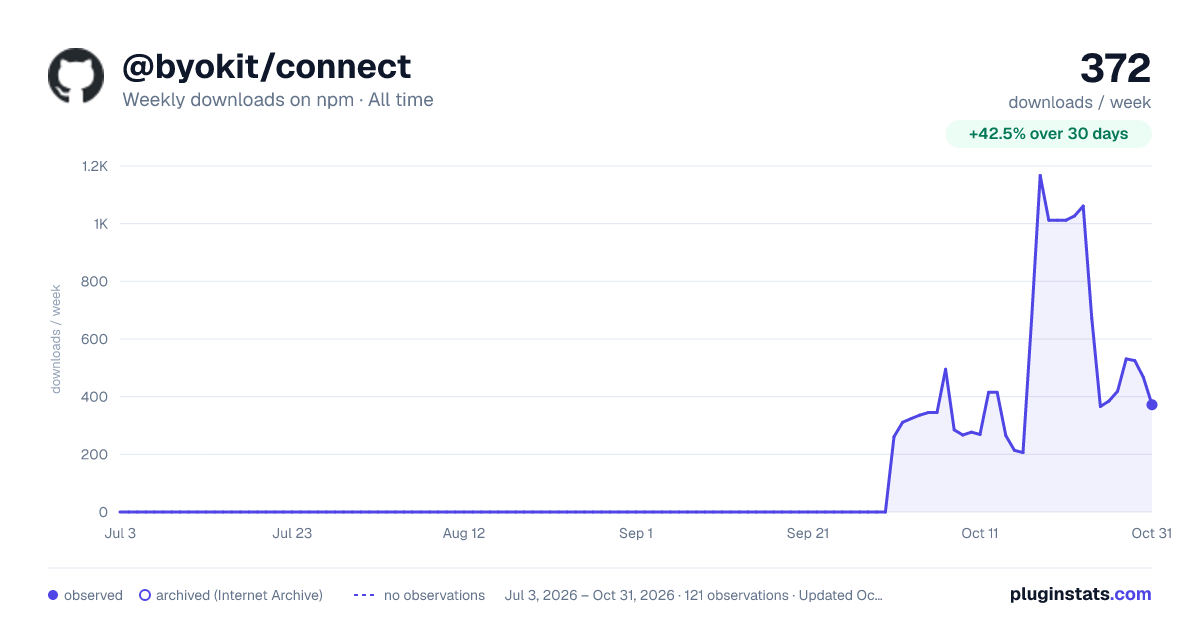

Adoption over time
7/30/90-day growth
Ranking history
Listing placement
Listing placement
Filled points are observed values; hollow points come from Internet Archive snapshots of the listing page. Dashed segments span periods with no observations — values between points are not interpolated.
Each band is one page of 20. Weekly downloads on a linear scale. Placement is projected from weekly downloads, so it can differ from the marketplace's own sort order. Hover a dot to see the listing.
Recent observations
Full history (1)Similar npm AI SDKs plugins
All 20 @byokit/connect alternativesData source
Weekly downloads (trailing 7 complete days) come from the official npm downloads API. Downloads include CI and mirrors and are not equivalent to installs or users. npm publishes no ratings.
Listing: https://www.npmjs.com/package/@byokit/connect. First seen Oct 28, 2026; last successful collection Oct 28, 2026. See the methodology.