 PluginStats
fadekit weekly downloads statistics
By fabroos · npm · Tailwind plugins
Smooth, eased fades for Tailwind CSS. Gradients without the hard edge.
fadekit has 87 recorded weekly downloads on npm, ranking #1706 of 2,644 tracked listings.
About fadekit
fadekit
Formerly
tailwindcss-better-gradient. Every class works the same; only the package name changed.
Smooth, eased fades for Tailwind CSS. A plain bg-linear-to-t from-black changes opacity at a constant rate, which leaves a visible hard edge where the gradient ends. This plugin builds the gradient from an easing curve instead, so overlays melt into whatever is behind them.
<div class="fade-from-black fade-to-t"></div>
Features
- 🎨 Any color: the palette, opacity modifiers (
/50), arbitrary values ([#123456]) and CSS variables ((--brand)) - 📐 8 directions plus any angle (
fade-to-45,fade-to-[200deg]) - 🎯 24 easing curves plus any
cubic-bezier() - 🎚️ Automatic stop count: the plugin uses the fewest stops that still look smooth, placed where the curve bends the most
- 🔧 Composable in any order, and compatible with variants (
hover:,md:,dark:), without!important - ⚡ Zero dependencies (except Tailwind CSS)
Installation
npm install fadekit
Requires Tailwind CSS v4.
@import 'tailwindcss';
@plugin "fadekit";
Usage
A fade is a color, optionally with a direction and a curve:
<!-- Color → transparent, fading toward the top (the default direction) -->
<div class="fade-from-black"></div>

<!-- Transparent → color -->
<div class="fade-to-blue-500 fade-to-b"></div>

<!-- Pick a curve, optionally with an explicit number of stops -->
<div class="fade-from-black fade-to-t fade-scrim"></div>
<div class="fade-from-black fade-to-t fade-ease-in-out/12"></div>

<!-- Variants work on every part -->
<div class="fade-from-black/60 fade-to-b md:fade-to-r hover:fade-from-black/80"></div>
Colors
| Class | Fade |
|---|---|
fade-from-{color} | from the color to transparent |
fade-to-{color} | from transparent to the color |
fade | from --color-background (white if it isn't set) |
{color} can be any theme color (blue-500, black, current), use an opacity modifier (black/50), an arbitrary value ([#0ea5e9]) or a CSS variable ((--brand)).
Direction
| Class | Angle |
|---|---|
fade-to-t (default) | 0deg |
fade-to-tr / fade-to-r / fade-to-br | 45deg / 90deg / 135deg |
fade-to-b / fade-to-bl / fade-to-l | 180deg / 225deg / 270deg |
fade-to-tl | 315deg |
fade-to-{n}, fade-to-[{angle}] | any angle |
The direction is the way the color fades out. fade-from-black fade-to-t is solid at the bottom and transparent at the top, the same as bg-linear-to-t from-black.
Curve
| Class | Curve |
|---|---|
| (none) | ease-out-cubic |
fade-{easing} | any easing below, automatic number of stops |
fade-{easing}/{n} | the same easing with exactly n stops (2–24, or /[n] up to 64) |
fade-{n} | the default easing with n stops |
fade-[cubic-bezier(…)] | any cubic-bezier (also fade-ease-[cubic-bezier(…)]) |
Easings: linear, scrim, ease-in, ease-out and ease-in-out (cubic), and ease-{in,out,in-out}-{sine,quad,cubic,quart,quint,expo,circ}.
Opacity at a point t along the fade is 1 - easing(t), so the names read like CSS transitions: ease-out leaves the color quickly and settles gently into transparency.
Choosing a curve
What makes a fade look smooth is how it ends. If opacity is still changing when it reaches 0, you see an edge. The table shows where each curve reaches half opacity, measured on a rendered gradient:
| Curve | 50% opacity at | Ends smoothly | Notes |
|---|---|---|---|
linear | 50% | ✗ | Visible edge at both ends, like Tailwind's gradients |
scrim | 37% | ✓ | Andreas Larsen's "scrim" curve: most coverage while staying smooth, good for text over images |
ease-out-quad | 30% | ✓ | |
ease-out-cubic (default) | 21% | ✓ | Smooth, but most of the color sits in the first third |
ease-out-quart/expo | 16% / 10% | ✓ | Short, concentrated shadows |
ease-in-out-* | 50% | ✓ | Smooth at both ends but steepest in the middle, so it looks like a soft band |
ease-in-* | 50%+ | ✗ | Holds the color, then cuts off with a hard edge at the transparent end |
As a rule of thumb, use scrim or ease-out-* for overlays, ease-in-out-* when the fade sits in the middle of a surface, and avoid ease-in-* unless the transparent end is clipped by the element's edge.
Configuration…
Description from the npm listing.
- tailwindcss
- tailwindcss-plugin
- gradient
- fade
- easing
- overlay
- scrim
- oklch
README badge
Show your rank in a README or on your website. The badge updates automatically.
Charts
Images: 30d · 1y · all time · 1600×900 dark


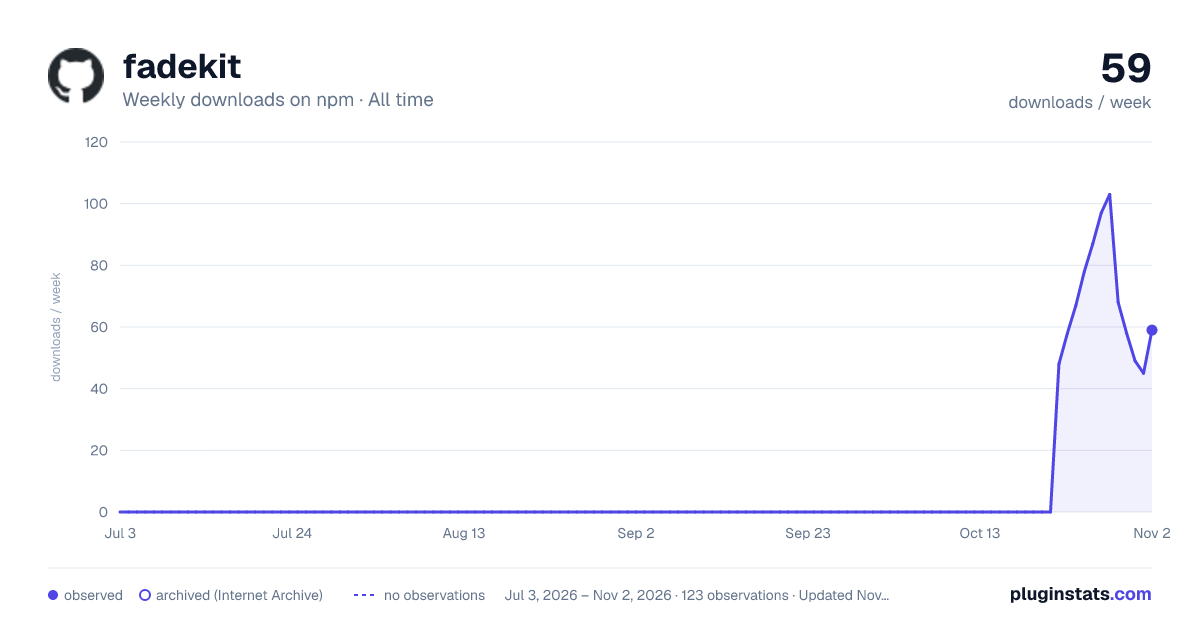

Adoption over time
7/30/90-day growth
Ranking history
Listing placement
Listing placement
Filled points are observed values; hollow points come from Internet Archive snapshots of the listing page. Dashed segments span periods with no observations — values between points are not interpolated.
Each band is one page of 20. Weekly downloads on a linear scale. Placement is projected from weekly downloads, so it can differ from the marketplace's own sort order. Hover a dot to see the listing.
Recent observations
Full history (1)Similar npm Tailwind plugins plugins
All 20 fadekit alternativesData source
Weekly downloads (trailing 7 complete days) come from the official npm downloads API. Downloads include CI and mirrors and are not equivalent to installs or users. npm publishes no ratings.
Listing: https://www.npmjs.com/package/fadekit. First seen Oct 28, 2026; last successful collection Oct 28, 2026. See the methodology.