 PluginStats
@deepraxis/cli weekly downloads statistics
By deepraxis · npm · Claude Code
The official command line for Praxis (知行云): models, agents, sandboxes, search and data from one terminal.
@deepraxis/cli has 14,924 recorded weekly downloads on npm, ranking #913 of 2,644 tracked listings.
About @deepraxis/cli
Praxis CLI
Models, agents, sandboxes, search and data from one terminal, with one account.
The official command line for 知行云 Praxis, the cloud where AI agents are built, run and hosted.



Website · Documentation · API reference · Console
</div>npm install -g @deepraxis/cli
praxis login
praxis api model chat completion create --model deepseek-flash \
--data '{"messages":[{"role":"user","content":"Hello!"}]}'
Every operation of the Praxis API is a command under praxis api: about 350 of them across models, agents,
sandboxes, cloud browsers, web search, databases, knowledge bases, files, media, automation
and hosted applications. The command tree is generated from the same contract as the API and
the SDK, so a new API capability reaches the CLI on the day it ships.
Build and deploy an application
praxis app create my-app         # standard template, dependencies installed
cd my-app && praxis app deploy   # build, publish, create declared secrets, health check, print the URL
praxis app rollback              # deploy the previous version again
praxis.jsonc at the project root names the app and may declare "secrets": {"SESSION_SECRET": "generate"}
(created once, kept by every later deploy) and "healthcheck": "/api/health" (a failing check fails the deploy).
In computers and sandboxes the CLI signs in with PRAXIS_API_TOKEN; PRAXIS_API_KEY takes precedence when both are set.
Why Praxis CLI
- One account, every capability. Chat with models from many providers, start a sandbox, search the web and query a database without juggling vendor keys.
- Made for people and for AI agents. Readable tables in your terminal, compact text when an AI coding agent runs it, and clean JSON in scripts. The CLI picks the mode by itself.
- Signs in through the browser.
praxis loginapproves the session in your browser and keeps the credential in the system keychain, never in a dotfile when a keychain exists. - Predictable grammar.
praxis api <domain> <resource> <verb> [id], the same shape everywhere, with--helpon every level.
Install
Requires Node.js 20 or newer.
npm install -g @deepraxis/cli     # or: pnpm add -g / bun add -g
praxis --version
Run it once without installing:
npx @deepraxis/cli model list
Sign in
praxis login    # approve in the browser with the code shown
praxis whoami   # account, organization, credential storage
You need a Praxis account; sign up at deepraxis.com.
Belong to several organizations? Every call runs in the active one:
praxis org list
praxis org switch <organization_id>
praxis api model list --org <organization_id>   # just this call
For CI and other headless environments, create an API key in the
Console and set it instead of logging in.
PRAXIS_API_KEY always takes precedence over a stored login:
export PRAXIS_API_KEY=<your-api-key>
A tour
Models
praxis api model list
praxis api model chat completion create --model deepseek-flash \
  --data '{"messages":[{"role":"user","content":"A haiku"}]}'
praxis api model embedding create --model <embedding_model> \
  --data '{"input":"hello world"}'
praxis api model image generation create --model <image_model> \
  --prompt "a lighthouse at dawn"
Agents
Define an agent once, then talk to it in sessions:
praxis api agent create --data '{
  "name": "helper",
  "model": {"id": "deepseek-flash"},
  "tools": [{"type": "agent_toolset_20260401"}]
}'
praxis api agent session create --data '{"agent": "<agent_id>"}'
praxis api agent session event send <session_id> --data '{
  "events": [{
    "type": "user.message",
    "content": [{"type": "text", "text": "What can you do?"}]
  }]
}'
praxis api agent session event stream --session <session_id>
Sandboxes
praxis api sandbox create --template-id base
praxis api sandbox command run <sandbox_id> \
  --cmd "python3 -c 'print(6 * 7)'"
praxis api sandbox delete <sandbox_id> --yes
Search, data and automation
praxis api search create --query "AI agent frameworks" --max-results 5
praxis api database create --name notes
praxis api automation run create --data '{
  "source": "export default async (i) => ({ answer: i.n + 1 })",
  "language": "ts", "input": {"n": 41}, "wait": 30
}'
Browse everything with praxis --help, praxis api --help, praxis api <domain> --help, or the full
command reference that ships in the package.
How commands work
There are two layers. Top-level commands are workflows and session commands (login, logout,
whoami, org, skill). Every API operation lives under praxis api, so the two never collide.
praxis api  sandbox  command  run  sbx_123  --cmd "ls"  --json
            domain   resource verb target   options     global
```…
Description from the npm listing.
- praxis
- deepraxis
- cli
- ai
- agents
- llm
- sandbox
- ai-agents
- claude-code
README badge
Show your rank in a README or on your website. The badge updates automatically.
Charts
Images: 30d · 1y · all time · 1600×900 dark


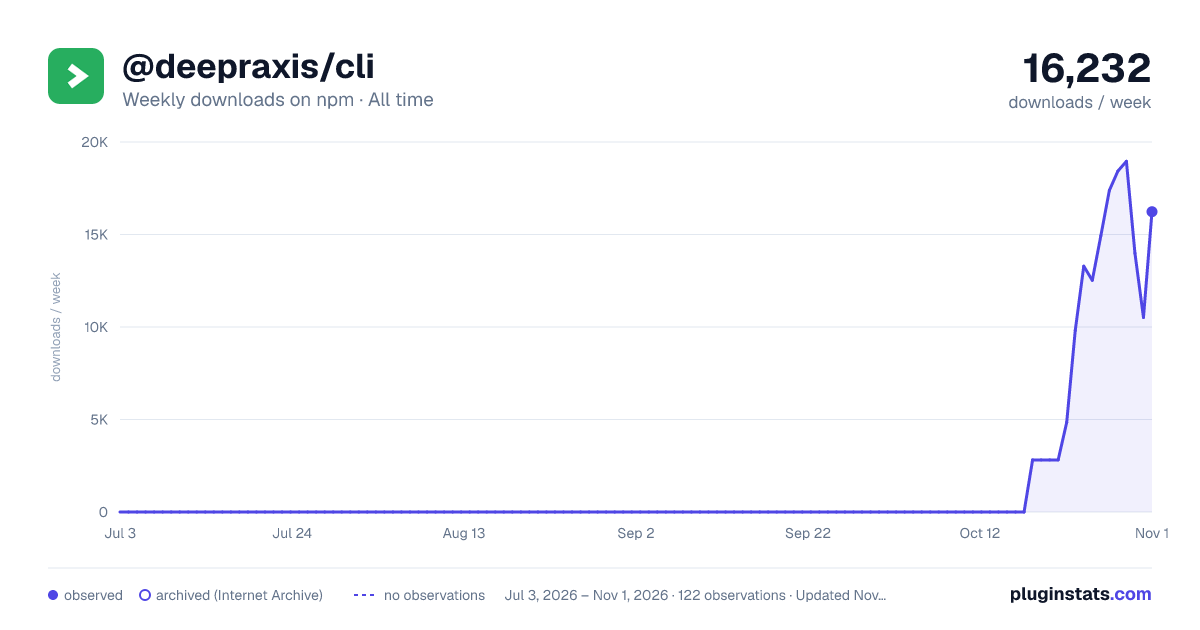

Adoption over time
7/30/90-day growth
Ranking history
Listing placement
Listing placement
Filled points are observed values; hollow points come from Internet Archive snapshots of the listing page. Dashed segments span periods with no observations — values between points are not interpolated.
Each band is one page of 20. Weekly downloads on a linear scale. Placement is projected from weekly downloads, so it can differ from the marketplace's own sort order. Hover a dot to see the listing.
Recent observations
Full history (1)Similar npm Claude Code plugins
All 20 @deepraxis/cli alternativesData source
Weekly downloads (trailing 7 complete days) come from the official npm downloads API. Downloads include CI and mirrors and are not equivalent to installs or users. npm publishes no ratings.
Listing: https://www.npmjs.com/package/@deepraxis/cli. First seen Oct 28, 2026; last successful collection Oct 28, 2026. See the methodology.