 PluginStats
JPG to TEXT: Image To Text Converter users statistics
By GetProd · Chrome Web Store · Tools
With JPG to TEXT, turn text in image to text quickly using a powerful picture to text converter that extracts effortlessly.
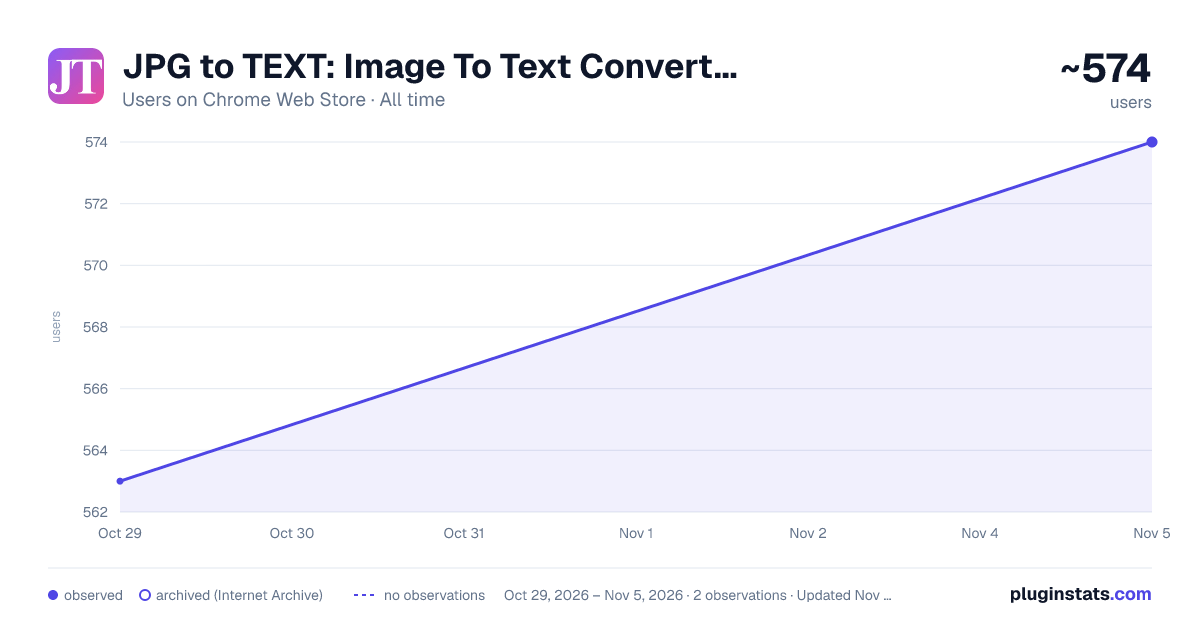
JPG to TEXT: Image To Text Converter has approximately 563 recorded users on Chrome Web Store, ranking #2497 of 5,223 tracked listings.
Rating: 5.00 / 5 from 6 ratings
About JPG to TEXT: Image To Text Converter
With JPG to TEXT, turn text in image to text quickly using a powerful picture to text converter that extracts effortlessly.
Looking for a fast, simple, and accurate way to convert JPG to text? You're in the right place! The JPG to TEXT Chrome Extension is the ultimate solution for anyone who needs to extract text from images with ease. Whether you're working with screenshots, scanned documents, or photos with embedded writing, this image text extractor is built to get the job done quickly and accurately.
With the JPG to TEXT extension, users can convert pic to text format directly from their browser. No need to download bulky software or upload files to suspicious third-party websites. Just click, convert, and copy.
Why choose our converter? ➤ Lightning-fast conversion speed ➤ High accuracy with advanced optical character recognition ➤ Supports multiple image formats like JPG, PNG, WEBP, GIF, BMP ➤ Easy-to-use interface for all skill levels ➤ Secure and privacy-friendly with no data tracking
This powerful jpg to text converter allows you to extract text from JPG, turning non-editable images into editable content. Whether you want to convert from jpg to text for editing, searching, or translation, this tool handles it all effortlessly.
💡 Use cases include: 💎 Copying content from a screenshot 💎 Converting scanned documents to editable data 💎 Extracting text from educational materials 💎 Translating foreign words captured in images 💎 Digitizing handwritten notes
With this image to text converter, you can convert JPG to readable content in seconds. It’s not just a picture to text converter – it’s your go-to tool to convert photo to text, extract text from jpg, or turn any text in image to text.
Here’s what you can do: 1️⃣ Extract JPG to text without leaving your browser 2️⃣ Copy text from image files instantly 3️⃣ Convert JPG file to text for editing or sharing 4️⃣ Change jpg to lettering to repurpose content quickly 5️⃣ Extract text from picture files like memes, signs, or scanned forms
The extension uses advanced optical character recognition to deliver precise results. From image text to text documents, the extension transforms your productivity.
📍 Key Features: ▸ One-click to extract content from JPG ▸ Convert jpg to word file online in seconds ▸ Supports jpg to txt file converter functionality ▸ Easily convert jpg to writing without internet if cached ▸ Smart formatting preserves layout when possible
Whether you need to convert jpg image to text for professional or personal use, this extension does it all. Use it to extract text from JPG, change JPG to words, or simply copy textual data from images. Even if you're dealing with difficult image conditions, our jpg to content converter delivers solid results.
➤ Additional Benefits: 🔹 Lightweight and fast-loading 🔹 Works on Google Docs, Gmail, PDFs, and more 🔹 Converts jpeg to text and img to text with ease 🔹 Ideal for students, researchers, and professionals 🔹 Frequent updates and reliable performance
Don't waste time retyping. Just convert jpg file to words and get it done faster. Need to extract jpg to text from a scanned invoice or form? This tool will save you hours of manual work.
📌 Compatible With: ✅ JPG ✅ JPEG ✅ PNG ✅ WebP
📍 Works seamlessly for: • Extracting text from JPG • Getting text from photo files • Converting image text to text for editing • Changing printed pages to editable text files • Pulling text from jpeg or screenshot with ease
Perfect for converting written materials from picture formats, the extension gives you a smooth experience. The jpg converter to text is efficient, smart, and reliable.
Now you can convert jpg to text file online or offline, turn text from jpeg to searchable data, and copy content from image formats in one click.
FAQ – JPG to TEXT Chrome Extension
Q1: Can I convert jpg to text file online with this extension? Yes! Once installed, you can convert jpg to content file online directly in your browser without external tools.
Q2: Does it work with JPEG and PNG formats too? Absolutely. The extension supports jpg, jpeg,webp, png and other formats and handles them equally well.
Q3: Is it safe to extract words from jpg using this tool? Yes. All processing is local and browser-based, so your data stays secure.
Q4: Can I extract text from picture files taken by my phone? Yes! Just open the image in your browser, activate the extension, and convert jpg image to lettering instantly.
Q5: How accurate is the conversion? Thanks to advanced optical character recognition, the extension offers high-accuracy results, even with complex layouts.
Q6: Can I convert from jpg to writing without an internet connection? If the page is cached and the extension is loaded, some functionality will work offline.
Q7: What makes this a top jpg to text file converter? Speed, accuracy, ease of use, and privacy. It’s the best way to convert jpg to readable content without hassle.
Q8: Can I copy text from image directly? Yes. After conversion, you can instantly copy text from image or photo and paste it wherever needed.
Get started with JPG to TEXT today – the smartest way to convert jpg to readable text, extract words from image files, and simplify your workflow!
Description from the Chrome Web Store listing.
README badge
Show your rank in a README or on your website. The badge updates automatically.
Charts
Images: 30d · 1y · all time · 1600×900 dark
Adoption over time
7/30/90-day growth
Ranking history
Ratings over time
Listing placement
Listing placement
Filled points are observed values; hollow points come from Internet Archive snapshots of the listing page. Dashed segments span periods with no observations — values between points are not interpolated.
Each band is one page of 20. Users on a linear scale. Placement is projected from users, so it can differ from the marketplace's own sort order. Hover a dot to see the listing.
Recent observations
Full history (1)Similar Chrome Web Store Tools plugins
All 20 JPG to TEXT: Image To Text Converter alternatives



Data source
Covers every Chrome Web Store extension with at least 100 users, found through the store's public sitemap. User counts are read from public listing pages. The 10% most-used extensions are refreshed daily, the next 40% weekly and the next 40% monthly; the least-used 10% are not refreshed. Google displays rounded user counts (and caps the display at 10,000,000+), so small changes may not be visible. Rating counts above 1,000 are rounded (e.g. 1.6K).
Listing: https://chromewebstore.google.com/detail/jpg-to-text-image-to-text/ekjilemlpolakepfkccpajeljlefecbj. First seen Oct 29, 2026; last successful collection Oct 29, 2026. See the methodology.