 PluginStats
ImgUpscaler - AI Image Upscaler users statistics
Enhance images locally in your browser with 2x / 4x upscaling, adjustable denoise and side-by-side comparison.
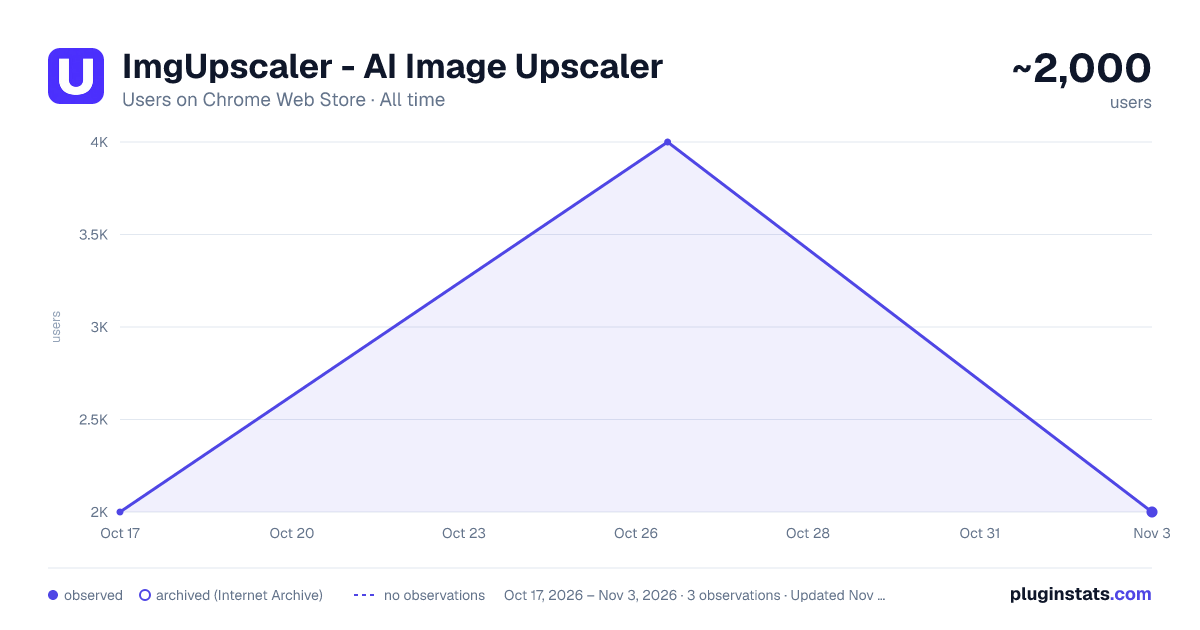
ImgUpscaler - AI Image Upscaler has approximately 2,000 recorded users on Chrome Web Store, ranking #683 of 2,952 tracked listings.
Rating: 4.80 / 5 from 4 ratings
About ImgUpscaler - AI Image Upscaler
Enhance images locally in your browser with 2x / 4x upscaling, adjustable denoise and side-by-side comparison.
ImgUpscaler is an AI image upscaler for Chrome that enlarges images by 2x or 4x and enhances them locally in your browser. Adjust noise reduction, compare the original with the result, and download a PNG without uploading your image for processing.
CORE FEATURES
• 2x and 4x image upscaling Increase image dimensions for photos, illustrations, product images and everyday graphics.
• Local AI enhancement Process one image at a time on your device. The extension does not send your images to a cloud service for enhancement.
• Adjustable noise reduction Choose a denoise strength from 0 to 1. The default is 0.5. Release the slider to enhance the original again with your chosen setting.
• Right-click to upscale Right-click an image on a webpage and choose 2x or 4x. You can also choose a local file, drag and drop an image, or paste one from your clipboard.
• Side-by-side comparison Open the original and enhanced image together in a new tab. Both appear at the same display size, with synchronized scrolling and zoom options for checking details.
• PNG downloads with transparency Import PNG, JPEG, WebP, AVIF or GIF images and download the enhanced result as a PNG. Transparency is preserved; animated images use the first frame.
• Sidebar or popup Choose how the extension opens. Follow the progress indicator, cancel a task, or enhance the image again. Keep the panel open while processing.
• Twelve interface languages English, Simplified Chinese, Traditional Chinese, Japanese, Korean, German, French, Spanish, Italian, Vietnamese, Hindi and Portuguese (Brazil and Portugal). The interface follows your Chrome language, with English as the fallback.
HOW TO USE
- Open the extension or right-click a webpage image.
- Choose an image and select 2x or 4x. Enhancement starts automatically.
- Adjust denoise if needed, compare the images, and download your PNG.
COMMON QUESTIONS
Are my images uploaded? Local enhancement runs in your browser. Webpage images are fetched from their original source when you grant access. Opening the official website does not automatically upload your current image.
Can this image upscaler process multiple images at once? The extension processes one image at a time. For batch processing and more advanced cloud enhancement, visit ImgUpscaler at https://imgupscaler.com/. Cloud processing requires uploading images on the website, and batch processing requires a paid plan.
What are the image limits? Input files can be up to 20 MB and 16 megapixels. Output is limited to 16 megapixels and 8,192 pixels on either side. Choose a smaller image or 2x if you reach the limit. Results and processing speed depend on the source image and your device; lost details may not be recovered.
Description from the Chrome Web Store listing.
README badge
Show your rank in a README or on your website. The badge updates automatically.
Charts
Images: 30d · 1y · all time · 1600×900 dark
Adoption over time
7/30/90-day growth
Ranking history
Ratings over time
Listing placement
Listing placement
Filled points are observed values; hollow points come from Internet Archive snapshots of the listing page. Dashed segments span periods with no observations — values between points are not interpolated.
Each band is one page of 20. Users on a linear scale. Placement is projected from users, so it can differ from the marketplace's own sort order. Hover a dot to see the listing.
Recent observations
Full history (1)Similar Chrome Web Store Tools plugins
All 20 ImgUpscaler - AI Image Upscaler alternatives



Data source
Covers every Chrome Web Store extension with at least 100 users, found through the store's public sitemap. User counts are read from public listing pages. The 10% most-used extensions are refreshed daily, the next 40% weekly and the next 40% monthly; the least-used 10% are not refreshed. Google displays rounded user counts (and caps the display at 10,000,000+), so small changes may not be visible. Rating counts above 1,000 are rounded (e.g. 1.6K).
Listing: https://chromewebstore.google.com/detail/imgupscaler-ai-image-upsc/agohjehhikoiecgekmlbjclgbclelklo. First seen Oct 17, 2026; last successful collection Oct 17, 2026. See the methodology.