 PluginStats
TVAlertsManager users statistics
Chrome Web Store · Workflow & Planning
Simplify TradingView Alert Management using TVAlertsManager. Save, load, pause, create, edit & delete TradingView alerts with ease.…
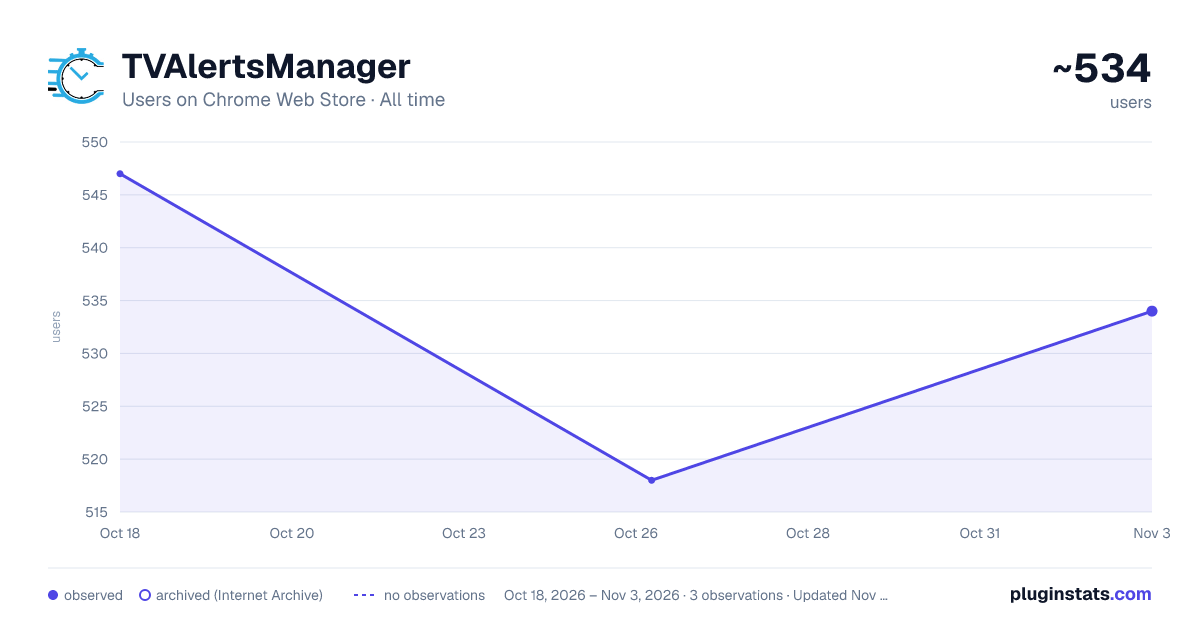
TVAlertsManager has approximately 547 recorded users on Chrome Web Store.
It ranks #980 of 2,033 tracked Chrome Web Store listings by users.
It is rated 4.9 out of 5 from 78 ratings.
PluginStats has 1 daily observations since Oct 18, 2026; the latest is from Oct 18, 2026.
Rating: 4.90 / 5 from 78 ratings
About TVAlertsManager
Simplify TradingView Alert Management using TVAlertsManager. Save, load, pause, create, edit & delete TradingView alerts with ease.…
Simplify TradingView Alert Management using TVAlertsManager. Save, load, pause, create, edit & delete TradingView alerts with ease. Automate your Alerts. Automate your Trading. Automate your Life. Take back your time with TVAlertsManager today!
Features: -Lightweight browser extension connects to your TradingView account through Chrome. -Secure: no TradingView account login information is required to manage alerts. -Manage all TradingView alerts from the user's Google spreadsheet. -Save, load, pause, create, edit & delete TradingView alerts with ease. -Fast execution times allows users to save time managing multiple TradingView alerts. -Save and load alerts from multiple spreadsheets. TVAM accepts indicators with up to 300 parameters. -Set names for all alerts without a name. -Ability to delete all alerts. -Ability to save/load alerts via filtering: name, ticker, exchange. -Automatically extend alert expiration dates for non TradingView Premium users. -Built in clear browser cache button. -Compatible with any TradingView indicator the user has access to. -Alert parser for 3Commas, Wick Hunter, Profit Trailer and CryptoHopper: build alerts quickly and efficiently by copying webhooks, pairs and naming convention. -Ability to automate trading strategies: Load alerts from spreadsheets based on user webhooks (8). -Ability to restart all inactive alerts based on user input in hours. example 1: Long webhook is received by the extension, and Long alerts are loaded from the "Long" spreadsheet and all prior alerts are paused or deleted. example 2: Short webhook is received by the extension, and Short alerts are loaded from the "Short" spreadsheet and all prior alerts are paused or deleted.
Join the Discord for support: https://discord.tvalertsmanager.com/
Complete installation & usage guide can be found here: https://guide.tvalertsmanager.com/
Privacy Policy: While using the service, we may store Personally Identifiable Information that can be used to contact or identify you. Personally Identifiable Information may include, but is not limited to:
-Usage Data -Tradingview Username -E -mail for Verification
Usage Data is collected automatically when using the Service. Usage Data may include information such as your device’s Internet Protocol address (e.g. IP address), browser type and browser version, the time and date of usage, the time spent or amount of usage, unique device identifiers and other diagnostic data for troubleshooting purposes. Data is collected in regards to the amount of alerts a user saves and loads as well as usage data of all the software functions.
Your Tradingview Username is collected and used to authenticate and maintain access to the service. The username is stored locally in the user’s Chrome cache to maintain authorization access to the software. The username is also stored on the server backend for authentication purposes. The software accesses https://www.tradingview.com/ and can not work on any other website. Data from https://www.tradingview.com/ is sent to https://us-central1-tv-alerts-mass-edit-tool.cloudfunctions.net/ to perform automation tasks. Data about your individual Tradingview account is not collected.
Use of Personally Identifiable Information: Personally Identifiable Information is used to to provide and maintain the Service, including to monitor the usage of our Service. This information is used to manage Your Account: to manage your registration as a user of the Service. The Personally Identifiable Information you provide can give you access to different functionalities of the Service that are available to you as a registered user. Your Personally Identifiable Information will never be sold to third parties.
For the full privacy policy please refer to the privacy police here: https://www.tvalertsmanager.com/privacy-policy/
Thanks for trading with TVAM!
Description from the Chrome Web Store listing.
Charts
Images: 30d · 1y · all time · 1600×900 dark
Adoption over time
7/30/90-day growth
Ratings over time
Listing placement
Filled points are observed values; hollow points come from Internet Archive snapshots of the listing page. Dashed segments span periods with no observations — values between points are not interpolated.
Each band is one page of 20. Users on a log scale. Placement is projected from users, so it can differ from the marketplace's own sort order. Hover a dot to see the listing.
Recent observations
Full history (1)Similar Chrome Web Store Workflow & Planning plugins
All 20 TVAlertsManager alternatives




Data source
Covers every Chrome Web Store extension with at least 100 users, found through the store's public sitemap. User counts are read from public listing pages. The 10% most-used extensions are refreshed daily, the next 40% weekly and the next 40% monthly; the least-used 10% are not refreshed. Google displays rounded user counts (and caps the display at 10,000,000+), so small changes may not be visible. Rating counts above 1,000 are rounded (e.g. 1.6K).
Listing: https://chromewebstore.google.com/detail/tvalertsmanager/nackkkahehnkdolnnpmpgnmkfdagmhma. First seen Oct 18, 2026; last successful collection Oct 18, 2026. See the methodology.