 PluginStats
DupDub: YouTube Video Transcript & Summary Tool users statistics
DupDub: Free YouTube Transcript, Translation, AI Summary, and Text to Speech
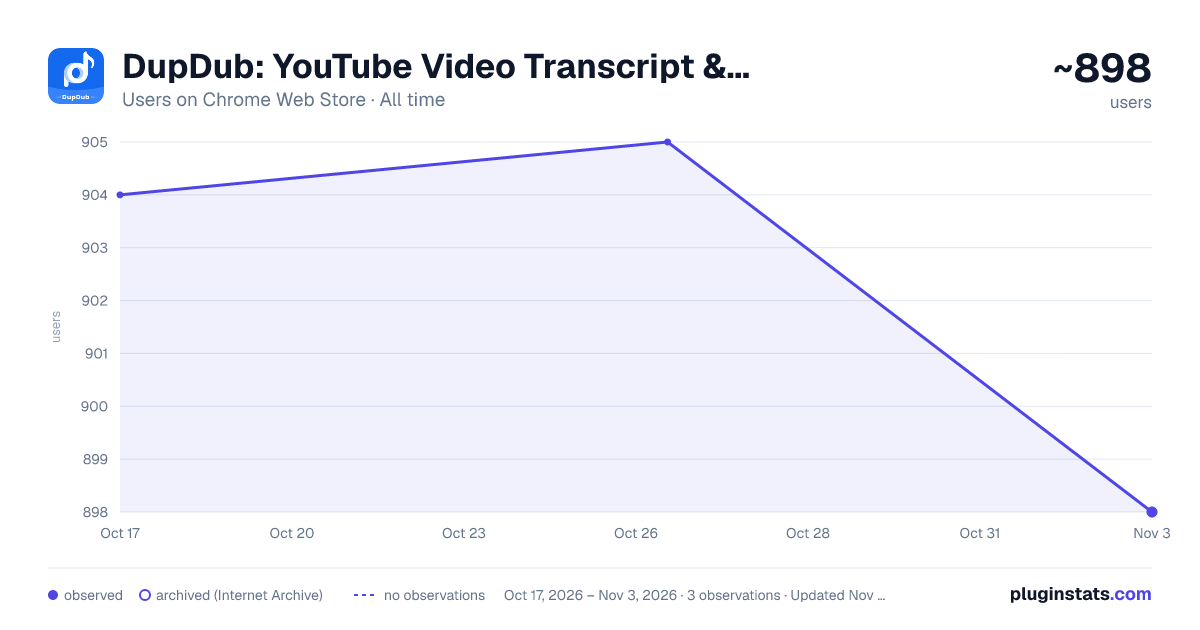
DupDub: YouTube Video Transcript & Summary Tool has approximately 904 recorded users on Chrome Web Store, ranking #1489 of 3,853 tracked listings.
Rating: 4.50 / 5 from 22 ratings
About DupDub: YouTube Video Transcript & Summary Tool
DupDub: Free YouTube Transcript, Translation, AI Summary, and Text to Speech
Transform your YouTube experience with DupDub, a free Chrome extension that automatically converts YouTube audio to text, translates video subtitles into 40+ languages, and generates AI-powered video summaries. Enhance your content with text-to-speech (TTS) , all seamlessly integrated within YouTube. DupDub is the ultimate tool for content creators, educators, and global audiences.
🌟 Why Choose DupDub?
- Free Real-Time YouTube Transcript: Automatically convert YouTube audio to text with high accuracy. Download transcriptions in TXT, SRT, or VTT formats.
- Multi-Language Subtitle Translation: Translate YouTube subtitles to 40+ languages, making content accessible worldwide.
- AI Video Summary: Instantly generate concise video summaries. Save time and improve comprehension.
- Text-to-Speech (TTS) Voiceover: Create professional voiceovers from translated text.
- User-Friendly and Free: Enjoy unlimited transcriptions and translations without any cost.
🚀 How to Use DupDub:
- Install the Extension: Search "DupDub" at the Chrome Web Store.
- Activate the Extension: Click the DupDub Extension while watching a YouTube video.
- Select Your Language: Choose your preferred translation language from the dropdown menu.
- Transcribe or Summarize: Click the button to transcribe audio or summarize the video.
- Download and Use TTS: Save the output in TXT, SRT, or VTT format, or generate a voiceover with TTS.
💡 Perfect for:
- YouTube Content Creators: Automatically generate transcripts and subtitles to improve accessibility.
- Educators and Students: Save time by generating video summaries and converting lectures to text.
- Global Viewers: Watch videos in your native language with real-time translation.
- Social Media Managers: Repurpose video content with AI-generated transcripts.
- Podcasters: Convert spoken content into written format for easy editing and publishing.
🔒 Privacy and Security: DupDub processes your data locally, ensuring privacy and security. No data is stored or shared externally.
Description from the Chrome Web Store listing.
README badge
Show your rank in a README or on your website. The badge updates automatically.
Charts
Images: 30d · 1y · all time · 1600×900 dark
Adoption over time
7/30/90-day growth
Ranking history
Ratings over time
Listing placement
Listing placement
Filled points are observed values; hollow points come from Internet Archive snapshots of the listing page. Dashed segments span periods with no observations — values between points are not interpolated.
Each band is one page of 20. Users on a linear scale. Placement is projected from users, so it can differ from the marketplace's own sort order. Hover a dot to see the listing.
Recent observations
Full history (1)Similar Chrome Web Store Tools plugins
All 20 DupDub: YouTube Video Transcript & Summary Tool alternatives



Data source
Covers every Chrome Web Store extension with at least 100 users, found through the store's public sitemap. User counts are read from public listing pages. The 10% most-used extensions are refreshed daily, the next 40% weekly and the next 40% monthly; the least-used 10% are not refreshed. Google displays rounded user counts (and caps the display at 10,000,000+), so small changes may not be visible. Rating counts above 1,000 are rounded (e.g. 1.6K).
Listing: https://chromewebstore.google.com/detail/dupdub-youtube-video-tran/mbjdcmgfklnjkmiibaipdhcmfnflgcdk. First seen Oct 17, 2026; last successful collection Oct 17, 2026. See the methodology.