 PluginStats
Go Full Free Webpage Image Downloader users statistics
Capture the full scrollable webpage and auto-download JPG, PNG, and PDF with datetime filenames.
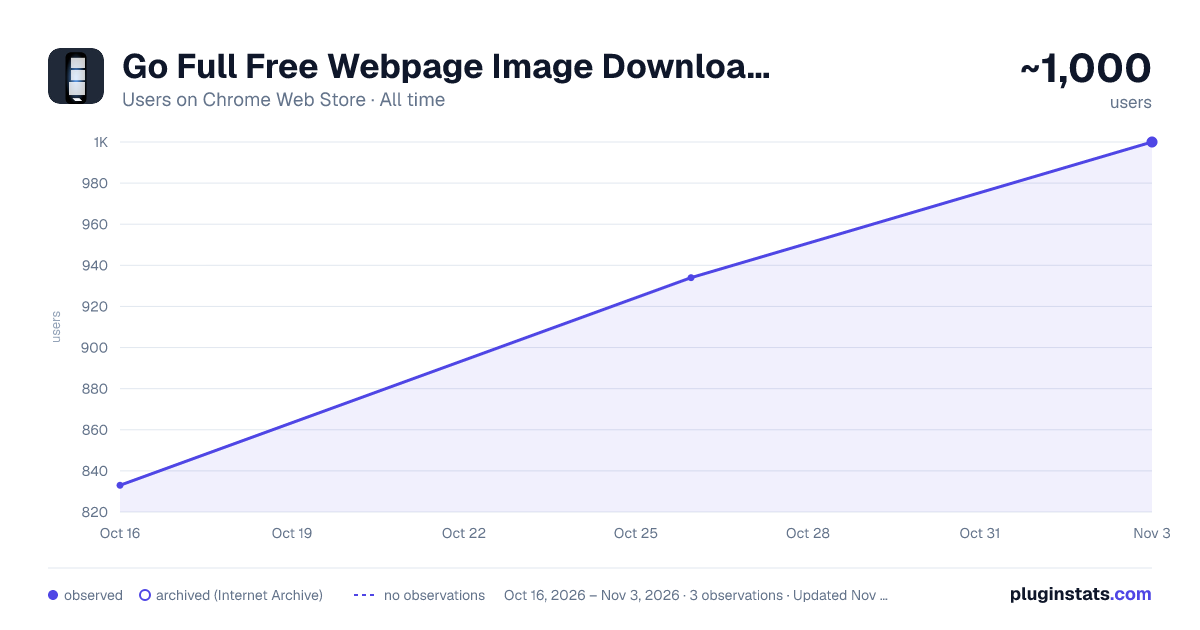
Go Full Free Webpage Image Downloader has approximately 833 recorded users on Chrome Web Store, ranking #990 of 2,495 tracked listings.
Rating: 5.00 / 5 from 1 ratings
About Go Full Free Webpage Image Downloader
Capture the full scrollable webpage and auto-download JPG, PNG, and PDF with datetime filenames.
Capture any webpage from top to bottom in one click.
Go Full Free Webpage Image Downloader takes a full-page screenshot of the entire scrollable page — not just the visible area — and automatically downloads it to your device in three formats at once: JPG, PNG, and PDF. Every file is named with the date and time of capture, so your screenshots stay organized without any renaming.
HOW IT WORKS
- Open the page you want to capture
- Click the extension icon
- Click the capture button
- Your JPG, PNG, and PDF download automatically
That's it. No account, no sign-up, no configuration.
FEATURES
- Full-page capture: grabs the entire scrollable page, not just the visible screen
- Three formats in one click: JPG, PNG, and PDF downloaded together
- Automatic datetime filenames: every capture is timestamped and easy to find
- One-click operation: no settings to learn
- Completely free: no premium tier, no watermarks, no limits
PRIVATE BY DESIGN
Everything happens locally in your browser. This extension:
- Collects no data of any kind
- Sends nothing to any server — it works fully offline
- Uses no analytics, tracking, or ads
- Stores nothing — your captures go straight to your downloads folder and stay on your device
The extension only accesses the page you are viewing, only when you click capture, and only to create your files.
GREAT FOR
- Saving receipts, confirmations, and invoices
- Archiving articles and documentation
- Capturing long pages, chat threads, and reports
- Creating PDF records of web content
- Design and QA reference screenshots
Capture the whole page. Keep it forever. Stay private.
Description from the Chrome Web Store listing.
README badge
Show your rank in a README or on your website. The badge updates automatically.
Charts
Images: 30d · 1y · all time · 1600×900 dark
Adoption over time
7/30/90-day growth
Ranking history
Ratings over time
Listing placement
Listing placement
Filled points are observed values; hollow points come from Internet Archive snapshots of the listing page. Dashed segments span periods with no observations — values between points are not interpolated.
Each band is one page of 20. Users on a linear scale. Placement is projected from users, so it can differ from the marketplace's own sort order. Hover a dot to see the listing.
Recent observations
Full history (1)Similar Chrome Web Store Tools plugins
All 20 Go Full Free Webpage Image Downloader alternatives



Data source
Covers every Chrome Web Store extension with at least 100 users, found through the store's public sitemap. User counts are read from public listing pages. The 10% most-used extensions are refreshed daily, the next 40% weekly and the next 40% monthly; the least-used 10% are not refreshed. Google displays rounded user counts (and caps the display at 10,000,000+), so small changes may not be visible. Rating counts above 1,000 are rounded (e.g. 1.6K).
Listing: https://chromewebstore.google.com/detail/go-full-free-webpage-imag/ahcmogncfcclhbengchabcgapnjkonhh. First seen Oct 16, 2026; last successful collection Oct 16, 2026. See the methodology.